Into the Expanse: A Security Leader’s Guide to the Agent Frontier
Read more


Every AI tool an employee connects to typically requests OAuth permissions to access data or perform actions within SaaS applications. Over time, these integrations accumulate scopes across email, storage, collaboration platforms, and other services. In many environments, these permissions remain active long after they are granted, with limited visibility into which applications hold them or how they are being used.
This creates a significant security risk. If an AI agent or plugin holds a permission, such as mail.send on a compromised account, an attacker can abuse the associated OAuth token to maintain persistent access. Because these tokens authenticate through delegated authorization rather than an interactive login, they can continue operating outside standard authentication flows enforced by controls such as SSO, MFA, or CASB policies.
WHAT YOU'LL LEARN
Traditional permission sprawl develops gradually. As employees change roles, they accumulate new privileges while older access is rarely removed, leaving users with permissions that exceed their responsibilities.
AI permission sprawl can occur instantly. A single OAuth authorization allows a plugin or AI application to inherit every scope it requests at the time of consent, often without centralized approval or access review.
Because OAuth integrations rely on delegated authorization, AI plugins inherit the full access level of the approving user. If a privileged account grants consent, the integration may receive broad permissions across connected SaaS applications. These OAuth tokens can also remain active after an employee leaves unless they are explicitly revoked, since standard offboarding typically focuses on disabling accounts rather than removing issued tokens.
AI Discovery (AI Governance → AI Discovery) surfaces every AI application connected in the environment, including tools that employees are authorized to use without formal approval. Filter by “Gen AI” to isolate foundation model applications. Any app labeled “To Review” or “Unsanctioned” holds active OAuth scopes that have not yet been assessed.
AI Agents Inventory (AI Governance → AI Agents) focuses on agentic AI. These autonomous agents perform actions on behalf of users rather than simply accessing data. Because they can execute operations across connected SaaS services, they present a higher permission risk when granted broad OAuth scopes.
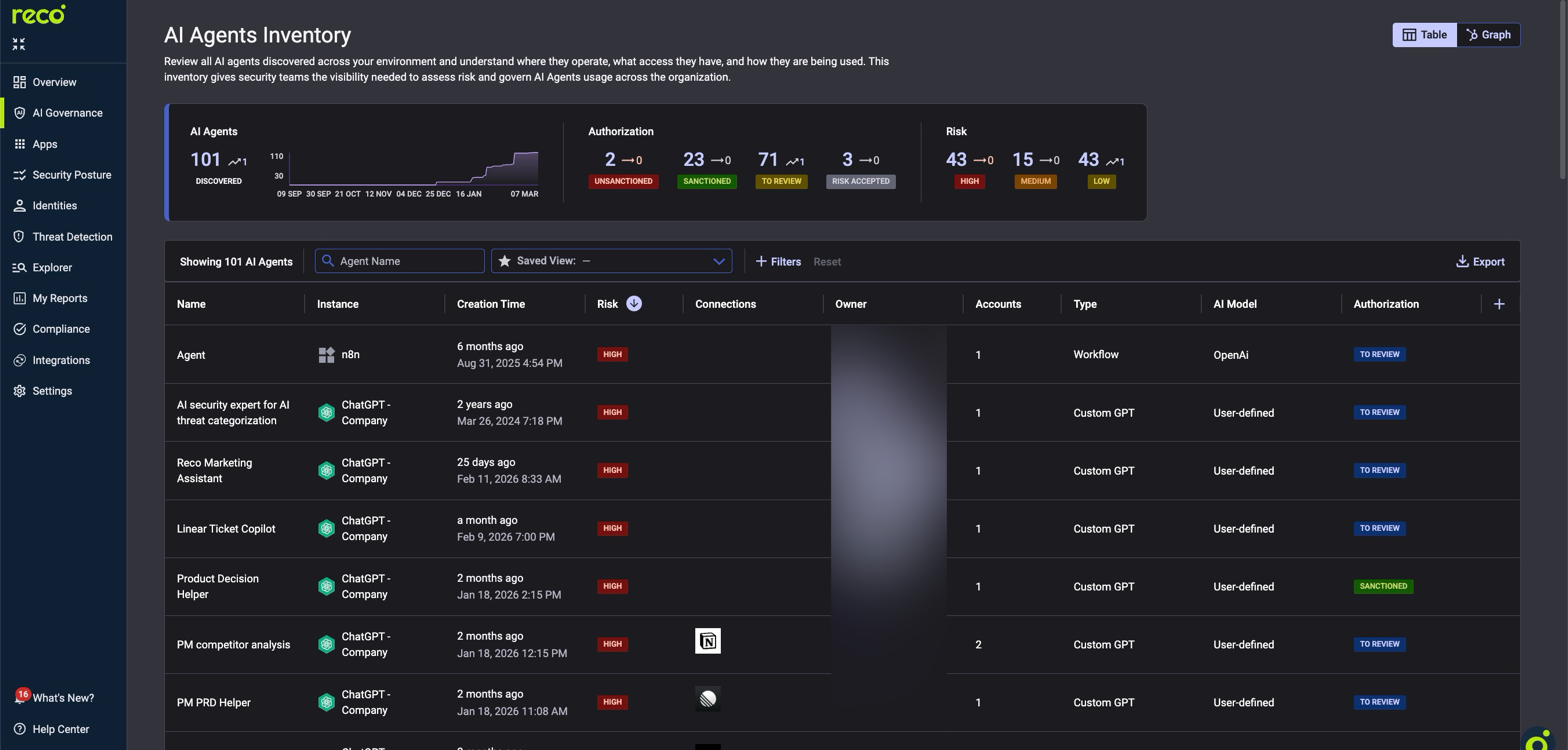
The table shows each agent’s platform (n8n, ChatGPT), type (Workflow, Custom GPT), risk level, SaaS connections, and authorization status. Agents with multiple connections have a larger blast radius.
The Graph view visually maps each agent and its SaaS connections. Clicking an agent node reveals its scopes, actions, and connected plugins, along with their associated risk levels.
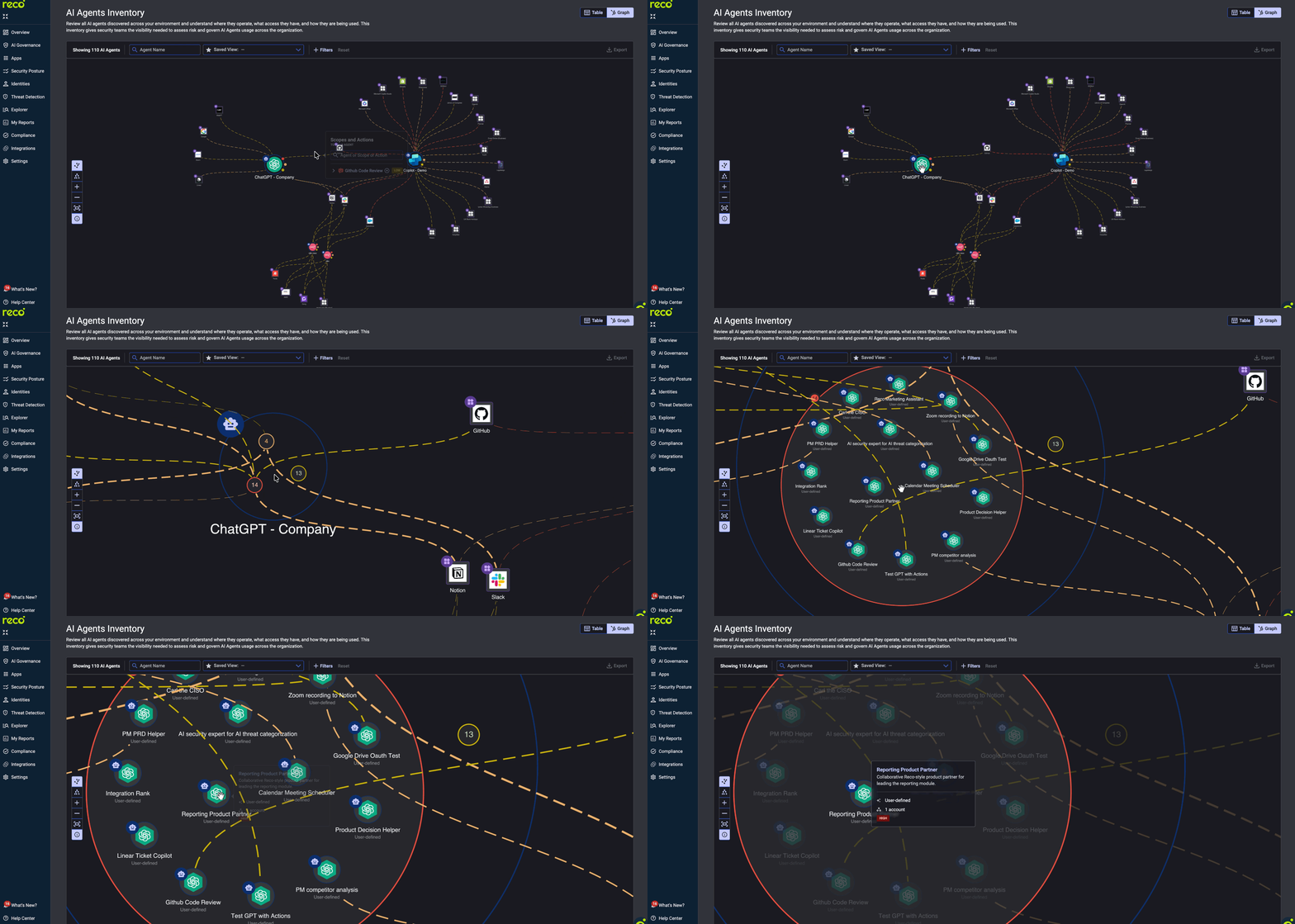
ACTION: Sort AI Agents by Risk (High first), filter for "To Review." Prioritize agents with multiple connections and recent creation dates. Assess connections, model type, and owner before assigning authorization status.
Navigate to: AI Governance -> Connected AI Apps
The Charts view shows each core application with a scope risk donut: red for high risk, amber for medium, and green for low. Sort by “High-Risk Scopes” to surface the highest exposure. High-risk scopes (e.g., mail.readwrite, files.readwrite.all) grant read and modify access across the tenant.
Switch to the Table view for per-plugin details, including exact permissions, associated accounts, and last activity date.
CAUTION: AI plugins inherit permissions from the authorizing user. If an administrator grants access, the plugin inherits admin-level scopes. Always verify who authorized high-risk plugins first.
ACTION: For the top five apps with high-risk scopes, document every plugin holding admin or write permissions. Revoke permissions where the scope exceeds the plugin’s function. Reauthorize with minimum permissions.
Navigate to: AI Governance -> AI Posture Checks
Posture checks evaluate AI configurations every 24 hours against more than 3,200 controls. To identify permission sprawl risks, filter by the Gen-AI Security and IAM domains. Critical checks include blocking guest access to Copilot, requiring phishing-resistant MFA for AI access, blocking Gen AI access when insider risk is elevated, and restricting Data Agent Item Creation.
For real-time detection, enable policies for App Governance, Privilege Escalation, and Shadow AI in Preview mode under Threat Detection → Policy Center. Alerts trigger within approximately 15 minutes of anomalous behavior. After two to four weeks of validated signal, switch policies from Preview to On.
ACTION: Enable every CRITICAL and HIGH check in Gen-AI Security and IAM. For each item marked “TO REVIEW,” use the detail modal for step-by-step remediation.
Every AI tool should hold only the scopes required for its function. Each scope should be reviewed regularly, and unused tokens should be revoked. Reco’s AI Governance modules make this process operationally feasible at scale.
AI tools and autonomous agents introduce a new layer of identity and permission complexity inside SaaS environments. OAuth scopes granted to these integrations can accumulate quickly, creating persistent access paths that traditional identity reviews rarely capture. Without continuous visibility, over-privileged AI tools can expand the blast radius of compromised accounts and expose sensitive data across connected services. By discovering AI integrations early, reducing excessive scopes, and enforcing posture controls, security teams can contain permission sprawl and maintain consistent governance as AI adoption accelerates across the organization.

%201.svg)
Gal is the Cofounder & CPO of Reco. Gal is a former Lieutenant Colonel in the Israeli Prime Minister's Office. He is a tech enthusiast, with a background of Security Researcher and Hacker. Gal has led teams in multiple cybersecurity areas with an expertise in the human element.