


Securing Google Gemini in Google Workspace: The Risks Most Enterprises Aren't Ready For

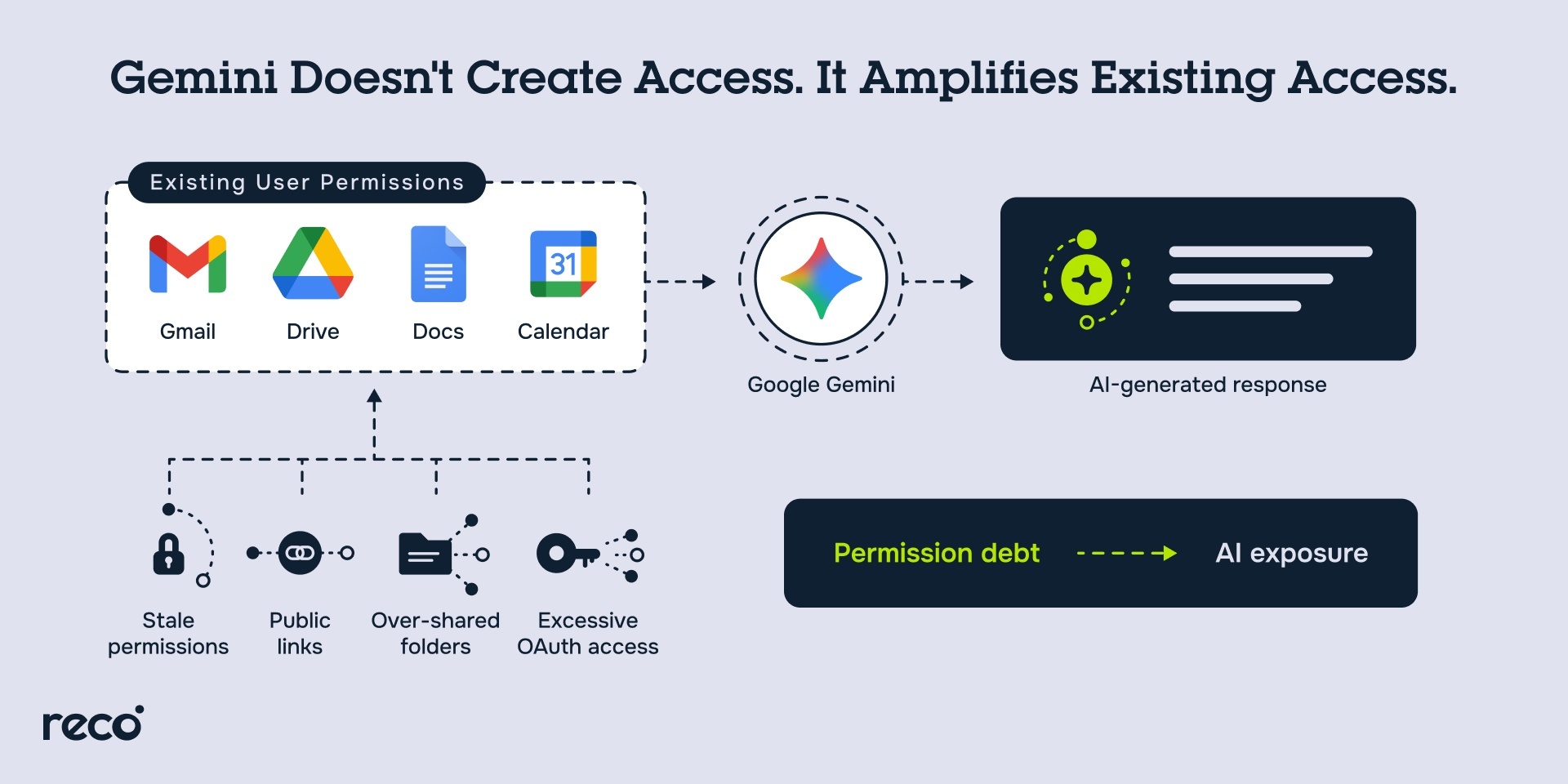
A shared drive folder gets set to "anyone with the link" for a vendor project in 2022. The project ends, the link stays live, nobody remembers it exists. Then Gemini gets turned on, and an employee asks it to summarize recent contract terms. Gemini surfaces a clause from that forgotten folder, because the system only retrieves, ranks, and generates context from data the user already has explicit permission to access, and that permission was simply never revoked. Google is explicit about this design: if a user doesn't have permission to see a file, Gemini can't see it or use it either.
That is the real risk with Gemini in Workspace. It does not create new access; it activates years of access debt at machine speed, and at a scale human users could never achieve. Google has built real protections into the platform, including data isolation, encryption, audit logging, and admin controls scoped by org unit, but none of that changes what happens when the underlying access model is already loose. Most enterprises secure Workspace for human users who click through interfaces, and Gemini does not operate like one.
What's at Stake When Gemini Security Falls Behind Enterprise Adoption
Most enterprises turned Gemini on feature by feature, in Gmail, then Drive, then Meet, without a parallel review of what that access actually touches. The risk lives inside the permissions, agent actions, and unmanaged usage already sitting in most Workspace tenants.
- Gemini Amplifies Existing Permission Misconfigurations Across All Workspace Apps: Google built trust rules in Drive to restrict Gemini's access by controlling how data is shared between internal and external users, since Gemini can only retrieve data the user already has access to. Drive inventory reporting gives admins visibility into how data is classified, who can access it, and how it is being used, effectively mapping everything Gemini can now surface.
- Autonomous Gemini Agents Take Real-World Actions With Minimal Human Oversight: Workspace Studio lets users create flows with Gemini and use AI-powered steps inside those flows, turning Gemini into something that executes multi-step actions across Workspace apps, not just a single prompt response. Most access reviews were never built to catch a non-human identity acting like that.
- Shadow AI Usage Creates Blind Spots That Existing Controls Cannot Detect: Employees with a personal Google Account can get Gemini features through Google AI Plus, Pro, or Ultra plans, entirely separate from any Workspace edition IT manages. Company context can flow into Gemini through an account the admin console never sees.
- Data Exposure Risks Grow as Gemini Accesses Sensitive Files, Emails, and Calendars: Gemini features now run across Gmail, Calendar, Chat, Docs, Drive, Forms, Meet, Sheets, Slides, and Vids. Every integration point is a place where sensitive data, contracts, HR records, and financial figures can flow into a Gemini prompt or response.
How Google Workspace Protects Gemini Data
Gemini runs inside Workspace's existing trust boundary. It only uses documents and information a user already has access to, and it never uses that data, prompts, or outputs to train Gemini or any other AI model, per Google's Workspace Security Handbook.
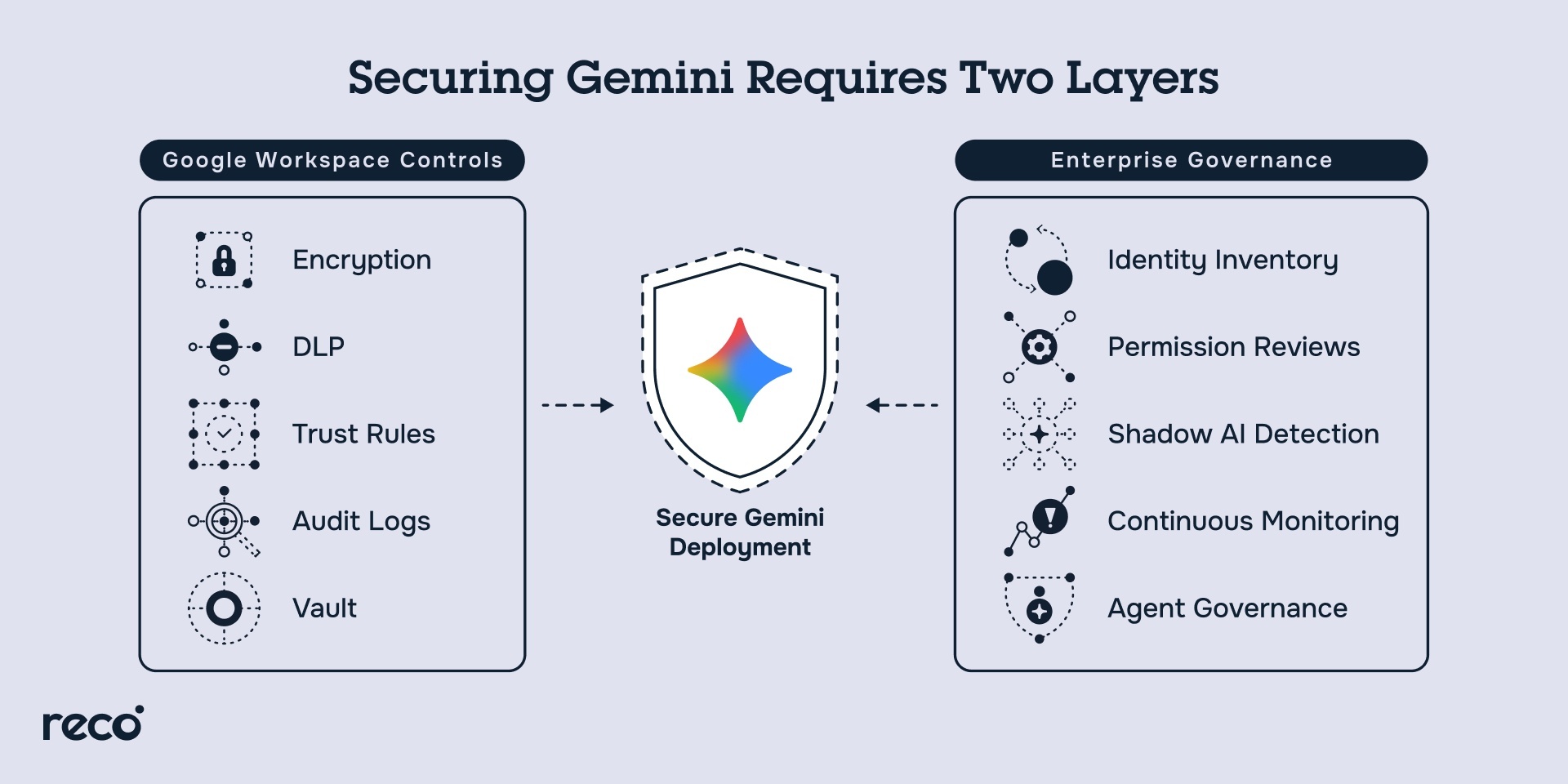
- Data Protection: Trust rules in Drive restrict Gemini's access by controlling how data moves between internal and external users, and IRM controls applied through DLP block Gemini from retrieving files marked to prevent download, printing, or copying. Client-side encryption goes further, making protected data indecipherable to any Google system or employee, including Gemini itself.
- Trust Boundary: Gemini stores prompts and generated content alongside existing Workspace content and does not share them outside the organization, and existing DLP and access controls apply automatically to anything Gemini generates, including sent emails and shared Drive files.
- Usage Transparency: Admins can review Gemini usage and data access across the org, query and export Gemini's Drive access logs through the Reports API, and use Vault to investigate Gemini app conversations for eDiscovery.
- Access Management: Admins can enable or disable Gemini features by user, group, or organizational unit, control access to the standalone Gemini app separately, and restrict the Gemini app and NotebookLM to compliant devices through context-aware access.
What Google's Native Controls Miss When Gemini Is Enabled
Google's controls are built to enforce the access rules already in place, not to question whether those rules still make sense. That distinction is where the real gaps sit.
Controls Assume the Permission Model Is Already Correct
Trust rules, IRM, and DLP all restrict Gemini based on permissions a file already has; they don't detect that a file was over-shared three years ago and never revisited. Gemini inherits that decision as-is.
Personal AI Plans Sit Entirely Outside Admin Visibility
An employee using Gemini through a personal Google AI Plus, Pro, or Ultra subscription is invisible to the Workspace admin console, which only governs activity tied to a managed Workspace edition. Company context can move through that account with zero logging on the org's side.
Audit Logs Record What Happened, Not What an Agent Is About to Do
Workspace Studio flows run as autonomous agents that touch Gmail, Drive, and Sheets without human approval at each step. Security researchers exploited exactly this gap when they discovered GeminiJack, a vulnerability in Gemini Enterprise where hidden instructions in a shared document could get executed as legitimate commands and exfiltrate data with no user interaction. Google fixed the issue after disclosure, but it's a clear example of logging what happened after the fact, not governing what an agent is allowed to do.
How to Secure Google Gemini in Google Workspace
Closing the gaps covered above takes more than the native settings Google already provides. It requires a repeatable process to find, restrict, govern, and monitor Gemini across the tenant.
Here's where that process starts:
- Discover Every Gemini Deployment and Connected Agent Across the Environment: Build a full inventory of where Gemini is active, across Gmail, Drive, Docs, Meet, the standalone Gemini app, and any Workspace Studio flows, or Gems users have built. Include every OAuth-connected integration Gemini can reach; an agent nobody catalogued is an agent nobody can govern.
- Audit and Enforce Least-Privilege Access Before Enabling Gemini at Scale: Review Drive inventory reporting to understand how existing data is classified and who can access it, then use that visibility to find and revoke over-shared files and stale permissions before Gemini goes live for a group. Tighten sharing settings and apply trust rules so Gemini only inherits access that's still justified today.
- Apply AI-Specific Governance Policies Across All Workspace Applications: Set org-unit and group-based policies for which Gemini features are enabled where, and pair them with DLP and IRM rules that account for Gemini specifically, not just human users clicking through the same apps.
- Monitor Gemini Activity Continuously for Anomalous Behavior and Data Access: Pull Gemini's access logs through the Reports API and watch for patterns that don't match normal usage, unusual access volume, off-hours activity, or a flow suddenly touching data it's never touched before.
Google Gemini Admin Console Security Settings
Every one of these settings lives under Generative AI in the Admin console, and most require the Gemini Settings administrator privilege or super admin access to change.
How Security-Conscious Teams Are Approaching Gemini Differently
The shift that matters is treating Gemini as an identity to govern, not a feature to switch on. In practice, that looks like a few consistent moves.
- Review and Tighten Workspace Sharing Permissions Before Enabling Gemini: Sharing cleanup works best as a prerequisite, not a parallel task, using Drive inventory reporting to see how data is classified and who can reach it, then applying trust rules to control what Gemini can inherit.
- Define Gemini Access Policies by Organizational Unit and Data Sensitivity: Rather than turning Gemini on org-wide by default, the Feature access panel allows enabling it selectively by org unit or group, which gives security teams a way to stage rollout by data sensitivity instead of an all-at-once switch.
- Treat Every Gemini Agent as a Non-Human Identity Requiring Governance: A Workspace Studio flow that reads Gmail and writes to Sheets is an identity acting on the org's behalf, not a passive feature, and it warrants the same discovery and review as any other service account or OAuth grant.
- Monitor Prompt Activity and Output Patterns for Signs of Data Exposure: Gemini's access logs through the Reports API give visibility into what was accessed, and reviewing that activity regularly, not just at initial rollout, is what catches exposure before it compounds.
Compliance and Governance for Google Gemini
Gemini's compliance posture spans five major frameworks, but coverage isn't uniform across every surface, so which "Gemini" is in scope matters as much as the certification itself.
- HIPAA: Gemini in Workspace and the Gemini app (excluding Gemini in Chrome) are covered under Google's HIPAA Business Associate Addendum. Gemini Notebook is not covered.
- FedRAMP High: Gemini in Workspace apps and the Gemini app were the first generative AI tools to achieve FedRAMP High authorization, confirmed on Google Cloud's blog.
- ISO and SOC: Gemini has attained SOC 1/2/3, ISO 9001, ISO/IEC 27001, 27701, 27017, 27018, and 42001, the last of which is the first international standard specifically for AI management systems. Gemini Notebook is excluded from this coverage too.
- GDPR: Admins can certify that EU Data Protection Law applies to their organization directly in the Admin console's Legal and Compliance settings, which activates Google's Data Processing Amendment, covering data transfer safeguards and assistance with GDPR-required impact assessments.
- EU AI Act: Google has committed to signing the EU's General-Purpose AI Code of Practice, confirmed on Google's own announcement, a voluntary framework for demonstrating AI Act compliance.
Certification coverage stops at the product boundary. The exclusions above aren't edge cases, they're exactly where regulated data is most likely to leak into an uncovered surface, so mapping which Gemini surface handles which data matters more than checking a single compliance box.
How Reco Helps Enterprises Secure Google Gemini in Google Workspace
Reco, an AI Agent Security Platform, closes the permission inheritance, agent sprawl, shadow AI, and compliance gaps that leave Gemini deployments ungoverned. Here's how each capability applies:
- Discovers Every Gemini Deployment, Agent, and Connected Integration Automatically: Reco's application discovery tracks every app, AI agent, and OAuth-connected integration the moment it appears, extending that same real-time visibility to AI agents running inside Google Workspace, including Gemini.
- Maps Gemini Access to Identity and Permission Data to Surface Overpermissioned Agents: Reco's Identity Context Agent maps every identity to every application and agent it can reach, surfacing excessive permissions and stale access paths a Gemini deployment may have quietly inherited.
- Agentic Posture Management Flags Gemini Configuration Drift Before It Becomes a Risk: Posture management and compliance detect configuration drift the moment it happens and map findings against frameworks like SOC 2 and ISO 27001, catching a loosened Gemini setting before it becomes an audit finding.
- Detects Shadow Gemini Usage and Unsanctioned AI Activity Across the Workspace Environment: The same discovery engine that finds every connected app also catches AI tools employees bring in on their own, including Gemini access through a personal account the admin console was never going to see.
- One-Click Remediation for Overpermissioned Gemini Agents and OAuth Grants: Data exposure management turns a found risk into a fixed one, revoking excessive permissions, correcting sharing settings, or triggering a remediation workflow directly from the platform.
- Monitors Gemini Behavior in Real Time and Alerts on Anomalous Data Access Patterns: Reco continuously watches for behavior that breaks from baseline, correlating activity across connected apps to catch a Gemini agent doing something it's never done before.
Conclusion
Gemini doesn't create the risk. It exposes the risks that were already there. It finds them first, and it will keep finding the next one faster than any manual review ever could. That could be a Drive folder shared in 2022, an OAuth grant nobody remembers approving, or a Workspace Studio flow quietly reading Gmail and writing to Sheets.
Trust rules, DLP, FedRAMP, and HIPAA coverage all play an important role, but they enforce the access rules already in place. They don't ask whether those rules still make sense. Certifications stop at the product boundary too. That responsibility still belongs to the enterprise, not Google.
The priority is straightforward. Pull a complete Drive inventory before enabling Gemini for the next org unit, not after. Catalog every flow and agent already running before trying to govern the ones nobody has discovered yet. Watch what Gemini actually does, not just what it is allowed to do. GeminiJack showed why that matters. The attacker didn't need a vulnerable Gemini deployment, only a tenant with stale permissions that Gemini was capable of finding. Everything after that is maintenance.
FAQs
How does Google Gemini amplify existing permission misconfigurations in Workspace?
Gemini only retrieves data a user already has permission to access, but it doesn't evaluate whether that permission still makes sense. It surfaces whatever access already exists, at scale and on demand.
- A file over-shared years ago and forgotten remains fully visible to Gemini
- Trust rules and Drive inventory reporting can restrict and reveal that access, but only if an admin acts on them
- Every stale permission becomes something Gemini can retrieve, summarize, and surface in a response
How can enterprises detect shadow AI usage of Google Gemini across their environment?
Shadow Gemini usage mostly comes through personal Google AI plans, which sit entirely outside the Workspace admin console's visibility.
- Employees can access Gemini through personal Google AI Plus, Pro, or Ultra accounts unrelated to any managed Workspace edition
- The admin console has no logging or control over activity on those personal accounts
- Detecting this requires visibility built for shadow AI specifically, not just Workspace-native admin settings
How does Reco help security teams govern Google Gemini access across Google Workspace?
Reco governs Gemini the way it governs any other identity, mapping what it can access and tightening permissions before they become a liability.
- Identity and access governance maps every identity to every app and agent it can reach, surfacing overpermissioned Gemini deployments
- Continuous posture checks catch configuration drift before it becomes an audit finding
- Together, they turn Gemini governance into an ongoing process instead of a one-time setup
How can Reco detect when a Gemini agent exceeds its intended access scope?
Reco watches behavior, not just configuration, so a Gemini agent acting outside its normal pattern gets flagged even if its permissions were technically valid.
- Identity threat detection and response monitors for activity that breaks from an established baseline
- Data exposure signals flag when that activity touches sensitive files or data it shouldn't
- Alerts correlate across connected apps, catching scope creep other tools would log but never flag
Tal Shapira


%201.svg)
ABOUT THE AUTHOR
Tal is the Cofounder & CTO of Reco. Tal has a Ph.D. from the school of Electrical Engineering at Tel Aviv University, where his research focused on deep learning, computer networks, and cybersecurity. Tal is a graduate of the Talpiot Excellence Program, and a former head of a cybersecurity R&D group within the Israeli Prime Minister's Office. In addition to serving as the CTO, Tal is a member of the AI Controls Security Working Group with the Cloud Security Alliance.


%201.svg)


.svg)