

Protect Your ServiceNow Instance from Inference Attacks


ServiceNow is one of the most widely used SaaS solutions in the world, and it houses prized data for attackers. Attackers can use the sensitive IT and HR data for extortion or to power spear-phishing attacks, and of course, they can use the different integrations to move laterally in your ecosystem.
Data in ServiceNow is secure first and foremost by ACLs. ACLs are powerful and complex, but they are often not sufficient. In this blog post, we will discuss the ServiceNow inference attack, which lets attackers exfiltrate high-value sensitive data even with restricted users, such as self-registered users. And more importantly, we will discuss how to secure your instance to ensure your environment is secure.
Access Controls (ACLs)
ServiceNow manages access through ACL rules that determine which users can read, write, or execute against tables and fields.
An ACL consists of 4 steps
- Roles - if defined, the ACL checks the user has the role before granting access
- Security Attributes - if defined, it checks the attributes of the user or the session. For example, if it’s logged in, or has passed MFA.
- Data Condition - If defined, it checks the values of different records to control access, for example, if the user is the user who created the record (sys_created = current user id)
- Script - “Advanced” ACLs can run a server-side JS code to determine whether the user can act or not
The last two controls (Data Condition and Script) can be used to grant access to specific records (or rows) in table. They are performed after the data has been queried from the database.
Inference Attack
Field-level ACLs hide field values. A user who lacks read access to the ssn column on sys_user except for its own SSN, will see an empty value when they try to query other users’ SSN value. But field-level ACLs do not necessarily prevent that field from being used as a filter condition in a query.
A user with table access to sys_user and restricted field-level access to ssn can still submit a query with a condition like ssn STARTSWITH 2. The SSN value will be empty, but the records matching that filter will be returned. The attacker can see which users have an SSN starting with 2. They can then iterate: STARTSWITH 21, STARTSWITH 213, STARTSWITH 2134 - character by character.
ServiceNow supports a range of filter operators that make this precise and automatable: =, !=, LIKE, STARTSWITH, CONTAINS, with multiple conditions combinable via an and operator: ^ and an or operator: ^OR. This attack bypasses field-level access restrictions.
“Count(er)-Strike”: the more severe variant
Unlike the basic inference attack that still requires row-level access, CVE-2025-3648, dubbed “Count(er)-Strike”, doesn’t require it. In fact, this variation can be used to exfiltrate any data protected by data conditions or the ACL script, as long as the field type supports querying. This works by using a different information channel - the total record count - hence the name.
As mentioned above, data conditions and ACL script conditions are calculated after the data is retrieved from the server. And Service-Now, by default, reports the total count of records retrieved from the database. By looking at the total count, the attacker can deduce whether there are records that satisfy those conditions, the same way they did in the standard inference attack, even if the records aren’t returned. This greatly increases the impact of the attack and can even be exploited by highly restricted users, even self-registered ones, to steal sensitive data.
Reco Labs researchers have confirmed that this attack vector remains viable in the recent Australia release, and that most instances are vulnerable to this exfiltration technique. Most, but not all, because it is possible to address and mitigate the problem.
Security Data Filters (SDFs)
Unlike ACLs, SDFs are applied before a query is executed. The consequence for Count(er)-Strike is direct: because the restricted rows are excluded at the database level before any result set is assembled, the count cannot be used to infer the field values of inaccessible records. The information channel that Count(er)-Strike depends on is closed.
SDFs are enforced across all access paths - UI, API, reports, and exports are all protected. They are also independent of ACLs: even if an ACL grants access, an SDF can still restrict which records a user sees. This is important to understand: for example, if you want to restrict access to HR cases so a user can only access their own file, you need to exclude HR personnel also in the SDF, not just the ACL.
By default, only the security admin role can create or update Security Data Filters.
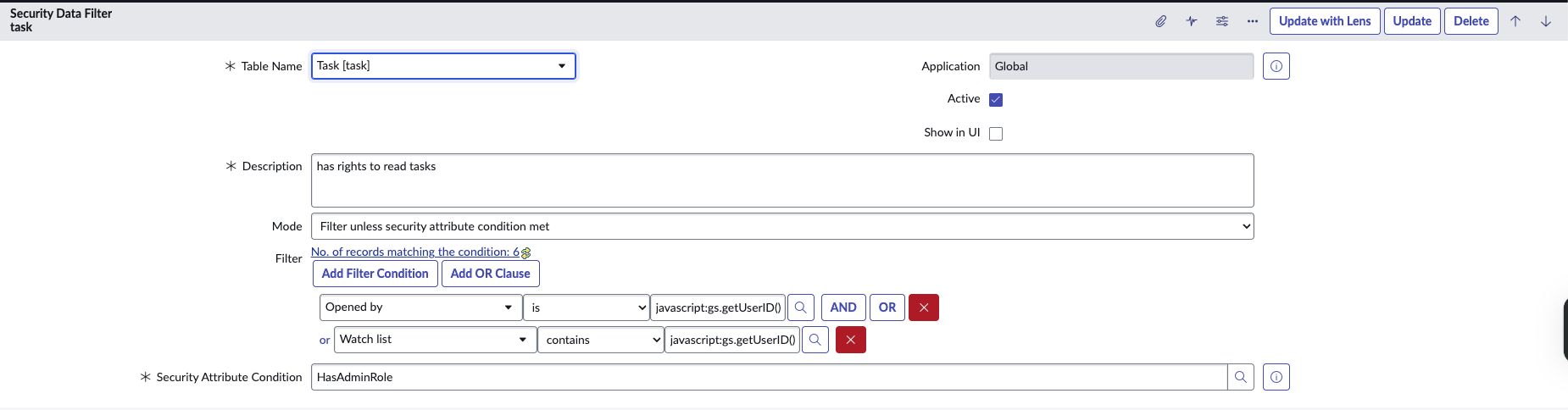
Security Data Filters contain the following controls:
- table - the table to apply the filter to
- security attribute condition - similar to the security filters in ACLs. Conditions that can check roles or session status. The way they affect the SDF depends on the value of mode
- mode - controls whether the security attribute condition enforces the filter, or bypasses it:
- Filter unless security attribute condition met - this means that the filter will not apply to users who meet the security condition. You can use it to exclude user roles such as admins from filters.
- Filter if security attribute condition met - this means the filter only applies to users who meet the condition. You can use it, for example, to block access to specific records if the user is an AI user.
- filter - data filters on the record values. For example, you can use “opened_by” and then put the dynamic “javascript:gs.getUserID()” so users can only see tasks they opened.
- Use SDFs if you want to restrict access to records for security reasons, when some table access is required. This is relevant to sensitive tables such as the table task and its child tables, sys_email, and more.
- Do not use if you only want to access specific field-level access, for example, to block employees from seeing values of fields like “salary” or “ssn” of other employees.
Business Rules
Before Query Business Rules are a special Business Rule type that fires before the database query executes. This can be used to protect from inference attacks by appending more conditions to the query (using the variable current) before it runs. Unlike SDFs, Business Rules support server-side JS code to control how and when to append those additional filters to the query.
For example:
restrictIncidents();
function restrictIncidents() {
	if (!gs.hasRole("itil") && !gs.hasRole("sn_incident_read") && gs.isInteractive()) {
		//Do NOT restrict Incidents if user has the service_viewer role.
		if (gs.hasRole('service_viewer'))
			return;
		if (GlidePluginManager.isActive('sn_fsm_itsm_mng') && gs.hasRole('wm_ext_agent'))
			return;
		// STRY52118544: ham_user is added to support incident read for reporting on HAM store app
		if (GlidePluginManager.isActive('com.sn_hamp') && gs.hasRole('sn_hamp.ham_user')) {
			return;
		}
		// DEF0330091: Allow query on OT Incident with sn_ot_incident_read role
		if (GlidePluginManager.isActive('com.sn_ot_inc_mgmt') && gs.hasRole("sn_ot_incident_read"))
			return;

		// Responders should be able to access all incidents
		if (gs.hasRole("sn_sow_srm.srm_responder")) {
			return;
		}

		var u = gs.getUserID();
		current.addQuery("caller_id", u).addOrCondition("opened_by", u).addOrCondition("watch_list", "CONTAINS", u);
	}
}
Use business rules when your logic is complex and requires JS instead of security attribute conditions and data conditions that are used by SDFs.
Do not use business rules when you can do the same thing using SDFs.
Query-Range ACLs
Query ACLs are a new ACL type introduced specifically to target the query layer — the gap that makes inference attacks possible in the first place. Rather than controlling what a user can see in the result, they control what filter conditions a user is permitted to apply to a field.
They can be attached to a table or a specific field, and they support wildcards (for example, to deny query ranges on *.short_description unless one is an admin, using a deny-unless query-range ACL).
Query-Range ACLs affect the following operators:
- STARTSWITH/ENDSWITH
- LIKE
- NOT LIKE
- BETWEEN
- >/</>=/<=
The default behavior, when no Query ACL is defined for a field, is to fall back to checking whether the user has read access to that field.
Use query range ACLs when you want to restrict access to a specific sensitive field. For example, salary, social security numbers, and passport numbers. You may want to restrict external users even more, and use query-range ACLs to block querying email addresses or even full names of other users.
Do not use Query Range ACLs when it’s important to filter by those fields. For example, on fields such as “created_on”. This is an important functionality - for example, to see or sort by the time a record was created.
Combining Them
The most effective defense involves combining these security mechanisms for different scenarios.
For example, a highly secure instance would use Query-Range ACLs on sys_user to prevent internal users from inferring sensitive personal data, while also employing SDFs to ensure external self-registered users can only access their own records.
Detection
Identifying when Count(er)-Strike is being actively exploited against a ServiceNow instance requires monitoring the syslog_transaction table, which contains user requests.
To detect high-frequency enumeration patterns against sensitive fields, many requests, narrow filter conditions that differ by a single character (field: url), originating from a single account or IP (field: sys_created_by and remote_ip). Correlating it into a coherent attack pattern at scale requires automated analysis. A more complex scenario is when the query does not appear in the URL. We have identified a unique signature using the acl_time field: the value initially decreases until it’s consistently below 5, except for small peaks that occur when the attacker’s guess hits an existing value, and the number of returned records isn’t 0. Reco, of course, does it for you.
Nitay Bachrach


%201.svg)
ABOUT THE AUTHOR
Nitay Bachrach is a Senior Security Researcher at Reco and a Salesforce security expert.