Into the Expanse: A Security Leader’s Guide to the Agent Frontier
Read more
Security teams typically discover three to four times more applications than IT has on record, and AI tools are the fastest-growing category in that gap. A tool connected via social login to a corporate Google account bypasses SSO entirely, leaving no trace in your identity provider logs.
Reco's AI Discovery module surfaces every AI application running across your environment: approved tools, shadow AI, and AI features embedded inside SaaS tools your team already uses. This guide covers the full workflow from first login to scope review.
WHAT YOU'LL LEARN
Navigate to AI Governance → AI Discovery
The page opens with a summary bar grouping your AI app population into five metric clusters. This is your triage view.

AI Discovery refreshes daily. The last update timestamp appears on the top right of the page.
Action: Start with the To Review count in the Authorization cluster. These are your pending decisions.
By default the page shows every discovered application. To work through AI specifically, apply the App Category filter.
Click + Filters, select App Category, and choose Gen AI. The inventory narrows to AI tools only. The Analysis column continues to surface non-AI apps that have AI features embedded, flagged as EMBEDDED AI.
Note: Gen AI apps (like ChatGPT, Claude, Cursor) are dedicated AI tools. EMBEDDED AI apps are traditional SaaS tools with AI features woven in. Both belong in your review queue.
Three columns in the inventory give you the fastest read on risk.
An AI tool discovered via Identity Provider with Social Login auth is the classic shadow AI pattern: employees signed in with their corporate Google or Microsoft account, creating no entry in your SSO logs.
The Accounts column tells you how many users in your org are touching that app. Sort by Accounts descending to work from highest exposure down.
Warning: The Network discovery method only activates when Microsoft Defender for Cloud Apps (MCAS) is integrated. Without it, you may miss apps accessed only through web browsers.
Every AI app in the inventory carries an authorization status. Your job during the first-pass review is to resolve the To Review items.
Select one or multiple apps and click Set Status for Apps. You can also customize status display names under Settings → System Settings → App Status.
Action: Export the filtered Gen AI inventory and share with stakeholders before changing status in bulk. Every authorization decision is audited.
Navigate to AI Governance → Connected AI Apps
AI Discovery answers which AI apps exist. Connected AI Apps answers what they can access. Use the view toggle in the top right to switch between Charts, Table, and Graph. The Graph view maps every core app to its connected plugins, with line colors indicating OAuth scope risk.
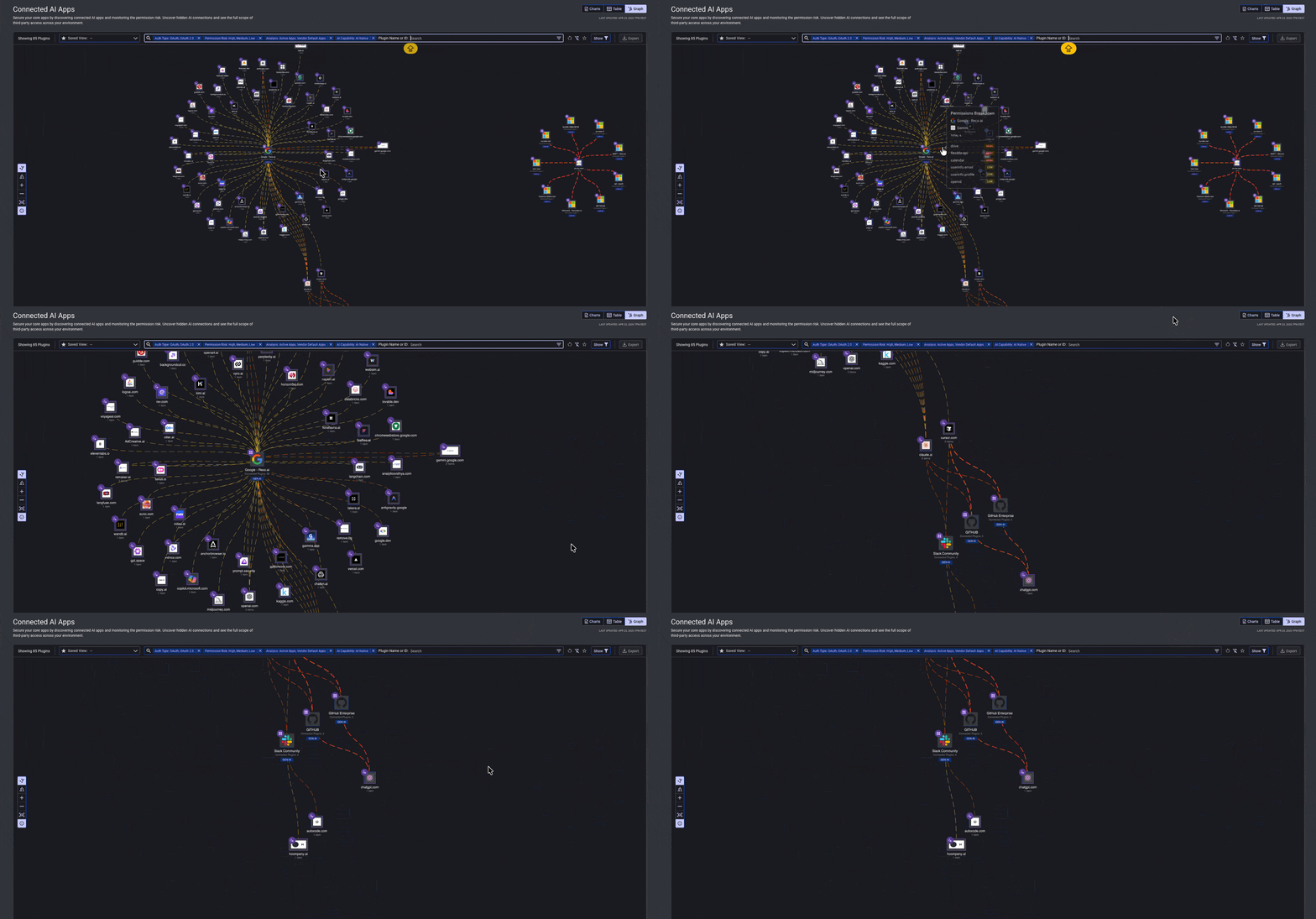
Clusters with many red edges indicate core apps with concentrated high-risk scopes. Switch to the Charts view to see each core app's scope donut and High Scopes to Review counter. Click into the highest-count app, review its plugins, and flag any scope granting write access or reaching data categories outside the plugin's stated purpose.
Action: Review the top three apps by High Scopes count monthly. Permissions drift between discovery cycles.
AI discovery is not a one-time inventory task. It is the starting point for governing how AI tools, embedded AI features, and connected apps interact with your SaaS environment, users, and data. By reviewing discovery signals, assigning authorization status, and prioritizing high-risk scopes, IT and security teams can turn shadow AI from an unknown exposure into a managed workflow.
Use AI Discovery as your weekly visibility layer and Connected AI Apps as your deeper permission-review layer. Together, they help you keep AI adoption moving while reducing the risk of unmanaged access, excessive permissions, and data exposure.
.svg)


.svg)