
The offboarding email goes out at 5 pm Friday. HR has notified IT. The SSO account is deactivated within the hour, and the offboarding ticket gets closed. Two months later, the former employee's ChatGPT subscription is still active on the corporate card, an n8n agent they built is still pulling data from Salesforce on schedule, and a Drive folder they owned just exposed a customer contract to an external party because nobody ever transferred file ownership.
Deactivating the IdP account does not offboard the user. The IdP account is the smallest surface a departing employee leaves behind. Everything that carries real operational and security risk lives in places the IdP never reached: shadow SaaS, OAuth grants, AI agents, API tokens, and file ownership. These outlast the SSO deactivation by default, because revoking them was never part of the workflow.
This article walks through how to configure an offboarding workflow that actually offboards. The structure is six surfaces, three workflow principles (sequence, verify, document), and one number that belongs in board reporting: time-to-full-offboard.
WHAT YOU'LL LEARN
Before getting into the workflow, here is the scope of the problem. The diagram below visualizes everything an offboarding workflow actually has to touch. Above the waterline is the SSO account. Almost everything else sits below it.

A workflow that revokes one surface and leaves five is not an offboarding workflow. It is an SSO deactivation wearing the name.
Most SaaS applications an employee uses were not provisioned through the IdP. Anything they signed up for with their corporate email but outside SSO sits outside the offboarding workflow by default. ChatGPT, Canva, Figma, Typeform, Loom, Calendly: the list is long, the catalog is rarely maintained, and individual subscriptions on the corporate card outlive the SSO deactivation. Reco's App Discovery surfaces these signups by correlating SSO logs, email metadata, and OAuth activity, catching the shadow tools that single-signal monitoring misses.
Every “Sign in with Google” or “Authorize Microsoft” creates a persistent grant. These grants live on the SaaS side, not the IdP side, which is why they survive SSO deactivation. A departed user's OAuth token can still be used by the third-party app that holds it. Reco's Connected AI Apps surface (and the SaaS-to-SaaS view for general OAuth) inventories these per user with grant timestamps and scope classification.
Personal API tokens (GitHub PATs, Slack user tokens, AWS access keys, Salesforce session tokens) survive SSO deactivation entirely. So do service accounts that the user created and bound to their identity. These are often the last items in the offboarding workflow, if they appear at all, which means they linger for months. Reco surfaces tokens and service accounts via App Portfolio and the Identities → Accounts view.
Agents built in Copilot Studio, n8n, Make, or LangChain continue running on the user's saved credentials and OAuth tokens. They are high-risk specifically because they operate without their owner present. Reco's AI Agents Inventory can be filtered by Owner to surface every agent attached to a departing user, with their connections, model, and authorization status visible.
Files the user owns in Google Drive, Box, or SharePoint. Repositories they own in GitHub. Channels they admin in Slack. These are not deletion targets; they are ownership-transfer targets. If the workflow does not explicitly transfer ownership, these resources persist under an orphaned owner, and their access controls quietly weaken as the system loses the original owner's group memberships.
A timestamped record proving each revocation happened. Required for ISO/IEC 27001:2022 Annex A 5.18 (Access Rights), SOC 2 CC6.2 (User Access Termination), HIPAA, and GDPR Article 32. Most offboarding programs cannot produce this evidence package on demand, which becomes a finding in every annual audit cycle until it is addressed.
Three principles for a workflow that actually closes the loop: sequence the revocations, verify each step, and document continuously.
The workflow fires from the HR system, not the IT ticket queue. Workday or BambooHR signals through SCIM into the IdP, the IdP signals into Reco, and Reco initiates the multi-surface sequence within minutes of the HR event. Waiting for an IT ticket to be assigned, picked up, and worked is where the first 24 hours of orphaned access typically live.
Reco distinguishes two separate states on the user inventory. Former means the employee has left. Former With Access means the employee has left and still has active accounts, OAuth grants, or agents attached. The first is HR data. The second is the offboarding failure metric, and it is the one the workflow exists to drive to zero.
The user inventory exposes both states directly. Navigate to Identities → Users to see the full population.

To isolate the offboarding failure state, apply the Former With Access filter in the Employment Status panel.
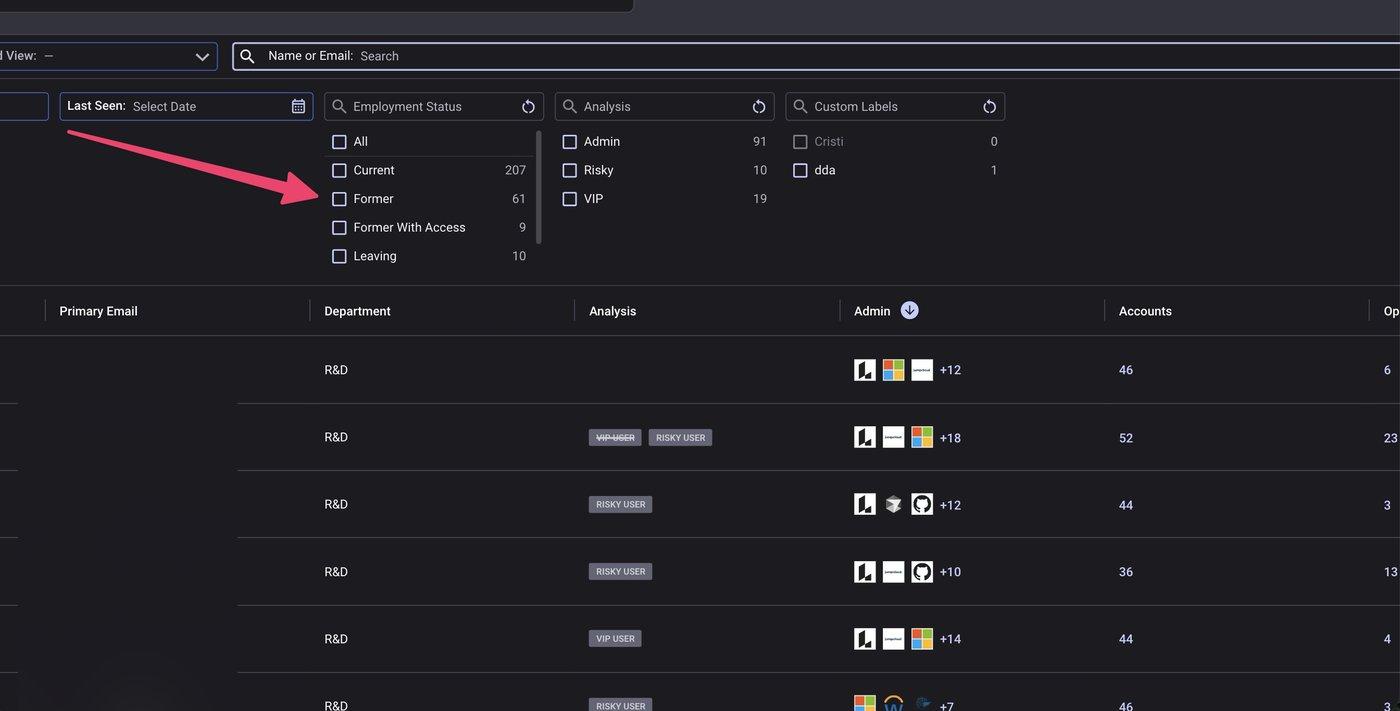
The filtered view is the workflow's accountability dashboard. Each row is an open offboarding ticket. The original process never closed.

The evidence package generated at step 8 contains: the surfaces touched, the timestamp for each revocation, before-and-after states for each surface, and the assigned successor for any transferred ownership. Stored as an immutable audit working paper. Referenced directly in the next compliance audit cycle.
Most organizations measure SSO time-to-revoke and report it in minutes. Few measure full offboarding completion, which is typically weeks for the lingering surfaces, sometimes never. The gap between the two metrics is the operational definition of former-employee debt.
Reasonable targets for the full metric: 24 hours for high-privilege users (admins, finance, legal), 72 hours for standard users. Report monthly to the security committee. Use Reco's Former With Access view aging report to track the time between an identity being marked Former and the last attached surface being fully revoked. The goal is to keep the Former With Access count permanently in single digits, and ideally at zero for users departed over 30 days.
Note: For high-privilege users, consider a pre-offboarding step: thirty days before a known departure, have Reco generate an early footprint inventory so the actual offboarding day is a verification exercise, not a discovery exercise. Surprise departures are the exception, not the rule.
Offboarding is a security control, not an HR task, and the IdP account was always its smallest piece. A properly configured workflow turns former-employee debt into something finite: measurable, documented, and closed on a deadline. It moves the question from "did we deactivate the account" to "did we revoke all six surfaces and verify each one." None of that works without a platform that maps every surface a user touches. But the map alone is just a dashboard. The workflow is what turns it into a control.
.svg)


.svg)


%201.svg)


.svg)