

CIS Microsoft 365 v6: What's New and How to Get Full Value From It

.png)

CIS Microsoft 365 v6 is a solid baseline for hardening Microsoft 365. Here’s what changed from v5, how to roll it out, and how to keep those settings from drifting between assessments.
Why This Update Matters
On October 31, 2025, CIS released Microsoft 365 Foundations Benchmark v6.0.0. The update reflects how Microsoft 365 is used today, with heavier collaboration, broader external sharing, a growing device footprint, and more complex identity environments.
Version 6 now covers 140 controls across six services: Exchange Online, SharePoint Online, OneDrive for Business, Microsoft Teams, Power BI, and Microsoft Entra ID. For security teams managing Microsoft 365 at scale, it defines a clear target configuration that can be assessed, audited, and maintained over time.
What Changed in v6
CIS added 13 new controls and removed 3 outdated ones. Most of the additions fall into four areas that have become more important since v5. Specifically:
With 98.5% continuity from v5, most organizations can upgrade without reworking their compliance program. The new controls mainly close practical gaps rather than changing the overall structure.
A Real-World Example: Why This Matters
Microsoft’s January 2024 incident began with a password spray attack against a legacy, non-production test tenant account that did not have MFA enabled. From there, the attacker's path included a legacy test OAuth application with elevated permissions. These are the types of identity and app governance gaps CIS benchmarks are designed to surface, but they are easy to miss if controls are only checked periodically
This is not a knock on benchmarks, as CIS v6 is well-constructed. The point is operational. Benchmarks define a target configuration, but day-to-day processes are what keep environments from drifting away from it.
Getting Full Value: Benchmark + Continuous Monitoring
Most organizations assess against CIS benchmarks on a quarterly schedule, which works well for formal compliance reviews. Microsoft 365 environments, however, change continuously between assessments as admins adjust sharing policies, new applications receive OAuth permissions, and guest accounts remain active long after projects end.
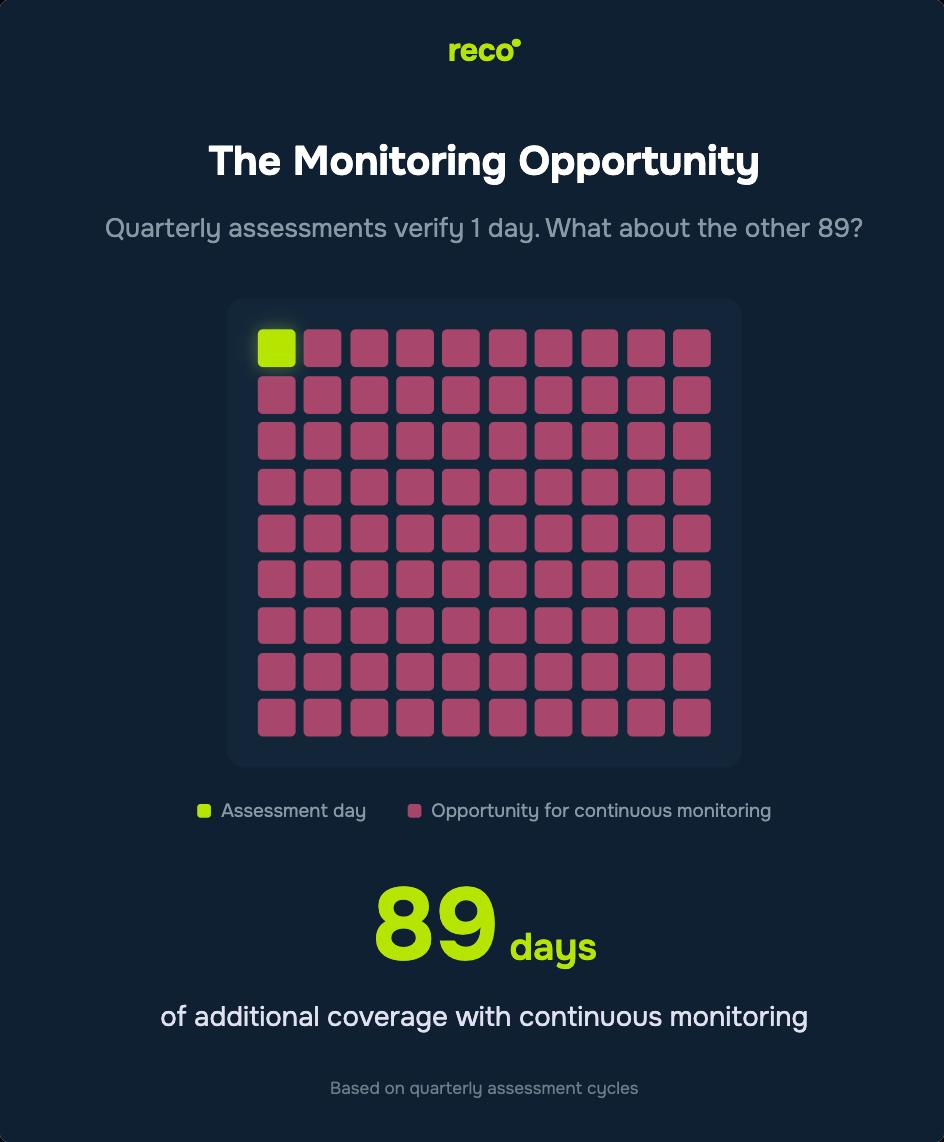
Adding continuous drift detection between formal assessments helps you spot configuration changes quickly instead of discovering them at the next quarterly review. It is the difference between understanding your posture on assessment day and maintaining visibility day to day.
Use CIS v6 as the baseline for target configuration and audit evidence, then layer continuous monitoring on top to flag deviations as they occur. This approach supports governance while reducing the operational gaps that attackers rely on.
What Benchmarks+ Monitoring Look Like Together
The Bottom Line
CIS v6 is a powerful baseline for Microsoft 365 security. Its 140 controls reflect modern usage patterns and address practical gaps from v5. Adopt v6 as your target configuration, then pair quarterly assessments with continuous monitoring in order to catch drift between reviews and maintain the secure state you validated.
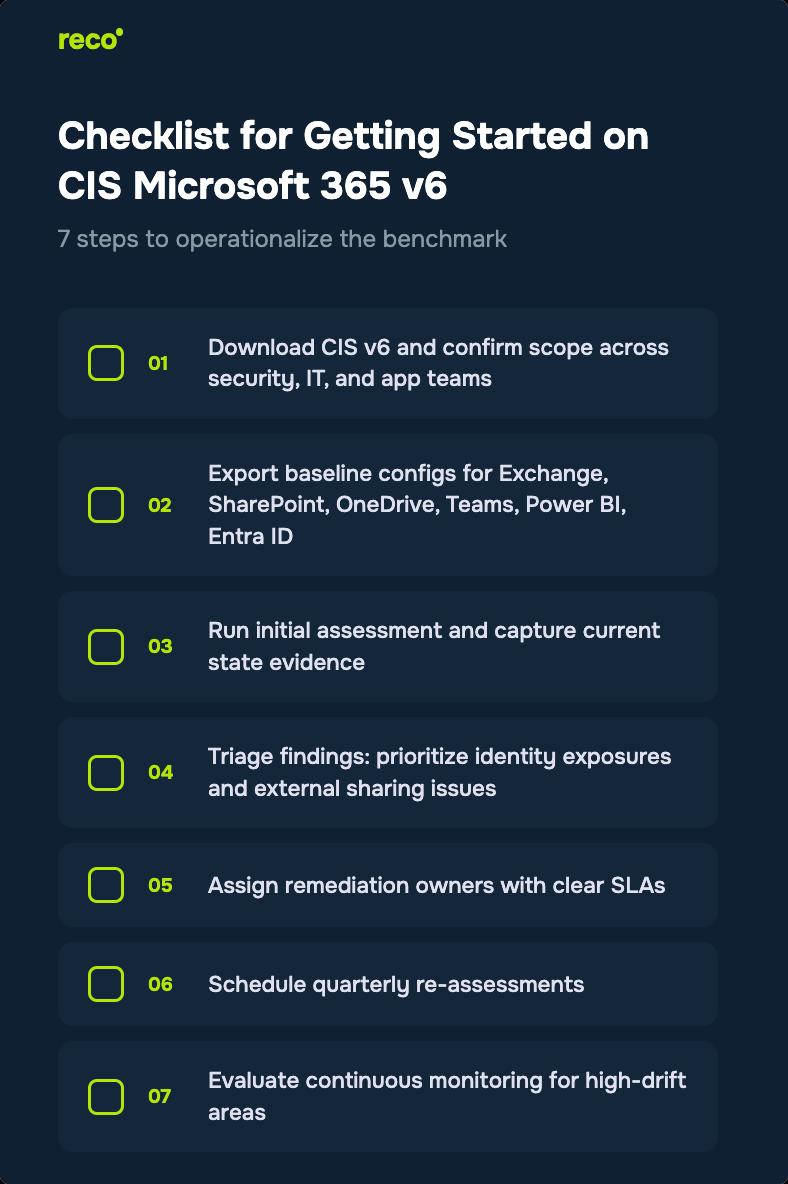
How Reco Makes CIS v6 Compliance Continuous, Not Quarterly
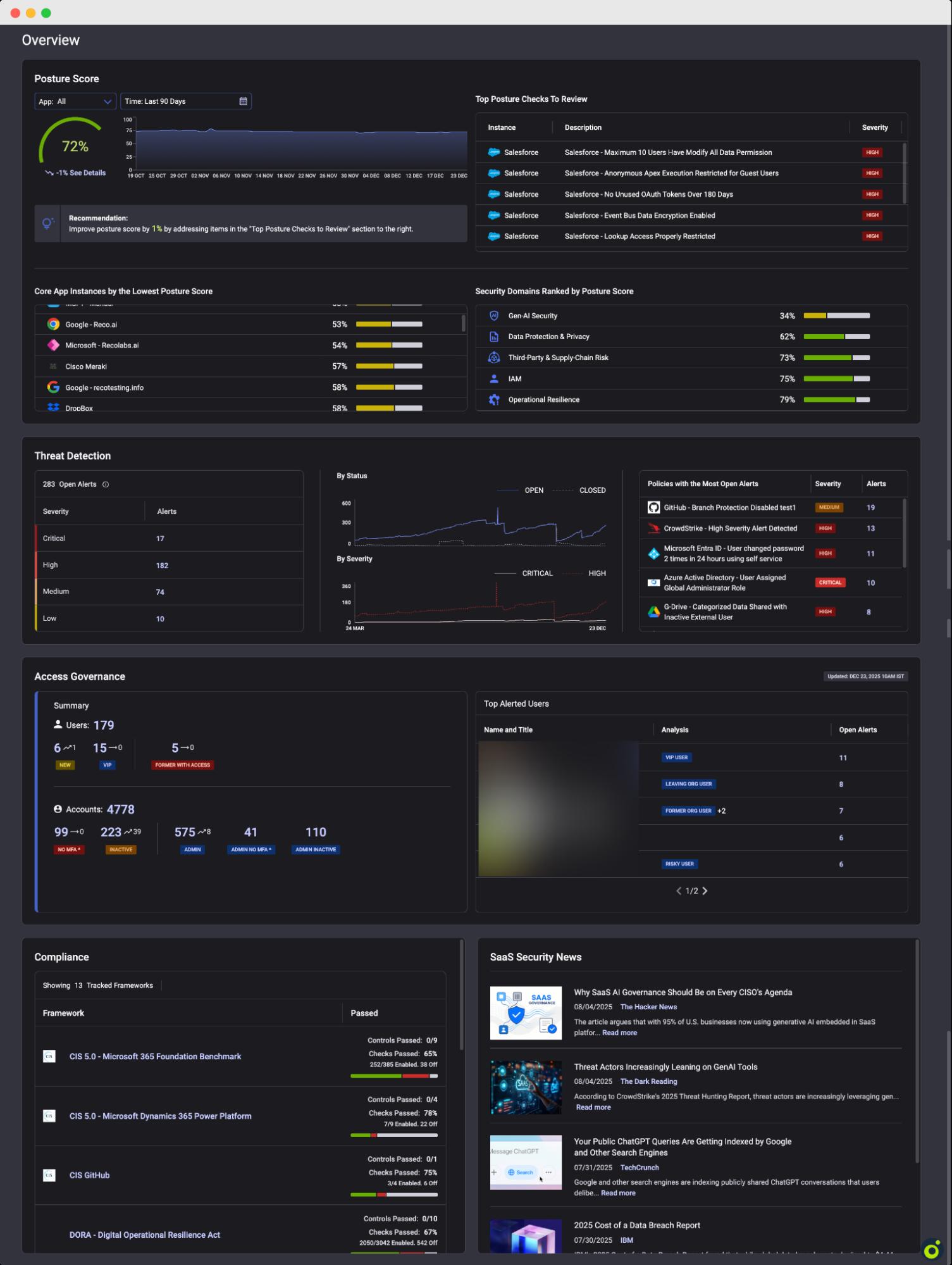
Reco surfaces Microsoft 365 configuration drift without agents or log forwarding. The platform continuously monitors your environment against CIS benchmarks and more than 20 compliance frameworks, alerting you when key settings change.
Navigate to > Overview
What you see at a glance:
From Detection to Remediation
Click any failing check to see exactly how to fix it. Reco provides step-by-step remediation guidance mapped to the specific CIS control.
Navigate to Security Posture → Posture Checks → Click any check
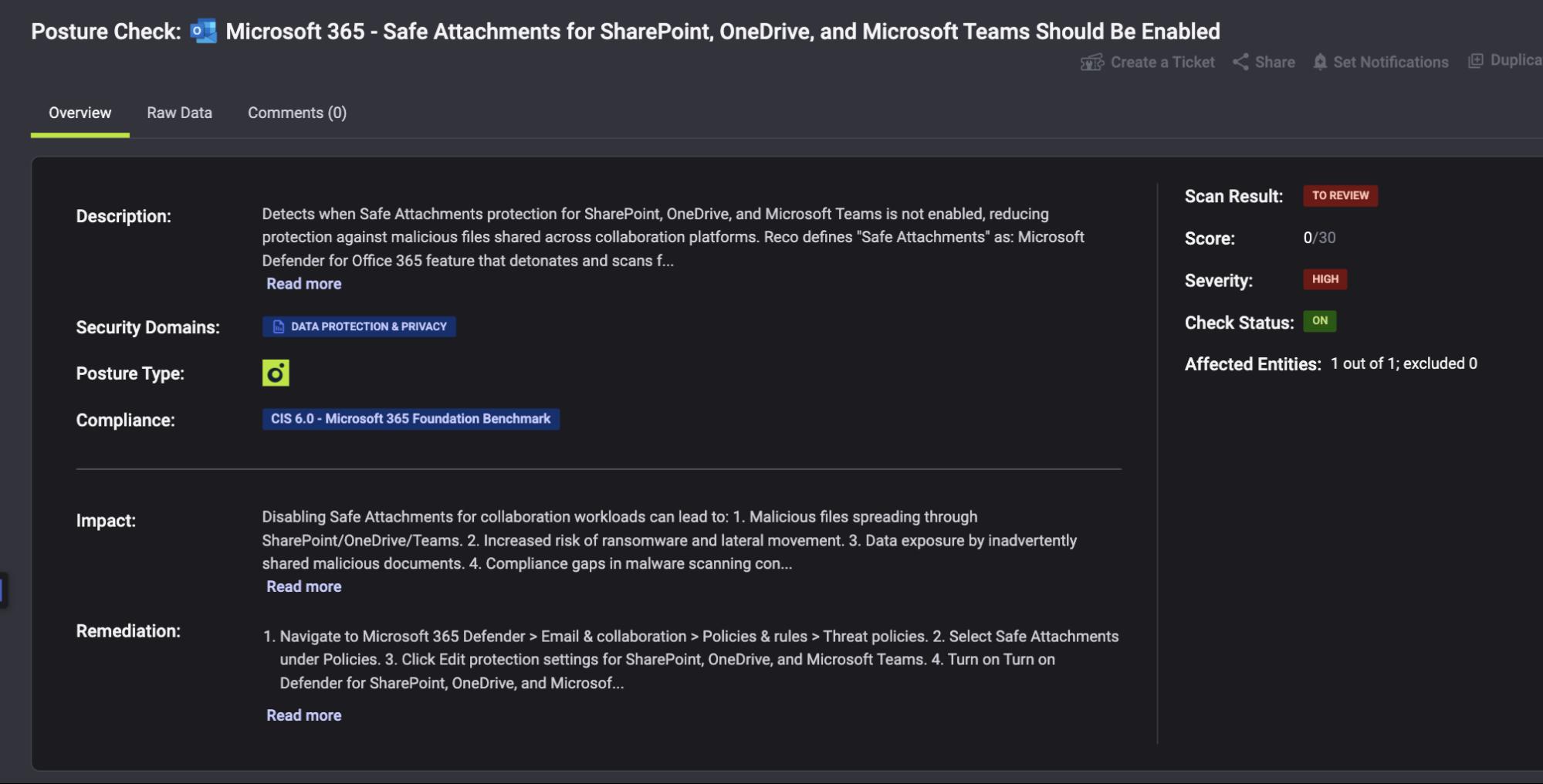
Each posture check includes:
The benchmark defines the target state. Reco helps you detect drift and maintain that state over time.
Conclusion
CIS v6 is a solid foundation for Microsoft 365 security. Its 140 controls reflect how organizations use M365 today, and the 98.5% continuity from v5 makes adoption straightforward. Use v6 as the baseline for your target configuration and compliance evidence, but avoid treating it as a quarterly checkbox.
The biggest exposure often occurs between reviews, when settings drift, and exceptions accumulate. Pairing benchmark assessments with continuous monitoring helps you maintain the secure state you validated and produce audit-ready evidence without waiting for the next assessment cycle.
Which M365 services does CIS v6 cover?
The benchmark covers six core services:
- Exchange Online
- SharePoint Online
- OneDrive for Business
- Microsoft Teams
- Power BI
- Microsoft Entra ID
Each service includes controls mapped to its relevant security settings.
How many controls are in v6?
There are 140 controls in total, up from 130 in v5:
- 13 new controls added
- 3 outdated controls removed
- 98.5% continuity with v5
The high continuity means most organizations can upgrade without major rework.
How quickly should we move to v6?
As soon as practical. Key reasons to start now:
- High continuity with v5 makes the upgrade straightforward for most environments
- You can address new controls before the next audit or compliance review cycle
- Moving earlier reduces the window where gaps remain unassessed under v6
Most teams can complete the initial gap assessment within a week.
Is benchmark compliance enough?
It's a strong foundation, but not the full picture:
- Benchmarks define the target configuration at assessment time
- Configurations can drift between quarterly reviews
- Continuous monitoring helps catch changes sooner
Using both together improves day-to-day security and makes audit evidence easier to maintain.
Does Reco support CIS Microsoft 365 v6?
Yes. Reco maps to CIS v6 controls and goes beyond point-in-time assessment:
- Continuous posture monitoring against v6 controls
- Alerts when configurations drift from the baseline
- Business context to help prioritize findings
- Evidence that supports both compliance reporting and day-to-day security operations
How is Reco different from running CIS assessments manually?
Manual assessments show your posture at a point in time. Reco adds ongoing visibility by:
- No agents or log forwarding required
- Drift detection in hours instead of quarters
- Automated workflows to support remediation
The CIS benchmark defines the target configuration. Reco helps teams maintain it between assessments.

Gal Nakash
%201.svg)
ABOUT THE AUTHOR
Gal is the Cofounder & CPO of Reco. Gal is a former Lieutenant Colonel in the Israeli Prime Minister's Office. He is a tech enthusiast, with a background of Security Researcher and Hacker. Gal has led teams in multiple cybersecurity areas with an expertise in the human element.

Gal is the Cofounder & CPO of Reco. Gal is a former Lieutenant Colonel in the Israeli Prime Minister's Office. He is a tech enthusiast, with a background of Security Researcher and Hacker. Gal has led teams in multiple cybersecurity areas with an expertise in the human element.






%201.svg)


.svg)