Most AI Acceptable Use Policies are written without knowing what AI is actually running in the environment. The result: a document nobody can enforce, signed by employees who use ten tools the policy never mentioned.
The traditional approach takes weeks. Legal drafts language. IT lists the apps it knows about. Security adds vague guardrails. The document gets posted, ignored, and outdated within a quarter.
This guide flips the order. You start with the data, not the document. Reco's AI Governance and AI Agents Security modules provide broad visibility into the AI apps, agents, and models connected to your environment within hours. Once you can see what's there, you can write a policy that maps to reality and survives contact with how people actually work.
WHAT YOU'LL LEARN
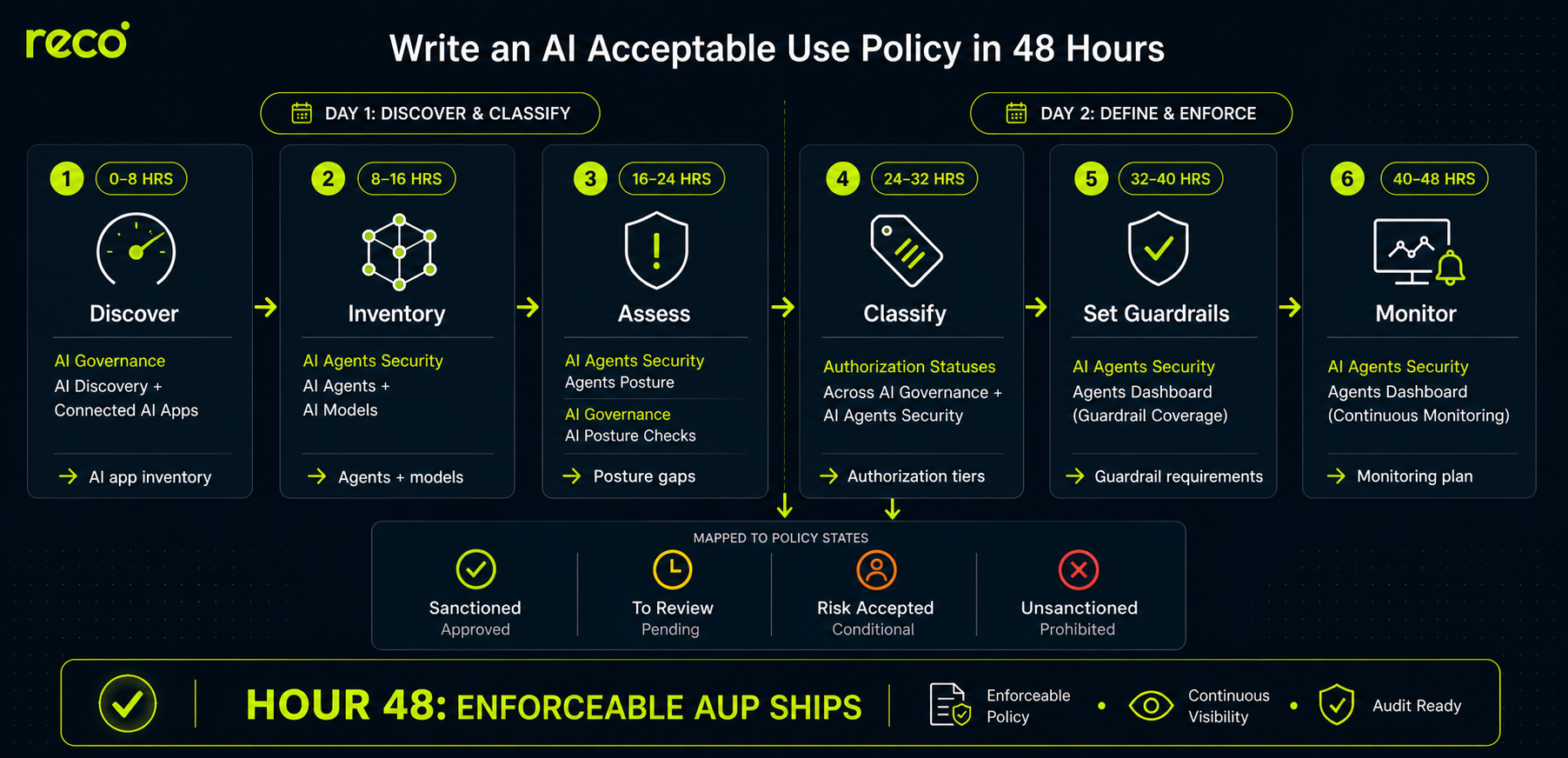
Before the step-by-step, here is the full playbook on a single page. Six phases across two days, each tied to a specific Reco module and producing a concrete deliverable, all converging on an enforceable AI policy baseline by hour 48.
Navigate to AI Governance → AI Discovery
Filter by Gen AI category to see the AI applications connected to your environment. The page shows sanctioned, unsanctioned, to review, and risk-accepted apps in a single view. Discovery inventories refresh every 24 hours, providing a continuously updated view of AI usage across monitored environments.
Then move to AI Governance → Connected AI Apps. This view surfaces OAuth integrations and plugins that have been authorized to access your SaaS data, including the scope each holds. Many AUPs miss this layer entirely and end up regulating ChatGPT while ignoring the dozen AI plugins already inside Google Workspace.
Action: Export both views. This is the raw input for your policy's “Approved Tools” and “Prohibited Tools” sections.
Navigate to AI Agents Security → AI Agents
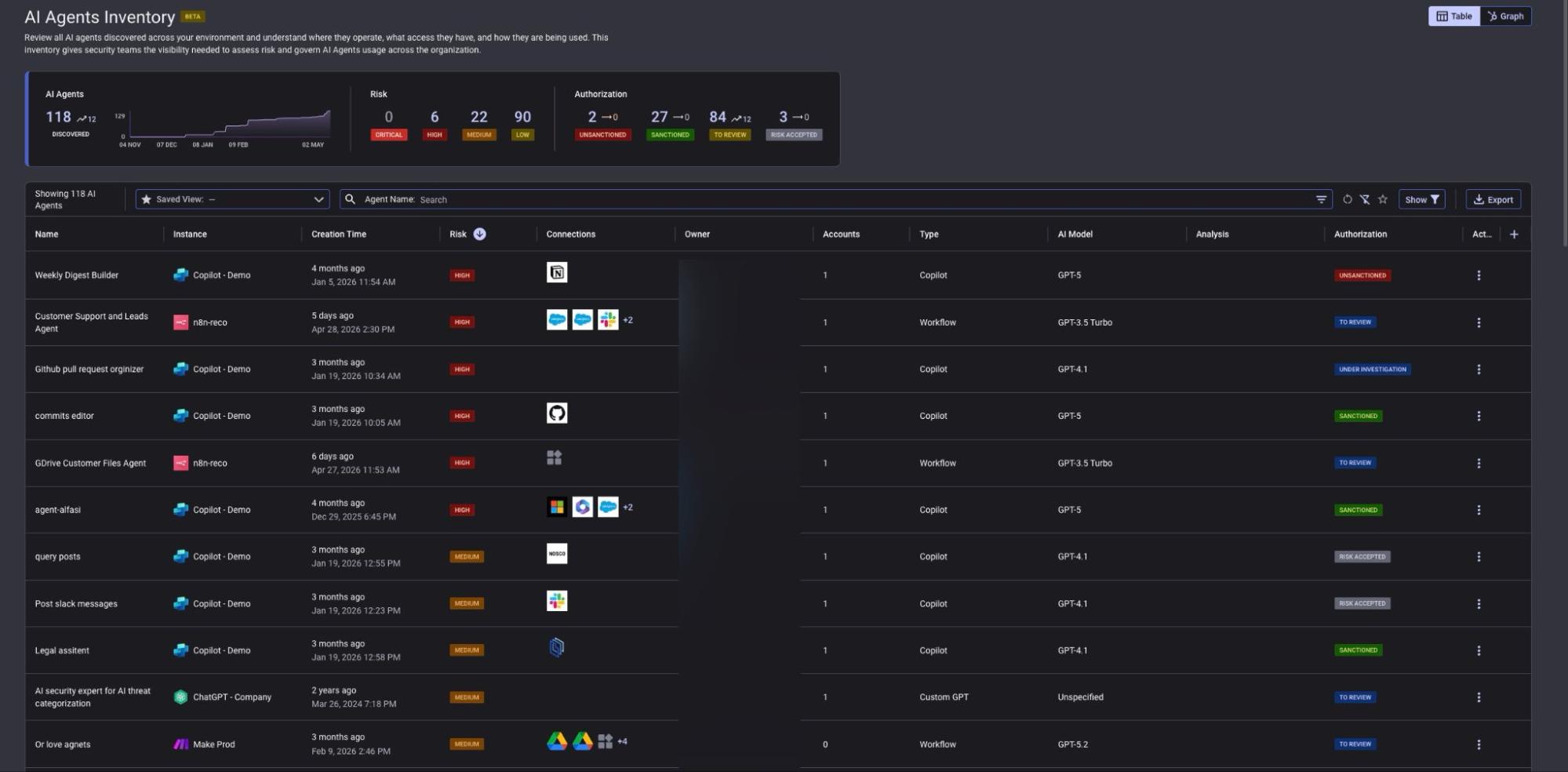
This is one of the most common places where unmanaged agentic workflows appear. Agents built in Microsoft Copilot Studio, n8n, Make, and similar platforms rarely show up as standalone apps because they live inside other tools. The AI Agents Inventory surfaces discovered agents with owner, connected systems, model, and authorization status.
Navigate to AI Agents Security → AI Models
The Models inventory shows the foundation models identified in active use, the vendor (OpenAI, Anthropic, others), the agents using each model, and the authorization status. This matters for policy because different models carry different residency, training, and disclosure obligations. A policy that says “no GPT-3.5” without showing which agents still depend on it is unenforceable.
Action: Identify any unsanctioned or under-investigation agents and models. These are the cases your policy needs to address by name, not by category.
Navigate to AI Agents Security → Agents Posture
The Agents Posture page evaluates your AI agents against specific controls: input guardrails, output guardrails, code execution restrictions, internal-user access scope, recursion limits, and similar. Each check returns a severity (HIGH, MEDIUM, LOW) and a scan result (TO REVIEW, PASSED, NA - NEW). Posture assessments refresh every 24 hours.
Then run the same exercise at the application layer. Navigate to AI Governance → AI Posture Checks for the broader misconfiguration view across AI-enabled SaaS apps.
Warning: Do not draft policy language based on what you assume the gaps are. Filter to TO REVIEW with HIGH severity first. The actual gaps are usually narrower and more specific than a generic policy template predicts.
Action: Every HIGH-severity check on the TO REVIEW list represents a control gap. Your policy needs language that either prohibits the underlying behavior or requires the missing guardrail before approval.
Reco uses four authorization statuses across both AI Governance and AI Agents Security: SANCTIONED, UNSANCTIONED, TO REVIEW, and RISK ACCEPTED. Map each to a policy tier with explicit, enforceable rules. This is the spine of the document.
Action: Pull current inventory counts from Steps 1 and 2 and use them to size your review queue. If you have 84 agents in TO REVIEW, your policy needs to commit to a realistic SLA, not a fictional one.
Navigate to AI Agents Security → Agents Dashboard
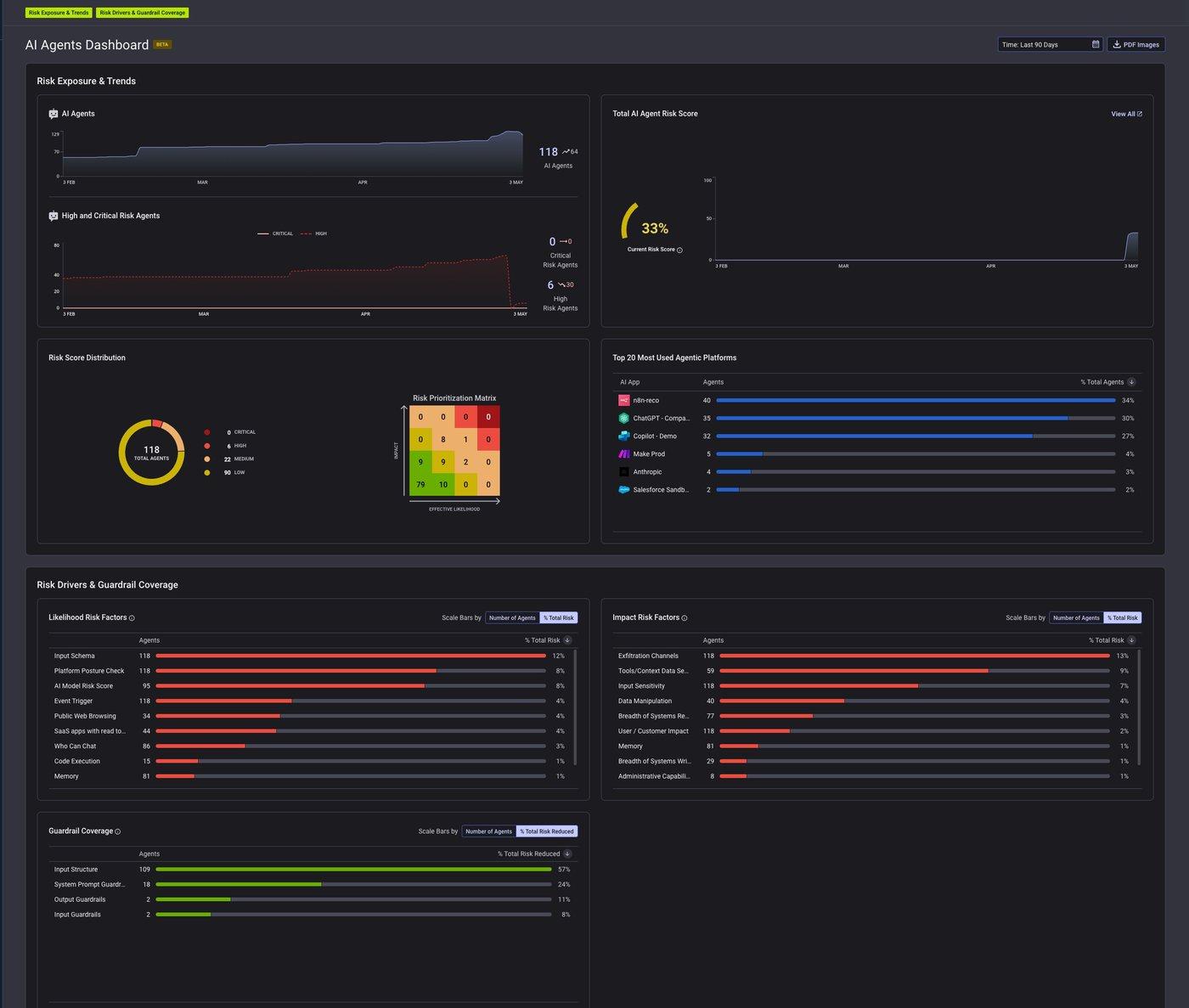
The Risk Drivers and Guardrail Coverage section breaks down likelihood and impact factors across all agents. You can see which guardrails are present (Input Structure, System Prompt Guardrails, Output Guardrails, Input Guardrails) and the percentage of agents covered by each.
Use these numbers to write minimum guardrail requirements directly into the policy. Specificity replaces hedging. For example, agents approved for higher-risk or broader-access use cases should require input structure validation and output guardrails before promotion to the Approved tier. Set a target percentage and a deadline.
Action: For each authorization tier, define the minimum guardrail set required before sanctioning. Tie tier promotion to closing posture gaps, not to a manual sign-off.
Navigate to AI Agents Security → Agents Dashboard

%201.svg)
Gal is the Cofounder & CPO of Reco. Gal is a former Lieutenant Colonel in the Israeli Prime Minister's Office. He is a tech enthusiast, with a background of Security Researcher and Hacker. Gal has led teams in multiple cybersecurity areas with an expertise in the human element.