Into the Expanse: A Security Leader’s Guide to the Agent Frontier
Read more


ChatGPT dominates enterprise AI. OpenAI now has over 5 million paying business users and processes billions of messages daily. A reported 88% of employees use AI at work, yet only 28% of organizations manage to translate that adoption into meaningful business outcomes.
This is what makes it a security problem, not a productivity story. A majority of organizations suspect or have confirmed that employees are using prohibited public GenAI. Employees connect through personal accounts, paste data outside SSO controls, and upload files through channels that bypass DLP monitoring.
The question "Does ChatGPT have access to our data?" assumes a binary answer. In practice, ChatGPT can access company data through multiple, often unmonitored pathways, and the level of exposure varies based on the ChatGPT tier in use and its associated data handling controls.
The gap between what is approved and what is actually happening is where the risk resides.
This article provides a practical framework for identifying how ChatGPT accesses company data and how to mitigate risk across each exposure pathway.
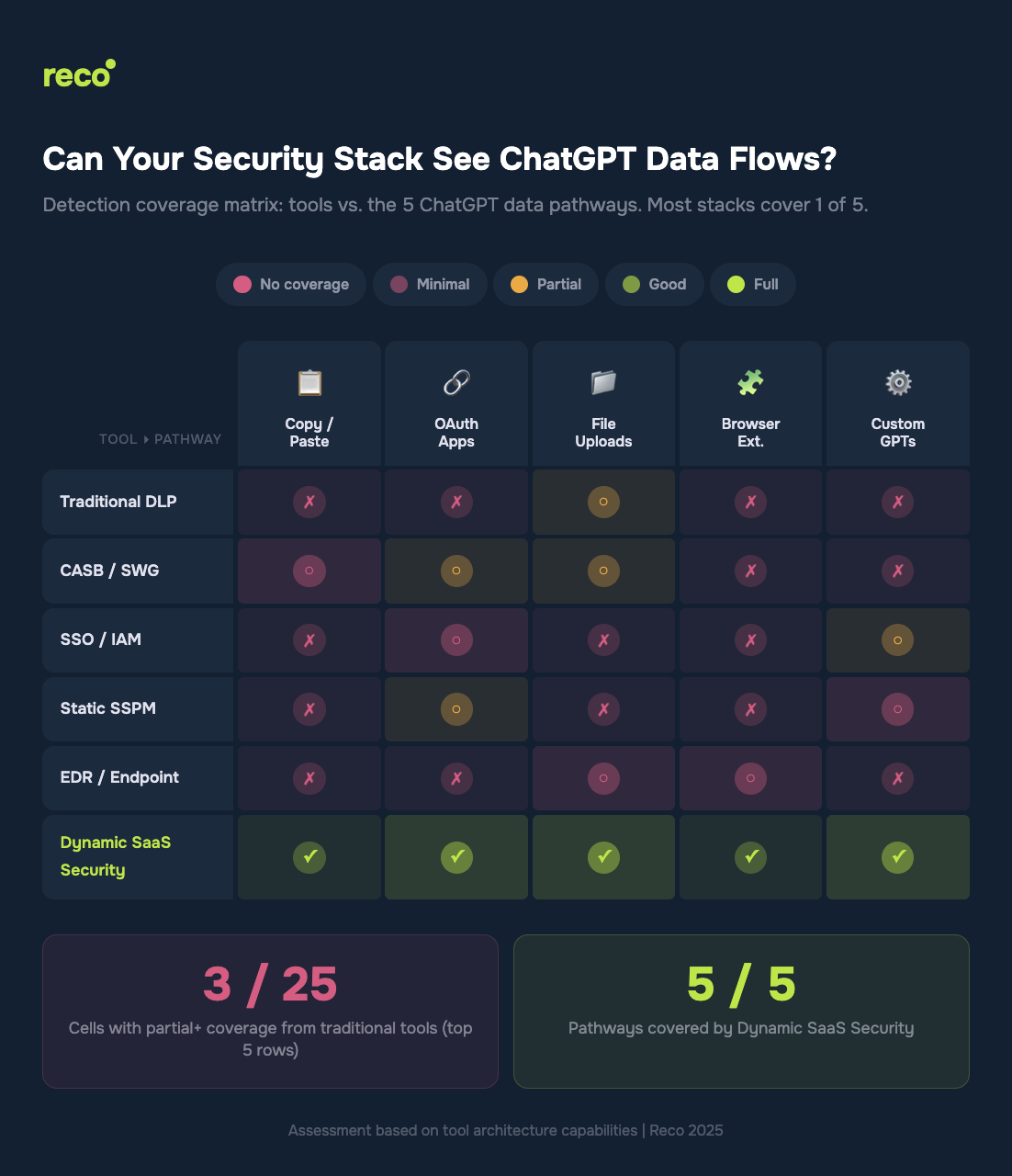
ChatGPT does not access company data through a single vector. It enters through multiple pathways, most of which are not covered by traditional security controls.
Approximately 68% of employees access free AI tools such as ChatGPT through personal accounts, and more than half of them paste sensitive or confidential data into those sessions. This represents fileless data transfer that bypasses traditional DLP controls designed for file-based monitoring.
The compounding risk: Personal accounts operate outside enterprise security controls. Even if ChatGPT Enterprise is deployed with full governance, employees often maintain parallel usage through personal sessions in the same browser. No SSO enforcement. No audit logging. No centralized visibility.
ChatGPT can connect directly to Google Drive, Slack, Salesforce, and other enterprise systems through OAuth. Each connection grants persistent, token-based read access to corporate data. On ChatGPT Business plans, these integrations are enabled by default. On Enterprise plans, they are disabled by default, but once enabled by an administrator, each user authenticates individually.
The risk: Employees authorize ChatGPT to access corporate systems without a security review. A single OAuth token becomes a persistent data pipeline.
File uploads to ChatGPT represent lower volume than copy and paste activity, but each upload can contain entire databases, financial spreadsheets, or source code repositories. Low volume, high impact.
IBM’s Cost of a Data Breach 2025 report shows that AI-related breaches are strongly associated with weak access controls and gaps in governance, increasing both the likelihood and impact of data exposure. A single spreadsheet export can contain both regulated data and proprietary assets.
AI-powered browser extensions have become a significant and largely invisible data exfiltration channel. These extensions can read page content, emails, and documents in the browser context, then transmit that data to remote LLMs, often bypassing Secure Web Gateways and traditional proxy controls.
Gartner predicts that by 2030, more than 40% of enterprises will experience security or compliance incidents linked to unauthorized shadow AI. Browser-based AI tools and extensions represent a growing and often unmonitored vector within that broader risk surface.
ChatGPT Enterprise and Business support custom applications built using the Model Context Protocol (MCP), which enables connections to internal knowledge bases, CRMs, and ticketing systems. These connectors operate through structured search and retrieval operations.
When enabled by an administrator and authenticated by users, ChatGPT can actively query internal systems and return contextual data in real time, effectively extending model access into enterprise data environments.
This is the critical question most CISOs skip. The tier determines your exposure.
Sources: OpenAI Enterprise Privacy 2025; OpenAI Business Data Privacy 2025
The gap: Even organizations that deploy Enterprise licenses cannot control employees who also use personal Free or Plus accounts on the same device. Nearly 68% of employees access free AI tools through personal, unmanaged accounts (Menlo Security, 2025). Enterprise controls apply to a single authenticated session, while parallel personal sessions operate outside SSO enforcement, audit logging, and centralized visibility.
Run this audit this week. No additional tools are required for steps 1 through 3.
If you have ChatGPT Enterprise or Business, log into the admin console. Review which apps and connectors are enabled, which users have authenticated, and which OAuth scopes have been granted. Verify whether app connectors are configured as “enabled by default” (Business) or “disabled by default” (Enterprise).
In Google Workspace Admin, review Security → API Controls → Third-party app access. In Microsoft Entra ID, check Enterprise Applications → Permissions. In Salesforce, review Connected Apps. Look for any OpenAI or ChatGPT OAuth grants. You will likely find authorizations that were not centrally approved.
Use your endpoint management tools to inventory browser extensions across the organization. Flag any AI-related extensions, including ChatGPT plugins, AI writing assistants, and AI summarization tools. Each represents a potential data exfiltration pathway that bypasses network-level security controls.
Steps 1 through 3 provide a point-in-time view. Employees connect new AI tools daily, so continuous monitoring is required to capture OAuth authorizations as they occur, detect new AI tool connections within minutes, and map which corporate data each tool can access.
This is where manual audits break down, and dynamic security becomes necessary. Static, periodic reviews often discover shadow AI tools more than 400 days after initial use (Reco, 2025). By that point, the tool is embedded in daily workflows, and the data exposure has already accumulated over months.
Reco’s Discovery Engine monitors OAuth patterns, API connections, and behavioral signals in real time. When an employee grants ChatGPT access to Google Drive at 2 PM, the connection is detected within minutes rather than during a later audit cycle. The Knowledge Graph then maps what data that connection can access and quantifies exposure in business-relevant terms, not just alert volume.
Discovery without action is just anxiety. Prioritize by data sensitivity.
The objective is not to block ChatGPT usage, as restrictive controls often shift activity into unmonitored environments. The priority is to establish visibility into tiers, identities, and data access flows, and to enforce controls appropriate to each exposure pathway.
ChatGPT likely already has access to your company data, not through a breach, but through everyday employee behavior: pasting customer data into prompts, authorizing OAuth connections to corporate applications, and uploading spreadsheets for analysis.
This is not theoretical. IBM and Gartner research show that shadow AI increases breach costs by an average of $670,000 and that more than 40% of enterprises are expected to experience a shadow AI-related security or compliance incident by 2030. The five primary pathways (copy and paste, OAuth, file uploads, browser extensions, and custom connectors) each bypass traditional security controls in different ways, and no single legacy control provides full coverage.
Start with the manual audit this week, then move to continuous discovery that captures new AI connections as they occur, not months later. The difference between a manageable governance issue and a reportable data breach is the time between connection and detection.

%201.svg)
Gal is the Cofounder & CPO of Reco. Gal is a former Lieutenant Colonel in the Israeli Prime Minister's Office. He is a tech enthusiast, with a background of Security Researcher and Hacker. Gal has led teams in multiple cybersecurity areas with an expertise in the human element.