

The “City-Forum” Campaign - An advanced attacker is targeting Salesforce and ServiceNow instances worldwide

.png)

Reco is tracking an ongoing campaign we've named the City-Forum Campaign, after a domain tied to the threat actor's IP (more on that below). A single server is pulling records out of Salesforce Experience Cloud sites and ServiceNow (SNOW) Service Portals, from infrastructure that has been standing since March 2025. In the last year, we've seen many threat actors that use Aura enumeration against over-permissioned Salesforce guest users, for example ShinyHunters. This actor is different. Except for Aura, the attacker reaches Salesforce Lightning Web Runtime (LWR) sites through the UI-API, a data layer we have not seen any public tool or write-up about, and it hammers a native ServiceNow Service Portal search endpoint that has almost no online documentation or well-known open source tools. This post covers the indicators, how to hunt them on both platforms, how to close the exposure and a technical dive into exactly how each technique works on the wire.
This makes this campaign noteworthy - the threat actor created their own toolset, based on research and techniques which are not well documented online. They studied the services to map different common data leak vectors - this is an advanced actor.
The campaign
Everything traces to one indicator: a single IP, 158.220.87.79, on a VPS from Contabo, a German hosting provider (ASN 51167), carrying Go-http-client/1.1 - the default Go net/http user agent - on essentially every request. That alone tells you it's a compiled dedicated tool, not a browser. The same fingerprint appears against both Salesforce and ServiceNow, across multiple organizations worldwide. It is still running, and the volume is climbing. So far, we have only seen guest user activities - never an authenticated user, but we cannot rule it out.
The same IP also resolves to the domain city-forum.com, which is where this campaign gets its name.
Two things about that domain matter. The first is timing: passive DNS records it pointing at this IP since March 2025. This infrastructure has been standing for well over a year.
We can't tell you when the scanning started. What we can say is that the attacker has held this infrastructure since at least March 2025.
The targets we can see span telecoms, banks and financial-services firms, enterprise-software vendors including security and data-privacy companies, and public-sector portals. We aren't naming any of them or characterizing individual victims further.
Indicators of compromise
- IP Address: 195.26.249.231 - A new IP address we have identified, associated with City-Forum, also Contabo
- IP address: 158.220.87.79 - ASN 51167 (Contabo GmbH), reverse DNS vmi2213719.contaboserver.net - commodity VPS hosting.
- Domain: city-forum.com - resolves to the same IP, and has done since at least 2025-03-12. Registered in 2002, but was abandoned.
- Subdomains currently resolving to 158.220.87.79:
city-forum.com
www.city-forum.com
server.city-forum.com
www.server.city-forum.com
mail.city-forum.com
www.mail.city-forum.com
mail.city-forum.com is also the domain's MX target. Historical records exist for smtp, webmail, exchange, mailserver, ftp, and dc-08d7d8a11593 under the same domain; none of these resolve today.
- SPF record authorizing the scanning IP to send mail as this domain:
v=spf1 mx a ptr ip4:158.220.87.79 a:server.city-forum.com a:mail.city-forum.com -all
Everything in this section is verifiable with dig from your own machine. We'd suggest resolving rather than visiting - there is no reason to load attacker-adjacent infrastructure in a browser.
- User agent: Go-http-client/1.1 - The default Go HTTP client. Experience Cloud sites and ServiceNow portals are driven by browsers; a guest session on Go-http-client, python-requests, curl, or go has no legitimate explanation.
Request signatures
- Salesforce LWR: guest requests to /<subsite>/webruntime/api/services/data/vNN.0/graphql, stepping through consecutive API versions v56.0 → v66.0.
- Salesforce Aura: high-volume guest getItems and getConfigData over /aura.
- Self-registration probing: guest hits on /SiteRegister and /CommunitiesSelfReg appended to many sub-community paths.
- ServiceNow: guest POST /api/now/sp/search?sysparm_cancelable=true at abnormal, escalating volume.
How to find it
Salesforce (Aura and LWR)
You need Salesforce Event Monitoring - Shield or the standalone add-on - for the request-level logs. Pull them:
SELECT Id, LogDate, Interval, LogFile, LogFileLength
FROM EventLogFile
WHERE EventType IN ('AuraRequest', 'Sites')
Fetch each LogFile as a CSV from https://{instance}.my.salesforce.com/{LogFile}, then work the columns:
- USER_AGENT - look for Go-http-client/1.1
- CLIENT_IP - look for 158.220.87.79
- ACTION_MESSAGE on AuraRequest rows - high counts of SelectableListDataProviderController/ACTION$getItems and HostConfigController/ACTION$getConfigData.
- The request URI on Sites rows - this is the LWR tell. Any guest URI containing /webruntime/api/services/data/v is a UI-API call. A run of them climbing v56.0, v57.0, v58.0… is the operator's version sweep. Watch the same column for /SiteRegister and /CommunitiesSelfReg bursts.
The /webruntime/ pattern is the piece nobody looks for today, and it's what makes LWR activity visible at all.
ServiceNow
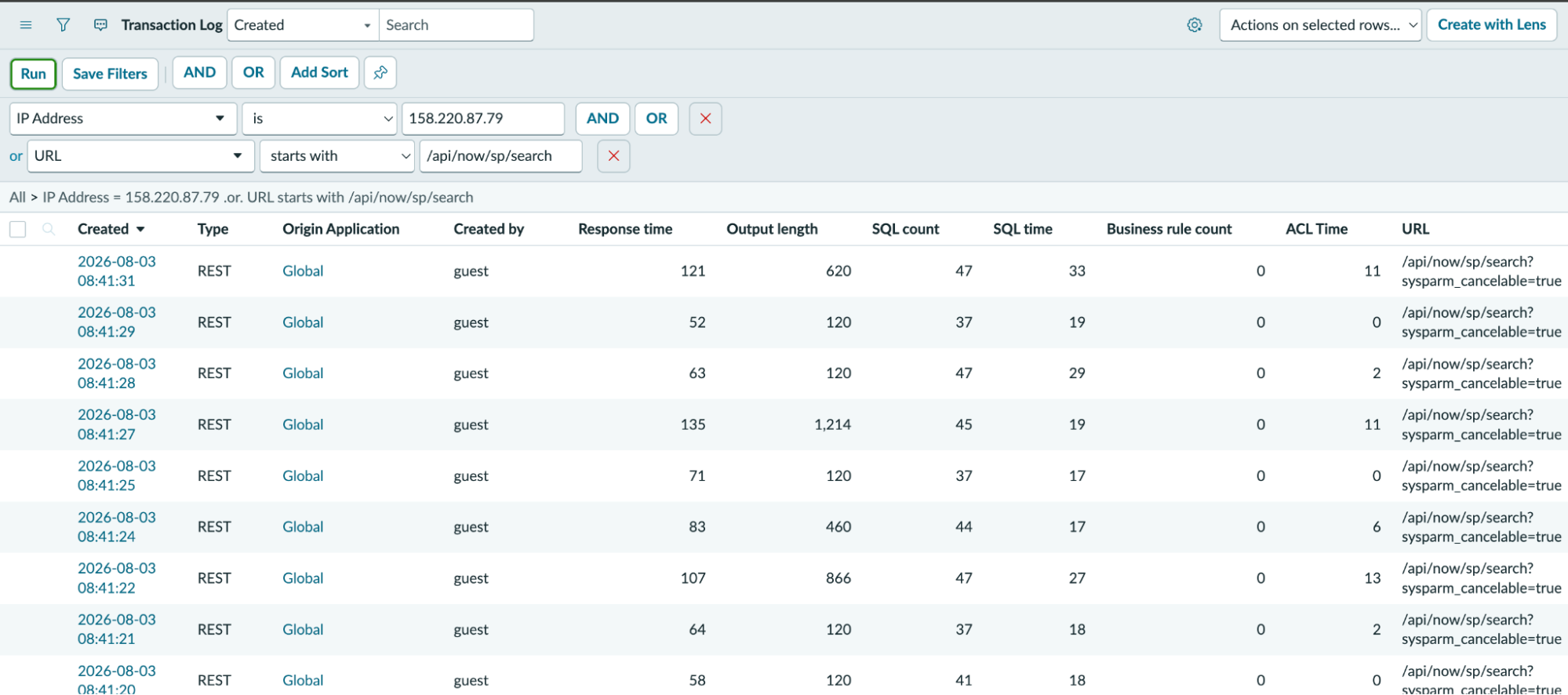
Request activity lands in the transaction log, syslog_transaction. Open it by typing syslog_transaction.LIST into the filter navigator (or browse to https://<instance>.service-now.com/syslog_transaction_list.do), then open the condition builder and add filters - the table is huge, so don't read it raw. The two that isolate this activity:
- IP Address is 158.220.87.79 - the operator's source. This is a real column on the transaction log, so you can pin the exact IP directly.
- URL starts with /api/now/sp/search - the search endpoint.
Combine them with AND to narrow to this threat actor hitting this endpoint, or with OR to see the two populations side by side (everything from that IP, and everyone hitting sp/search). Hit Run.
The rows that come back tell the story on their own. Created by reads guest - legitimate portal search from a signed-in user is attributed to that user's account, not guest, so guest traffic to this endpoint is already anomalous - and Type is REST, on /api/now/sp/search?sysparm_cancelable=true, at a cadence no human produces. Group by Created by or Created to watch the volume climb over your window (in the case we investigated, from tens of requests a day into the hundreds). The transaction log also records the user agent, so Go-http-client/1.1 is available as a further filter condition if you want it. The Output length column is worth a glance while you're here: rows returning noticeably more than the small empty-result baseline are searches that came back with content, and are the ones to run down first. One honest limit: the log records the request, not the POST body - you can confirm a portal-search sweep and see how much came back, but not reconstruct the exact terms.
Remediation
Salesforce
Work the guest user down to least privilege:
- Review the guest user sharing rules. These are what expose Accounts, Contacts, Cases, and the rest to anonymous Aura and GraphQL reads - the single highest-impact control. Remove any rule that shares records with the Guest User beyond what the site genuinely has to serve to the public.
- Strip object- and field-level permissions from the guest profile. For every object the site doesn't need to render for anonymous visitors, remove read access on the guest profile, and hide sensitive fields with field-level security. If the guest can't read the object, neither GraphQL nor Aura will return it.
- Remove the "Access Activities" permission from the guest profile - it exposes Tasks and Events that guests almost never need.
- Disable self-registration unless the site truly requires it.
- Turn off guest file access and member visibility so guests can't retrieve ContentDocument files or enumerate other site members.
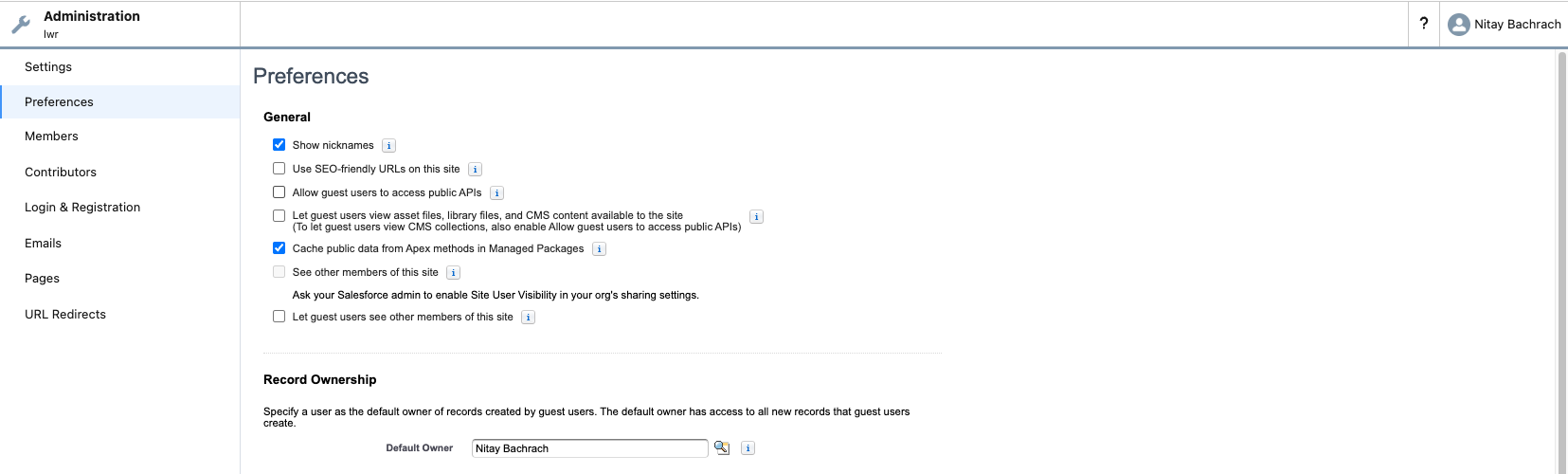
On LWR, also turn off guest access to the UI-API. In Experience Builder, go to Workspaces → Administration → Preferences and uncheck "Allow guest users to access public APIs." That closes GraphQL and the UI-API REST endpoints in one move - the strongest single lever LWR gives you, and one Aura never did. Two ways admins get a false sense of safety here:
- This is not the "API Enabled" profile permission. A guest without "API Enabled" can still be fully exposed through the UI-API - they're unrelated controls, and removing "API Enabled" does not close this. That being said, "API Enabled" must be disabled for guest users as it introduces other risks.
- It is not the "Guest users can see and interact with the site without logging in" setting. That setting controls the default visibility and access of the site's pages to unauthenticated visitors - what a guest can load in a browser - not the API surface. Treat them as separate controls: tightening page visibility does not, on its own, close GraphQL/UI-API, and "Allow guest users to access public APIs" is the one that governs that surface.
Reco checks all of the above continuously - guest sharing rules, guest object and API access, anonymous Apex, self-registration, file and member visibility, and guest UI-API exposure - and surfaces each as a posture finding with the specific fix.
ServiceNow
/api/now/sp/search is public by design, so hardening it isn't about the endpoint - it's about what sits behind it: which search sources a guest-facing portal exposes, and whether those sources enforce access. Work it in that order.
1. Map guest-facing portals to their search sources. Three tables:
- sp_portal - your Service Portals. Note which are reachable without login.
- m2m_sp_portal_search_source - the portal-to-search-source join. This is what tells you which sources a given portal actually exposes through /api/now/sp/search.
- sp_search_source - the source definitions.
Anything attached to a public portal is in scope. Detach any search source a public portal doesn't need.
2. Read each search source's logic. On every in-scope sp_search_source row, look at:
- is_scripted_source - scripted vs. table-backed.
- data_fetch_script (scripted sources) - the code that runs the query. Two questions: does it gate on gs.isLoggedIn() before querying, and does it use GlideRecordSecure (which enforces ACLs) rather than a plain GlideRecord (which does not)? A scripted source doing a raw GlideRecord query with no login gate returns rows to anyone. For reference, the stock Catalog source (sc) opens with if (!gs.isLoggedIn()) return results;; the stock Knowledge Base source (kb) has no such gate and relies entirely on KB read criteria - step 3.
- source_table, condition, roles (table-backed sources) - a source pointing at a sensitive table with no roles requirement is directly reachable by the guest.
3. Audit Knowledge Base read criteria - the KB source's only real gate:
- kb_knowledge_base - your knowledge bases (title, active).
- kb_uc_can_read_mtom - the "Who Can Read" join: which user_criteria grant read on which KB. (kb_uc_cannot_read_mtom holds exclusions.)
- user_criteria - the criteria records. Flag any that is active = true, advanced = false, and has every scoping field empty (role, user, group, company, department, location). That's the "Any User" pattern - it resolves true for the guest identity, exactly like an explicit public grant. The built-in Any User and Any user for KB seed records are precisely this, and they ship on every instance with the same fixed sys_ids, so they get attached without anyone realizing what they mean. One caveat: a criteria with advanced = true and empty fields is governed by its script, not unconstrained - don't flag those blindly.
4. Fix. For any KB or catalog item that shouldn't be world-readable, remove the unconstrained criteria and replace it with a properly scoped one (by role, group, or company). Detach the specific kb_uc_can_read_mtom row rather than editing the shared Any User criteria record - that record is reused across the instance, so editing it has blast radius. For custom scripted sources, add the gs.isLoggedIn() gate and switch GlideRecord → GlideRecordSecure, or restrict the source to authenticated portals only. Where a portal does not need anonymous search at all, require login on it.
The guest user
Every Salesforce Experience Cloud site has its own Guest User: a real, persistent user that unauthenticated requests execute as. Every ServiceNow instance has a guest user, which also represents the unauthenticated user. You cannot delete those guest users, and requiring login doesn't remove them - the profile, its permissions, its sharing rules, and any code running in its context all still exist. If the guest can read a record, so can anyone on the internet.
That is not a platform vulnerability. Every byte the attacker retrieved was something a site owner had exposed to anonymous users.
The Aura Framework
Aura is the older of Experience Cloud's two component frameworks, and attacking it through the guest user is well-documented - including in our own posts on the ShinyHunters Experience Cloud campaign and pentesting Aura sites. Short version here, because it's the volume leader in this campaign.
The framework has one endpoint, /aura (also /s/sfsites/aura), to which you POST a descriptor and its parameters. The opening move is almost always HostConfigController.getConfigData, which enumerates the objects reachable from the guest context (structure real, values illustrative):
{
  "returnValue": {
    "apiNamesToKeyPrefixes": {
      "Account": "001", "Contact": "003", "Case": "500",
      "Lead": "00Q", "User": "005", "ContentDocument": "069"
    },
    "isNetworksEnabled": true
  }
}
Every key under apiNamesToKeyPrefixes is a candidate. From there SelectableListDataProviderController.getItems pages through each object's records. That loop is where most of this threat actor’s Salesforce effort goes - the busiest target logged over 560,000 events from this IP across the campaign window, essentially all of it guest Aura enumeration. Alternatively, we can use GraphQL over Aura.
This is what AuraInspector-like tools do, and on a misconfigured site it's straightforward data theft.
Salesforce over LWR
LWR (Lightning Web Runtime) is Salesforce's newer Experience Cloud framework. Its/aura endpoint is disabled. You can fingerprint one from the site root: the response carries an lwr_app Link header and the bootstrap HTML is full of LWR.define(...) calls. Point an Aura-only scanner at a pure LWR site and it finds nothing, which is exactly why LWR has been an offensive blind spot.
A guest on an LWR site has two distinct surfaces: the UI-API for data, and Apex for custom logic. The attacker used the first. The second is worth understanding anyway, and we'll come back to it.
The UI-API
LWR's data layer lives under /webruntime/api/services/data/{version}/, backing both a GraphQL endpoint and a set of REST endpoints. Guest access to all of it hangs off a single Experience Builder preference - "Allow guest users to access public APIs" - which is the toggle described in Remediation, and which is not the same thing as the guest's "API Enabled" permission.
The GraphQL endpoint is POST /webruntime/api/services/data/{version}/graphql, with ?language=en-US&asGuest=true&htmlEncode=false. Enumerate the schema first, straight out of EntityDefinition (illustrative):
query { uiapi { query {
  EntityDefinition(first: 2000) {
    edges { node {
      QualifiedApiName { value }
      KeyPrefix { value }
    } }
  }
} } }
That returns every queryable object's API name - the LWR equivalent of getConfigData's object map, but richer. Then read records for anything the guest can see, paging with cursors - query and response both illustrative:
query { uiapi { query {
  Account(first: 2000) {
    edges { node { Name { value } Phone { value } } }
    totalCount
    pageInfo { endCursor hasNextPage }
  }
} } }
{ "data": { "uiapi": { "query": { "Account": {
  "edges": [
    { "node": { "Name": { "value": "Acme Corp" }, "Phone": { "value": "+1-555-0100" } } }
  ],
  "totalCount": 4821,
  "pageInfo": { "endCursor": "MjAwMA==", "hasNextPage": true }
} } } } }
totalCount tells you how much is there before you commit to pulling it; endCursor and hasNextPage walk the rest.
The same UI-API also serves REST - GET /webruntime/api/services/data/{version}/ui-api/object-info/{Object} (plus an /object-info/batch/{A,B,C} form) for field metadata and data types, and /ui-api/records/{id} for direct record reads.
Just like in Aura sites, the server enforces the guest profile's object permissions, field-level security, and sharing rules. Everything it returns is according to those settings.
What the attacker actually did here was sweep versions. For each experience site it discovered, the tool walked v56.0 through v66.0 against the GraphQL endpoint in sequence. It leaves an unmistakable burst. Proportionally, the LWR traffic was light next to the Aura flood: a handful of requests per version per subsite. The operator isn't leaning on LWR as its primary technique. This is to be expected - Aura sites are still more common. AuraInspector, and other tools such as S-RET or CirrusGo do not use webruntime. That includes not only the open-source version but also the modified version ShinyHunters used in their original campaign.
Self-registration probing
The third Salesforce behavior, and the most consistent one. Alongside the enumeration, the tool appended /SiteRegister and /CommunitiesSelfReg to nearly every experience site path it discovered - testing whether self registration is enabled. If self-registration is on, a guest promotes itself into an authenticated external user, which generally sees considerably more than the guest profile does. We observed this across most of the Salesforce targets, on every site the tool found, which makes it a deliberate part of the method rather than incidental noise. It's cheap for the attacker and it's the difference between reading what's public and reading what's merely "logged-in."
ServiceNow: the Service Portal search endpoint
On ServiceNow, their tool works the guest-facing Service Portal. It first loads the portal's landing page - GET /$sp.do?...&id=landing, the same request a browser makes to open the portal - and then concentrates essentially all of its volume on one endpoint:
POST /api/now/sp/search?sysparm_cancelable=true
It's a native endpoint implemented in ServiceNow's platform Java, which is why it appears in no customization table and nowhere in Studio. ServiceNow publishes no API reference for it. It's POST-only, with the query in the body, and the stock Service Portal typeahead widget calls it with precisely the URL and sysparm_cancelable=true parameter we observed in the logs. Reverse-engineered from that widget's client controller:
POST /api/now/sp/search?sysparm_cancelable=true HTTP/1.1
Content-Type: application/json

{
  "query": "password",
  "portal": "sp",
  "page": "homepage",
  "source": ["kb", "sc"],
  "include_facets": false,
  "searchType": "typeahead",
  "count": 5
}
Where the access decision actually lives
The endpoint does not gate on authentication at the transport layer. An authenticated POST and a fully anonymous POST both return HTTP 201. What differs is the body, and that is decided entirely by the search sources (sp_search_source) wired to the portal through m2m_sp_portal_search_source. We looked into two common sources which could not be more different:
Catalog (sc) opens with a hard login gate before it touches data, then re-checks per item:
var results = [];
if (!gs.isLoggedIn())
    return results;
// ... then, per candidate item:
if (catalog_item.canViewOnSearch()) { /* include */ }
Two independent layers. Leaking through Catalog takes a deliberate code change.
Knowledge Base (kb) has no gs.isLoggedIn() check at all. It goes straight into new KBPortalServiceImpl().getResultData(request). But it does have an access control mechanism. It checks each knowledge base's "Can Read" user criteria. There is no code-level gate - safety here is a data configuration, and nothing in the script will warn you either way.
To show what the endpoint actually returns, here are two captures from a test instance of our own - not from any affected environment. Authenticated, against a catalog the caller can read:
{ "result": { "results": [
  { "name": "Password Reset", "type": "sc", "table": "sc_cat_item",
    "sys_id": "29a39e830a0a0b27007d1e200ad52253",
    "short_description": "Request a reset of a password for a service or an application." }
], "total_number_results": 3 } }
The identical request with no Authorization header and no session cookie also returns 201, with X-Is-Logged-In: false and X-Is-Visitor: false, and an empty set:
{ "result": { "results": [], "additionalResults": [], "facets": {},
  "$$uiNotification": [], "total_number_results": 0 } }
That empty 201 is the trap, and it cuts both ways. For a caller, it's indistinguishable from "nothing matched" - no error, nothing that says you were blocked - so an operator sweeping the endpoint with varying terms learns the shape of what's behind the wall by watching which queries come back non-empty. For a defender, it means the response tells you nothing either: a portal that returns 201 to anonymous callers looks identical whether it's leaking or not.
Attribution
We don't know who this is, and we're not ruling anyone in or out.
On the surface, the activity resembles the ShinyHunters Experience Cloud campaign: guest enumeration of Salesforce over Aura and GraphQL. It also differs from what's been published about that campaign - they used custom tools and not a modified version of AuraInspector like in the March campaign. The Contabo infrastructure is generic hosting, tied to no named group and absent from public feeds.
None of that means it isn't ShinyHunters, and none of it means it's anyone else. A campaign that doesn't match a group's last known fingerprint tells you nothing on its own - actors rewrite tooling, rent new boxes, and add techniques constantly. Reasoning from "this doesn't look like their previous campaign" to "different actor" is how confident, wrong attribution gets made, so we're not making that jump.
There is one operational pattern worth naming, even as a soft signal rather than an attribution: campaigns like ShinyHunters' have typically drawn on multiple machines and rotating IP ranges over their run. This one hasn't. The same IP has carried the same domain since March 2025 and is still scanning today - at least seventeen months on one address, with no rotation at any point. That's simply a different operational pattern from what's usually reported; we're not reading anything about scale or resourcing into it.
The box itself doesn't resolve who's behind it. Passive scans show only SSH and a CUPS print-sharing service exposed - no web panel, nothing dashboard-like. That's consistent with this box being the scanner and nothing more, but it says nothing about what's on the other end of it: the operator could be running the whole operation from here, or using this box purely to send requests while everything else - staging, storage, whatever comes after the data is pulled - sits somewhere we haven't looked. Its SSH service is genuinely stale, though: the same build has sat in place across the entire window we've observed, roughly a year and a half behind current, missing more than a dozen disclosed CVEs since. That's poor hygiene on infrastructure the actor evidently isn't worried about protecting - not a signal of skill either way, since there's little reason to harden a box you intend to burn.
What we can say is technical rather than attributive: one Go binary hit Salesforce over both Aura and LWR and hit ServiceNow, from the same box, which is most consistent with a single custom multi-platform toolset rather than anything off the shelf.
Closing
The Experience Cloud attack surface didn't stop at Aura, and the tooling hasn't either. LWR is where new Salesforce sites are going, its guest endpoints are just as reachable as Aura's, and there is now at least one attacker in the wild that knows it - alongside a ServiceNow portal endpoint we had not seen abused before. The fix, though, hasn't changed at all. In every case here - Aura, LWR, and the ServiceNow portal alike - the exposure is a guest identity that was granted more than it needed.
Reco continuously checks both platforms for the guest misconfigurations this threat actor and other actors hunt for. If you haven't audited your guest sharing rules, your LWR UI-API exposure, and your ServiceNow portal search access lately, this campaign is a good reason to do it now.

Nitay Bachrach
%201.svg)
ABOUT THE AUTHOR
Nitay Bachrach is a Senior Security Researcher at Reco and a Salesforce security expert.
Nitay Bachrach is a Senior Security Researcher at Reco and a Salesforce security expert.



.png)


%201.svg)


.svg)