
Inside the ShinyHunters Experience Cloud Campaign: IOCs, Detection Logic, and What's at Risk

.png)

Reco is actively investigating a campaign attributed to ShinyHunters targeting Salesforce Experience Cloud sites. This post covers what we know about the threat actor, what they're doing, and — most importantly — how to detect it.
About ShinyHunters
ShinyHunters is believed to have formed in 2019. They first surfaced publicly in January 2020 with a breach of the math platform Mathway, but rose to notoriety in May 2020 through a rapid succession of high-profile database thefts — Tokopedia (91 million records), Microsoft's private GitHub repositories, and eventually Wattpad in July 2020, where they extracted 270 million user records. Their early MO was straightforward: breach a consumer platform, extract the user database, post it on BreachForums with a sample, collect payment or release for free to build reputation.
Over time the targeting shifted significantly. By 2024-2025 they had pivoted away from bulk consumer database theft toward deliberate, high-value enterprise targets: cloud platforms, SaaS environments, CRM systems. The Snowflake campaign in 2024 — which netted data from Ticketmaster, Santander, and AT&T among others — marked a clear inflection point in their operational sophistication and ambition.
Their extortion model is strict pay-or-leak: stolen data is used as direct leverage, with public countdown timers, extortion messages addressed to named executives, and active media pressure to force payment. There is no encryption, no recovery path — the leverage is purely informational, which makes it in some ways harder to remediate than traditional ransomware.
The Current Campaign
The campaign Reco is investigating target organizations running Salesforce Experience Cloud (formerly Community Cloud) sites — specifically those with misconfigured guest user profiles that leave CRM data accessible without authentication.
This is not a novel vulnerability class. We covered the underlying attack surface in depth in our AuraInspector post: guest users exist on every Experience Cloud site regardless of configuration, and overly permissive sharing rules can expose sensitive Salesforce objects — Accounts, Contacts, Cases, internal Users — to completely unauthenticated requests via the Aura API. Tools exploiting this have been publicly available since at least 2022 (sret, cirusgo), and the underlying GraphQL technique dates to 2021. AuraInspector, released by Mandiant in January 2026, is the most recent and most polished entry in this tool category, but the attack surface it targets is not new.
ShinyHunters claims to have compromised between 300 and 400 organizations in this campaign. Notably, they have deliberately targeted cybersecurity companies, specifically to harvest client lists and support cases — data that enables downstream supply chain attacks against the victim organizations' own customers. This is a calculated targeting decision, not opportunistic scanning.
As with any campaign of this type, the attacker tooling is secondary. The root cause is misconfigured guest user permissions. The tool used to exploit them — whether AuraInspector, sret, or something custom — is largely interchangeable.
IOCs from Reco's Investigation
Based on our investigation, we have identified the following indicators of compromise.
User Agents
Two user agents have been observed in connection with this campaign:
- Mozilla/5.0 (Macintosh; Intel Mac OS X 10.16; rv:85.0) Gecko/20100101 Firefox/85.0
- Anthropic/RapeForceV2.01.39 (AGENTIC) AppleWebKit/537.36 (KHTML, like Gecko) FalconSensor/2025 Chrome/132.0.0.0 Safari/537.36
The first is the hardcoded default user agent in AuraInspector. It's worth being clear about what this means: this UA will appear whenever anyone runs AuraInspector against your org, whether that's ShinyHunters, another threat actor, or a red teamer. It's not exclusively associated with this campaign — it's a signal of tool-based access to the Aura endpoint more generally, and any occurrence should be treated as requiring investigation. It has been observed to be used by actors other than ShinyHunters.
The second is specific to ShinyHunters' tooling in this campaign and is a high-confidence indicator. It is not used by Anthropic or Claude agents.
IP Addresses
The following IPs have been linked to scanning activity in this campaign:
138.199.60.10
54.251.184.9
88.216.68.137
171.248.110.170
Detection: Hunting This in Salesforce Event Monitoring
Detecting this activity requires Salesforce Event Monitoring, which is available as part of Salesforce Shield or as a standalone add-on. Without it, you will not have the log visibility needed to identify this class of attack.
The events you're looking for appear in the Event Log Files under the AuraRequest event type. To pull these logs, run the following SOQL query:
SELECT Id, LogDate, Interval, LogFile, LogFileLength
FROM EventLogFile
WHERE EventType = 'AuraRequest'
The LogFile field contains a relative path. Construct the full URL as:
https://{your-instance}.my.salesforce.com{LogFile}
For example:
https://acme.my.salesforce.com/services/data/v66.0/sobjects/EventLogFile/0ATOy00000Dc3TzOAJ/LogFile
This returns a CSV. The columns that matter for this investigation are:
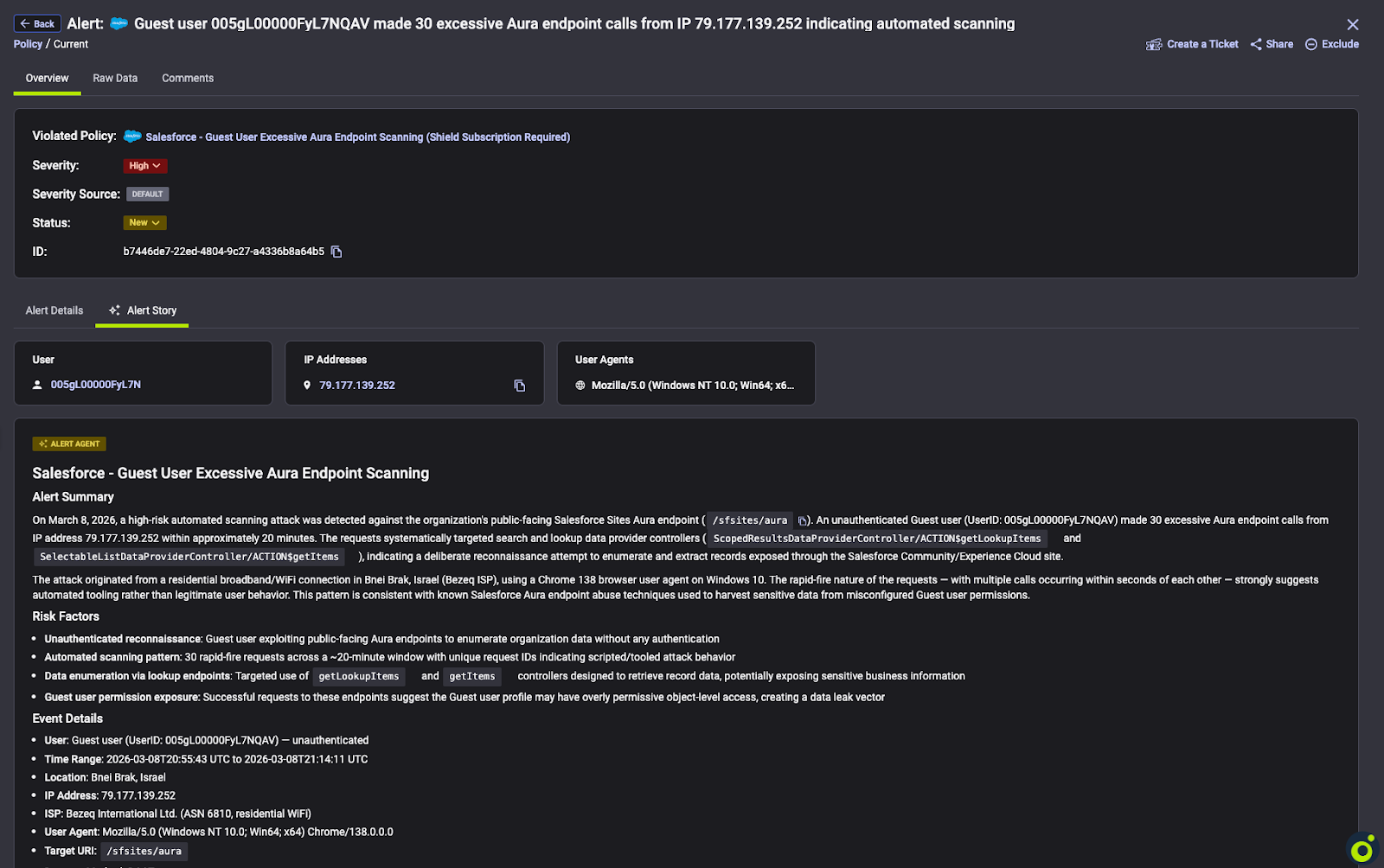
- USER_AGENT — The user agent string of the client making the request. Aura requests should only ever come from browsers or legitimate mobile apps. Non-browser user agents — anything containing strings like python, go, curl, or the specific user-agents listed above — are a strong signal of automated tooling. Flag immediately.
- USER_TYPE — For unauthenticated access, this will be Guest. Filtering on USER_TYPE = 'Guest' and then examining what objects those requests touch is one of the most effective ways to identify unauthorized enumeration.
- USER_ID_DERIVED — The full 18-character Salesforce user ID. Useful for correlating activity across events and confirming you're looking at the guest user profile.
- CLIENT_IP — Source IP of the request. Cross-reference against the IOCs listed above and look for volumetric anomalies — a single IP generating an unusually high number of Aura requests in a short window is worth investigating regardless of whether it matches a known-bad IP.
- TIMESTAMP_DERIVED — Timestamp of the action. Useful for reconstructing timelines and identifying burst activity patterns consistent with automated scanning.
- ACTION_MESSAGE — Contains the methods called in the request. A single row can contain multiple stacked actions. This is the most information-dense column and warrants the most attention. For example, “1$serviceComponent://ui.force.components.controllers.lists.selectableListDataProvider.SelectableListDataProviderController/ACTION$getItems=40”.
High-volume sequences of getItems calls:
serviceComponent://ui.force.components.controllers.lists.selectableListDataProvider.SelectableListDataProviderController/ACTION$getItems
This method is used to retrieve lists of records. Automated tools page through Salesforce objects by calling it repeatedly. Look for guest user sessions where this method appears with high call counts.
GraphQL invocation by guest users:
aura://RecordUiController/ACTION$executeGraphQL
Guest users have no legitimate reason to invoke the GraphQL endpoint in most environments. Any occurrence of this method in a guest user session should be treated as a high-priority alert, regardless of call count.
In terms of detection logic: start by filtering USER_TYPE = 'Guest', then look for the above method patterns in ACTION_MESSAGE. Layer in the IOC-based filters (user agent strings, IP addresses) as additional signals.
It goes without saying that Reco monitors and identifies those kinds of attacks as well as many other threats. Of course, there is no need to wait for the attack to happen, as Reco identifies risky configurations and permissions to ensure your instance is secure.
If you haven't audited your Experience Cloud guest user sharing rules, this campaign is a good reason to do it now. The underlying misconfiguration class this campaign exploits is well-documented, detectable, and fixable — but only if you have visibility into your Aura request logs. Reco continuously monitors for these patterns across customer environments. If you want to understand your current exposure, reach out.
You can watch our ondemand webinar on the ShinyHunters Experience Cloud Campaign which features a live breakdown on what to do if you think you may be affected.

Nitay Bachrach
%201.svg)
ABOUT THE AUTHOR
Nitay Bachrach is a Senior Security Researcher at Reco and a Salesforce security expert.
Nitay Bachrach is a Senior Security Researcher at Reco and a Salesforce security expert.