Into the Expanse: A Security Leader’s Guide to the Agent Frontier
Read more


The signals come in scattered. A volume spike of outbound traffic to api.openai.com from a service account. A customer support ticket asking why their internal product roadmap appeared in a ChatGPT response. A Reco alert flagging an OAuth grant for an AI plugin that nobody approved. Individually, each looks small. Together, they can signal an AI data leak in progress.
Most incident response playbooks were written before generative AI existed. They assume one breach, one attack chain, one bad actor. AI leaks are different. They are often continuous, frequently involve sanctioned tools used in unsanctioned ways, and the data has usually crossed into a third-party system before anyone notices.
This is the first 72-hour playbook. It assumes you already have a generic IR plan; what you need is the AI-specific layer. Each phase below maps to a Reco surface and produces evidence that becomes the appendix of your post-incident report.
WHAT YOU'LL LEARN
Before the phase-by-phase, here is the response on a single page. Five rings radiate outward from the leak event at the center, cooling from alarm-red through amber and lime into the teal of the regulatory layer. The inner rings happen in minutes; the outer rings stretch into days. The 72-hour mark is where the outer ring's deadlines start triggering.
.png)
Navigate to Threat Detection → Alerts
Filter to AI-related sources (Connected AI Apps, AI Agents, Microsoft Copilot, ChatGPT Enterprise, Claude, n8n) and severity HIGH or CRITICAL. Threat Detection alerts can surface within minutes of the originating event, depending on telemetry availability and integration coverage, so the timestamp on the alert becomes your incident clock zero.
Tag the originating alert as the incident anchor. Open the alert detail to capture the affected identity, the AI tool involved, and the activity timestamp. Cross-reference the identity in Identities → Users to confirm role, group memberships, and what other systems the user has access to.
Warning: Do not waste time validating whether the alert is “really” a leak. Assume true and move to containment in parallel. AI exfiltration is often continuous; every minute spent debating scope is data leaving the perimeter.
Navigate to AI Governance → Connected AI Apps
Find the implicated AI app or plugin. Revoke the OAuth grant directly from the SaaS admin console (Reco surfaces the integration; revocation happens in the source system, e.g., Google Workspace OAuth settings, Microsoft Entra enterprise applications, Salesforce Connected Apps). Capture the revocation timestamp.
Then navigate to AI Agents Security → AI Agents
Pause or disable the implicated agent in its source platform (Copilot Studio, n8n, Make). Reco identifies the agent and its connections; the kill-switch lives in the platform that hosts the agent. Lock the originating user account in Identities → Users and force MFA reauthentication.
Critical: Do not remediate posture findings in this phase. Closing failed checks, re-enabling guardrails, or reconfiguring agents will overwrite the timestamps that prove what the environment looked like at the moment of the leak. Containment first, posture remediation in Phase 6.
Navigate to AI Agents Security → AI Agents
Switch AI Agents Inventory to Graph view. The graph centers each AI platform (n8n, ChatGPT, Copilot Studio, Make) as a node, with lines extending to every SaaS app the platform's agents touch: Google Drive, Slack, GitHub, Salesforce, Notion, AWS. The blast radius becomes literal. Every connection is a potential exposure path. Find the implicated agent's platform, trace its lines outward, and you have a visual map of what a leak from that platform could reach.
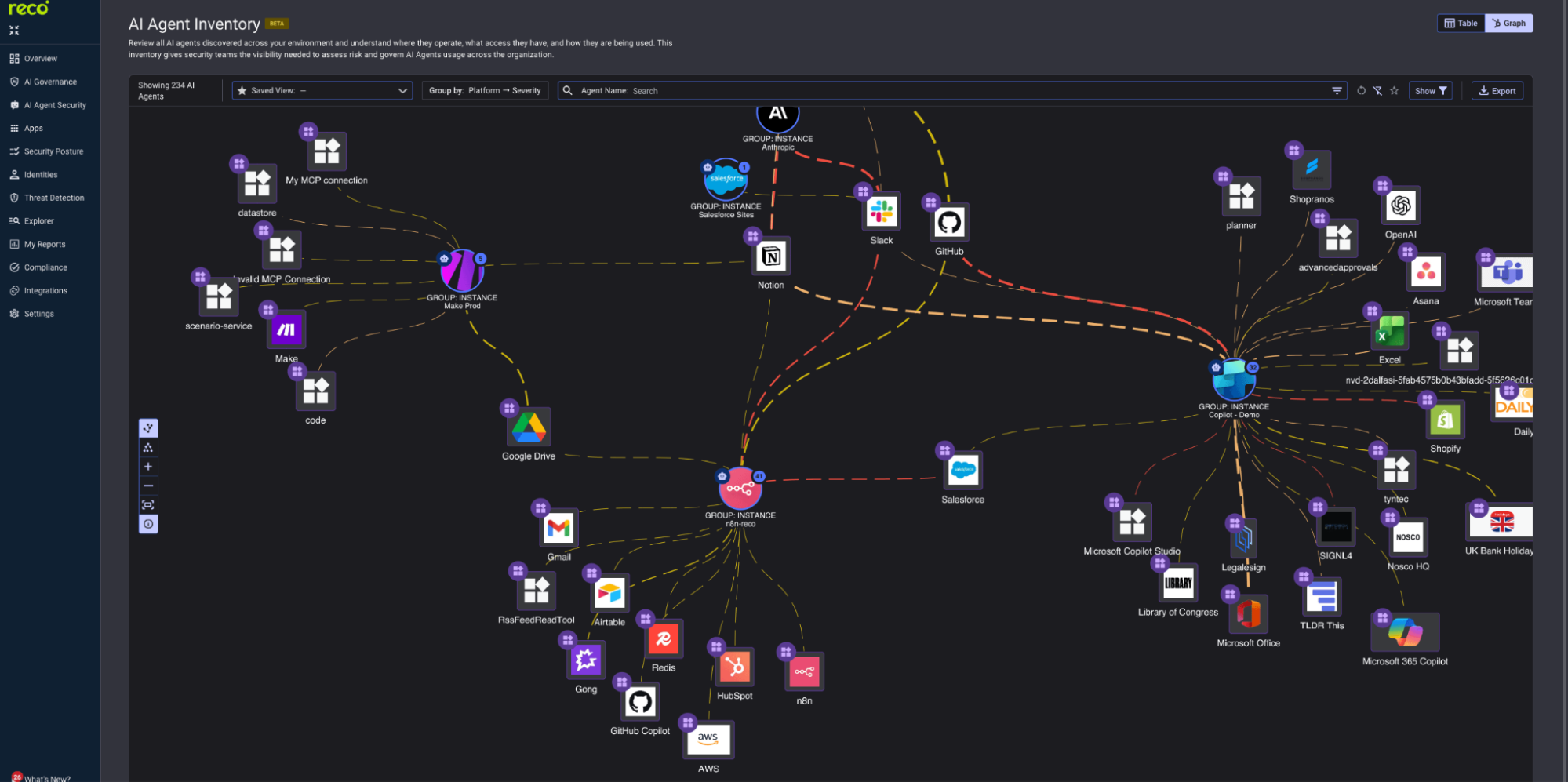
Switch back to Table view to cross-reference. Filter by Owner, Model, or Connections to find sibling agents that share the implicated agent's risk profile. AI agents rarely live alone. If one agent built in n8n was reading from a Google Drive folder it should not have accessed, there is a high probability that other agents in the same workspace, owned by the same user, or connected to the same Drive instance are doing variations of the same thing.
Then check AI Governance → Connected AI Apps
Filter to apps holding the same OAuth scope risk class (HIGH). Granting a HIGH-scope OAuth token can indicate that the same person or process has approved similar access before. The blast radius is rarely a single integration.
Then check Threat Detection → Events
Trace events for the affected identity 30 days back. Look for repeating patterns: same time of day, same data resource, same destination IP. This is where you turn “we found a leak” into “we know what was leaking and for how long,” which is the first thing legal will ask.
Action: Output a one-paragraph blast-radius statement: how many agents affected, how many integrations involved, how far back the activity extends. This paragraph anchors every downstream decision.
Before anyone touches a posture check, export the forensic baseline. The Reco platform timestamps every scan and event; these timestamps become the evidence trail in court, in front of a regulator, and in the post-incident review.
Required exports:
Store the exports in a write-once location with cryptographic checksums. Hand the package to legal counsel and the Data Protection Officer simultaneously, not sequentially. Their evaluation of notification triggers (Phase 5) requires the evidence package as input.
Note: Cutting off the AI tool does not delete data already in the vendor's system. OpenAI, Anthropic, and many foundation-model vendors may retain conversation history under their data-processing agreements (often around 30 days, though enterprise retention terms vary by contract and configuration). File a deletion request with the vendor as part of the response, and document the request in the evidence package.
The 72-hour mark is not arbitrary. It is the GDPR Article 33 supervisory-authority notification window, and it overlaps with emerging EU AI Act incident-reporting obligations for certain high-risk AI systems. If your organization is publicly traded in the U.S., the SEC cyber-disclosure rule (Item 1.05 of Form 8-K) requires disclosure within four business days of a materiality determination.
Run notification triggers against the evidence package, not against assumptions:
For each trigger that fires, draft notification copy that references the platform evidence by ID and timestamp. Regulators and customers will accept “agent X with OAuth scope Y was active from timestamp A to timestamp B, exposing data Z” far more readily than narrative reconstruction.
Action: Build three comms tracks in parallel: regulator (legal-led, evidence-heavy), customer (concise, factual, remediation-focused), internal/board (full timeline with platform screenshots). Hold release until legal counsel signs off on the evidence package.
Navigate to AI Agents Security → Agents Posture
Now you can remediate. Apply the tightened guardrails (input validation, output filtering, scope restrictions, recursion limits) across the entire agent fleet, not just the implicated one. The blast-radius statement from Phase 3 told you which siblings carry the same risk profile; review and remediate them as a group.
Then move to Threat Detection → Policy Center
Find the policy that fired the original alert. If it was running in Preview state, promote it to On so future alerts stream to your SIEM. If no policy is fired, build one from the event pattern in your evidence package.
Schedule the post-incident review within two weeks. Use the platform timeline as the source of truth for the chronology. The retrospective should produce three artifacts: an updated AI Acceptable Use Policy that closes the gap, a tightened set of posture checks across the fleet, and at least one new detection policy that would have caught this leak earlier.
Action: Add the incident to your quarterly AI audit working papers. The next audit starts with the lessons from this one already encoded into the platform configuration.
The AI environment that produced this leak will produce another. The question is whether you catch the next one at minute fifteen or at month three. The platform surfaces above tell you when something is wrong; the playbook turns that signal into a defensible response. The post-incident review is where it stops being incident response and starts being a program.

%201.svg)
Gal is the Cofounder & CPO of Reco. Gal is a former Lieutenant Colonel in the Israeli Prime Minister's Office. He is a tech enthusiast, with a background of Security Researcher and Hacker. Gal has led teams in multiple cybersecurity areas with an expertise in the human element.