Into the Expanse: A Security Leader’s Guide to the Agent Frontier
Read more


Most AI audits start but never finish. Spreadsheets get circulated, screenshots get pasted into decks, and owners stop replying to follow-up emails. By the time the evidence is compiled, the underlying environment has already changed, and the audit no longer reflects reality.
The bottleneck is not the audit framework. NIST, ISO 42001, and the EU AI Act all give you defensible structures. The bottleneck is data collection. Most organizations cannot produce a complete list of AI applications in use, let alone the agents and models running inside them.
This guide helps close that gap. Reco's AI Governance and AI Agents Security modules continuously gather the evidence an audit needs. The platform handles the discovery while your team focuses on the analysis. In 48 hours, you can produce a board-ready audit with a defensible evidence trail tied to live platform signals.
.png)
WHAT YOU'LL LEARN
Before the step-by-step breakdown, here is the audit on a single page. Reco scans through five layers of your AI environment, from sanctioned applications at the surface to the data they access, capturing evidence throughout the 48-hour audit window. Each layer below corresponds to one of the steps that follow.
Navigate to Overview
Start with the question every audit needs to answer: what counts as AI usage in this organization? The defensible answer covers four layers: AI applications connected to your SaaS environment, OAuth integrations and plugins with AI capability, AI agents built inside Copilot Studio, n8n, Make, and similar platforms, and the foundation models those agents use.
Document the audit objective, the compliance frameworks in scope (NIST AI RMF, ISO/IEC 42001, EU AI Act, internal policy), and the audit period. Lock the scope before pulling data. Scope creep is the most common reason these audits never get completed.
Action: Write a one-page audit charter. Sign it before opening any Reco screen.
Navigate to AI Governance → AI Discovery
Filter to the Gen AI category. The page returns every AI application connected to your environment with its current authorization status (Sanctioned, Unsanctioned, To Review, Risk Accepted). Discovery scans every 24 hours, so the inventory you export reflects the environment at the time of the audit. Capture the timestamp.
Then move to AI Governance → Connected AI Apps. This view surfaces OAuth integrations and plugins that have been authorized to access your SaaS data, including the scope each holds. For an audit, this layer is critical because it identifies the AI tools that bypass the front door of your firewall and enter through trusted SaaS apps.
Action: Export both views as audit working papers. Note the scan timestamp on each export.
Navigate to AI Agents Security → AI Agents
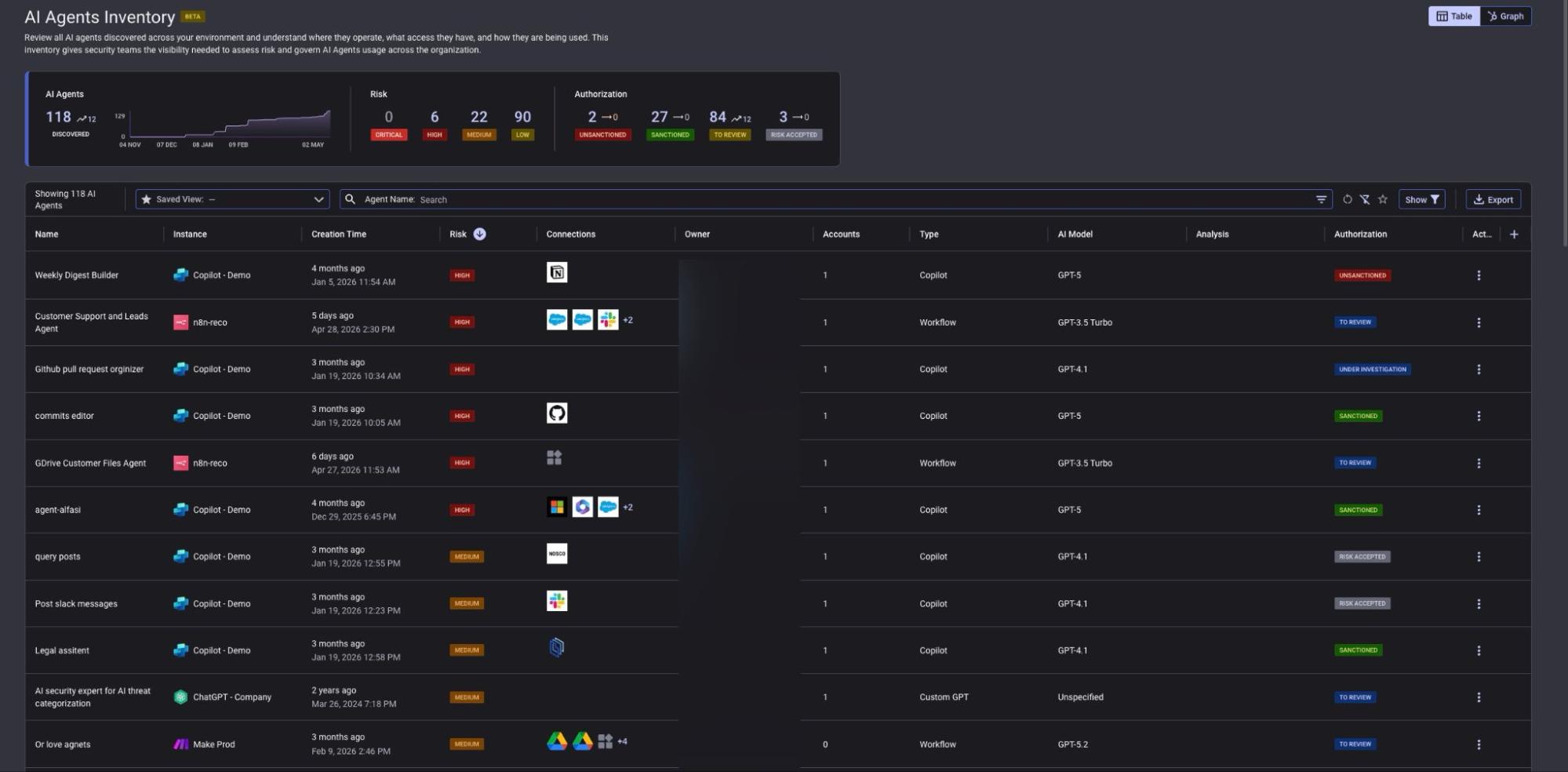
This is where most audits fail. AI agents built in Copilot Studio, n8n, Make, and similar workflow tools never appear as standalone applications, so traditional discovery misses them. The AI Agents Inventory captures each one with owner, connected systems, model in use, and authorization status.
Then navigate to AI Agents Security → AI Models
The Models inventory shows every foundation model in active use, its vendor (OpenAI, Anthropic, others), the agents that depend on it, and the authorization status. For audits tied to data residency, model training disclosure, or vendor risk, this view is the single source of truth.
Warning: Cross-reference unsanctioned agents and models against any incidents reported in the audit period. An unsanctioned agent connected to a customer-data system is not a low-priority finding.
Action: Export the agent inventory and model inventory. Tag every agent with HIGH or MEDIUM risk for follow-up in Step 4.
Navigate to AI Agents Security → Agents Posture
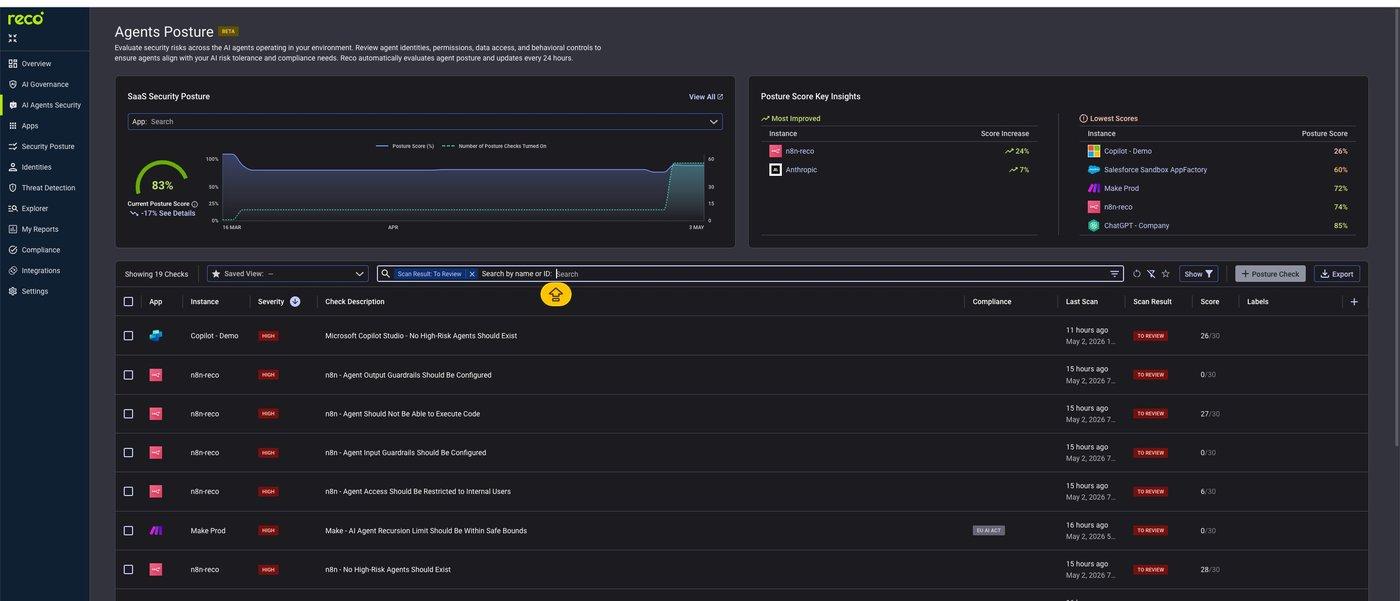
Posture checks are where audit evidence becomes defensible. Each check evaluates a specific control: input guardrails, output guardrails, code execution restrictions, internal-user access scope, recursion limits, and similar. Each check returns a severity (HIGH, MEDIUM, LOW) and a scan result (TO REVIEW, PASSED, NA - NEW). Scans run every 24 hours.
Then run the same exercise at the application layer in AI Governance → AI Posture Checks for SaaS misconfigurations relevant to AI access (e.g., Copilot data access settings, Salesforce field-level security on AI-readable objects).
Action: Filter to TO REVIEW with HIGH severity. Export the results. Each row becomes a numbered audit finding with severity, evidence type, and a built-in last-scan timestamp.
Navigate to AI Governance → Connected AI Apps
For each connected AI app, document the OAuth scopes granted. Reco classifies scope risk as HIGH, MEDIUM, or LOW based on what the app can read, write, or modify. For audits tied to data protection (GDPR, HIPAA, financial regulations), this is your data-flow map: every AI tool that can read PII, every plugin with write access to source-of-truth systems, and every integration that has been quietly granted access and never reviewed.
Cross-reference with the agent inventory from Step 3. An unsanctioned agent paired with a HIGH-scope OAuth integration is the audit's worst-case scenario: an unmanaged AI actor with broad access to regulated data.
Note: Threat detection alerts on AI-related events surface within 15 minutes via Threat Detection → Alerts. Reference the alert log for the audit period as part of the data-flow appendix. It shows which permissions were actually used, not just granted.
Action: Build the permission map as a structured appendix: app, OAuth scopes, scope risk, agent dependencies, data exposure.
Navigate to AI Agents Security → Agents Dashboard
The dashboard gives you the executive summary on a single page: total agents discovered, critical and high-risk agent counts, total AI agent risk score, top agentic platforms in use, and guardrail coverage by control type (Input Structure, System Prompt, Output Guardrails, Input Guardrails). These numbers are the audit's headline metrics.
Compile findings in three layers. Executive summary: the dashboard numbers and the top three risks. Detailed findings: the posture-check exports from Step 4, ordered by severity. Appendix: the inventories from Steps 2 and 3 and the permission map from Step 5. Reference live dashboard URLs throughout the report so reviewers can verify any number against the current state.
Action: Ship the report. Schedule the next quarterly audit to start from the same scope document. The platform will keep collecting evidence between audits.
A complete AI audit does not require weeks of manual evidence collection. It requires the right data, captured at the right time, organized into a report that holds up under scrutiny. The six steps above give you both: a structured process that runs in 48 hours and an evidence trail tied to live platform signals rather than to screenshots that go stale the moment they are taken. Run this quarterly from the same scope document, and each audit builds on the last - so the organization's AI posture improves continuously rather than resetting with every new review cycle.

%201.svg)
Gal is the Cofounder & CPO of Reco. Gal is a former Lieutenant Colonel in the Israeli Prime Minister's Office. He is a tech enthusiast, with a background of Security Researcher and Hacker. Gal has led teams in multiple cybersecurity areas with an expertise in the human element.