
What an Agent Can Reach Through the Headless 360 MCP Server



Salesforce's Headless 360 MCP server lets an AI agent act in your org as the person who connected it. Whatever that user can reach, the agent reaches, and in most orgs that is a great deal more than their job needs. The agent does not get a fixed list of what it can do either - it asks at runtime, gets back a ranked set of candidate operations, and calls one.
This post covers how an agent finds an operation, why you cannot write down what the integration reaches before you turn it on, what the user behind it can already do, and what to check in your own org.
What the Server Exposes
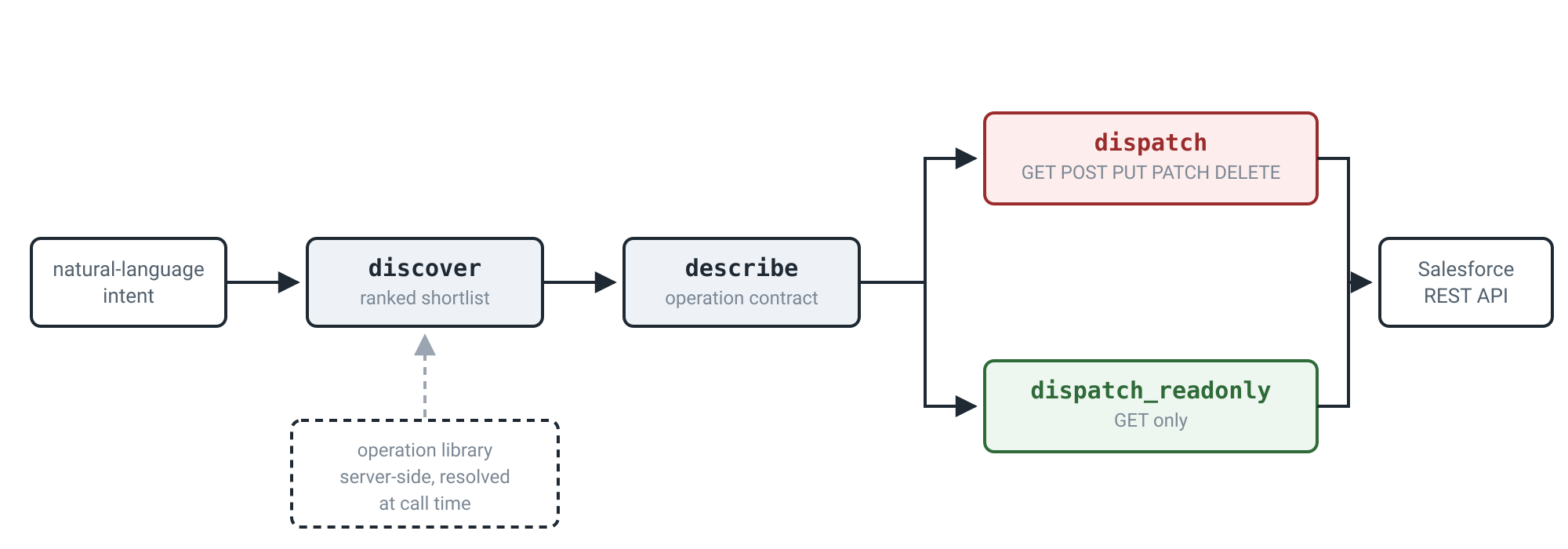
Four tools do the work. discover finds actions by intent, describe returns the contract for one of them, and dispatch runs it, with dispatch_readonly as the read-only variant. There are others on the server - display_widget among them - but those four are the whole path from an intent to an executed call. The server is platform/headless-360, it needs an External Client App with the mcp_api scope (setup also requires refresh_token on that app), and it is off until an admin activates it under Setup > MCP Servers.
Two items on Salesforce's list of what agents can do with it are the ones a practitioner stops on: reading, writing and deploying Apex triggers, and creating named credentials "including authentication mechanisms, endpoints, and certificate handling."
Every transaction runs as the authenticated user through that External Client App. Object permissions, field-level security, sharing rules, profile permissions, and permission sets all apply, and the audit trail attributes the action to that user. There is no separate agent identity to point at. That is the premise for everything below, not the finding.
A call looks like this:
{
  "tool": "dispatch_readonly",
  "arguments": {
    "url": "/services/data/v67.0/public/grid/workbooks",
    "method": "GET"
  }
}
How Discover Works
discover takes a natural-language description of what you want to do and returns candidate operations ranked against it. It has four parameters and only query is required. The schema describes the matching as a "hybrid semantic + keyword search across the API corpus." limit runs 1 to 50 and defaults to 10, and domain filters by AIP-103 domain such as platform or commerce.
resultType selects between the two kinds of things the library holds. An endpoint is a single API operation. A sor is a Setup Operation Recipe: a multi-step workflow with ordered steps, dependencies between them, and written guidance for the agent on how to run them. Unset, you get both.
Here is a real call, with domain and resultType left off:
{
  "tool": "discover",
  "arguments": {
    "query": "query data in a grid worksheet built by Agentforce",
    "limit": 10
  }
}
Ten results came back, ranked:
What you get back is a card per candidate, not the operation itself. Each carries a sor_id to pass to describe, a relevance score, a complexity band, a step_count, and an agent_description written for the model rather than for you - the first one reads "Build, run, and manage Agentforce Grid workbooks and worksheets to create AI-generated test cases, configure columns, execute worksheet runs, and evaluate agent behavior. Scope: agent testing workbench." The response also carries a filtered_out_count, which was 2 on this call.
Nothing is executable yet. To get there you call describe with one of those ids:
{
  "tool": "describe",
  "arguments": { "id": "shared-agentforce-grid-connect-api-sfdc.shared.agentforce.grid.connect.api-oas-67.0" }
}
For a SOR, that returns the whole recipe. The grid one has 60 steps - 29 read, 18 write, 8 verify, 4 delete and 1 validate - along with its preconditions:
[
  "Agentforce Grid entitlement is active on the org",
  "User has appropriate permissions to manage workbooks and worksheets"
]
and agent_guidance, which is prose aimed at the model:
HAPPY PATH — Create workbook and generate test cases: get-agents → generate-test-columns → get-workbook (verify workbook created). Use agentId from get-agents as input to generate-test-columns.
A single step looks like this:
{
  "id": "get-dataspaces",
  "description": "Retrieve available dataspaces to determine which data context to use for test generation or data model exploration.",
  "api": "GET /services/data/v67.0/public/grid/dataspaces",
  "api_type": "connect_api",
  "purpose": "read",
  "status": "implemented",
  "output": {
    "description": "Returns dataspaces array containing available dataspace identifiers and metadata.",
    "schema_resolved": true
  }
}
That api field is where the chain closes. Split "GET /services/data/v67.0/public/grid/dataspaces" on the space and you have exactly the two things dispatch_readonly requires, method and url. Most write steps carry an inputs array naming each parameter and where it comes from - "Source: output of get-agents." Steps that only need an id take it from the path template in api instead. The eight verify steps carry depends_on, each pointing at the step it checks.
Pass describe a bare operation id instead of a SOR id and you get that one operation's OpenAPI detail rather than a workflow: method, path, request and response schemas, and the declared access checks.
What the agent can call is assembled at call time out of that library. It is not fixed when you connect the client.
Why You Cannot Scope-Review This Integration
When you approve a connected app you can read its scope, attach it to a change ticket and hand it to an auditor.
Headless 360 gives the agent a handful of tools. The things it can actually do live in what Salesforce calls "a continuously growing library of Salesforce operations," which sits server-side and expands with each release. From the docs: "Your agent's tool surface stays small and stable while the set of actions it can take scales independently." The agent finds out what is available by calling discover, which returns a ranked shortlist rather than a manifest. Some paths are withheld from it server-side — the xds-connect-api entry tells the agent that write and delete paths for external object rows are "daemon-only and filtered from the agent view" — but what that filter checks, and where else it applies, is not documented.
describe does not close the gap either. Here is a dispatch POST against the operation that converts natural language into SOQL. The response arrives with its quotes and angle brackets HTML-escaped in the stored value, so what comes back is not directly executable:
POST /services/data/v67.0/public/grid/generate-soql

{"text": "all accounts in the technology industry with revenue over 1 million"}
{
  "soql": "SELECT Name, Industry, AnnualRevenue FROM Account WHERE Industry LIKE '%Technology%' AND AnnualRevenue > 1000000 LIMIT 50"
}
describe gives that operation's declared access checks as org-access-check: "AI Workbench enabled" and user-access-check: "AI Workbench access", and says nothing about the Account data the generated query will eventually read, because generating a query and running it are different operations. The contract does not tell you an operation's data reach, which is the other half of what a scope review needs.
What the Connected User Can Already Do
The user who authorizes the connection is the agent, and what that person is carrying is the ordinary state of a mature Salesforce org rather than a broken one.
Permissions accrete. A profile gets View All Data during an implementation because the integration consultant needed it to finish on time. Modify All Data gets granted for a data migration years ago and the project closes without anyone revoking it. Manage Sharing arrives inside a permission set group, or gets pushed to a whole role through Data Loader, so the assignment has no owner and nobody remembers approving it. Somebody clones a profile to make a new one and the clone inherits everything the original had collected. A developer moves to another team and keeps Author Apex. A support lead gets View All Data so they can see every Case, which is reasonable, and they keep it when they move into enablement, which is not.
None of this is exotic and none of it is anybody's fault in particular. Revoking a permission is work with no visible benefit and a real risk of breaking somebody's Tuesday, so it does not get done. The result is that the gap between what your users can do and what they do do is enormous, and it has been enormous for years.
The obvious answer is to connect MCP as a dedicated least-privilege user, and that is a genuinely good move which more orgs should make. It is also not what usually happens, because the admin who wants an agent that can deploy an Apex trigger has to authorize an account that can deploy Apex triggers, and the fastest such account to hand is their own. Whoever authorized your org's connection, the check that finds what they are carrying is in "Who has connected, and what they can do" below.
Why That Has Not Hurt You Yet
Holding a permission and using it are different things, and almost everything in a Salesforce org has been quietly enforcing that difference.
The Lightning UI surfaces a fraction of what a profile allows. A support lead with View All Data sees the Cases their list views are built around, not every Case in the org, because the interface only ever asks for the ones on screen. People do not know which Setup page exists, so the permission to use it sits idle. Integrations have fixed scopes that somebody reviewed once, years ago, and they have not widened since. Writing REST calls by hand against your own org is not how most people get through the day.
None of that was designed as a security control, and all of it has been working as one, with the permission matrix sitting behind it as a backstop - which is a large part of why it was allowed to rot.
Headless 360 removes those layers deliberately. Salesforce's framing of the launch was "No Browser Required" - the point is that an agent reaches the platform without the UI and without a fixed integration scope. An agent has no list views and no sense that a Setup page is obscure. It asks what operations exist, gets an answer, and calls one. The support lead who has had View All Data for three years and never once queried every Case in the org now has something attached to their account that will do exactly that, the first time a question makes it relevant.
Everything so far has been reads, and writes behave differently, because a request often has more than one way to satisfy it. Ask an agent to let somebody see a record: it can create a share, or it can widen the org-wide default for the whole object. Ask it for a public link to a file when the org setting that allows public links is switched off: it can report that the setting is off, or it can switch the setting on. The broad route in each pair needs a permission of its own — Manage Sharing for the org-wide default, Setup access for the file setting — which is to say that the admins and developers most likely to be wired to an MCP client have both routes open. Both end with the person able to see the thing they asked about. An admin picks the narrow one because they know the broad one changes the org for everybody, and that judgement is not in the permission set and not in the request.
Salesforce's documentation is direct about this. Per-user authentication means every call runs with the permissions of the user who authorized it, "the same field-level security, object access, and sharing rules that apply in Lightning," and the docs call this "a feature, not a constraint: it means that AI agents operate within your existing governance model without extra configuration." That is accurate, and it assumes the existing governance model was load-bearing. For a user holding View All Data, sharing rules do not restrict anything, because that is what the permission means; Modify All Data does the same on the write side. The permission matrix is now the boundary, and it is the layer nobody has been maintaining.
What to Check in Your Org
Is it on. Setup > Quick Find > MCP Servers, and look for headless-360. The server is off by org-wide default, so the question is whether someone activated it and when.
Which External Client App agents connect through, and who can use it. Setup > External Client App Manager, looking for the app carrying the mcp_api and refresh_token scopes. "By default, any user in your org can authenticate through the External Client App." Restricting that means creating a custom permission set and requiring it for pre-authorization under OAuth Policies.
How long an agent's access lasts. "By default, refresh tokens remain valid indefinitely." For a client holding a refresh token, that is what the agent's access rests on between sessions, so the default is an open-ended grant. Salesforce recommends 30 days or less with refresh token rotation enabled.
Who has connected, and what they can do. Cross the list of authorized users against profiles and permission sets. A connected user with View All Data, Modify All Data, Manage Sharing, Author Apex or Manage Users is a different proposition from a connected user without, and that short list is far more useful than a general permission audit.
What your client can actually gate. MCP annotations attach to tools, and on this server the tools are discover, describe, dispatch and dispatch_readonly. A delete is method: "DELETE" inside dispatch, so a client-side destructive gate here is all-or-nothing on dispatch rather than per-operation. "Require approval for destructive tools" collapses into "require approval for every write."
Where Enforcement Can Happen
Salesforce's guidance is to configure your MCP client to require approval before it runs a tool that changes org configuration or deletes data. Turn that on. It is not enforcement, though, and Salesforce says so in the same documentation set: "Annotations are hints, not enforcement. Not all clients read or respect them."
So the test for everything else here is whether it still holds when the client does not cooperate.
Posture is the Salesforce-side picture: which users are connected, what their profiles and permission sets actually allow, whether the server is activated, how long the refresh tokens last. That is the work of the previous section, it is what most orgs can start on today, and it fixes the underlying problem rather than containing it - every permission you take off a connected user is one an agent cannot use.
What posture cannot tell you is whether a permitted action should happen. Permissions answer whether a user may do something, and Salesforce already enforces that - if the connected user cannot do it, the call fails without anybody's help. Every example in this post is a call that passes that check. The support lead may read every Case. The admin may widen an org-wide default. Nothing in the permission model is going to stop either one, because nothing in the permission model disagrees with either one.
What separates them is policy, and policy has never had anywhere to live in Salesforce. "We do not change an object's org-wide default to solve one person's access problem" is not a permission. "We do not turn on public links" is not a permission. These are the rules an admin carries in their head, which is exactly why friction was doing the work - the rule and the person applying it were the same thing. An agent inherits the permission and none of the rule.
Enforcing that means acting on what an operation does rather than on who is allowed to do it: how far it reaches, whether it changes configuration or data, whether it is proportionate to what was asked. Which is harder than it sounds on this server, because of what a call looks like. What arrives is a dispatch with a url and a method, and POST /services/data/v67.0/... does not say which operation it is or what it changes. That has to be resolved before any rule can be applied to it, in the moment between the agent choosing the call and Salesforce running it.
The pair from earlier is the case that makes this concrete. Creating a share and widening an org-wide default are both dispatch calls. Both are made by the same user, both sit inside the same permission, and both satisfy the request that prompted them. One changes a row and one changes the object for everybody, and that difference is visible only in the arguments of the call that is about to run.
Reco does both. Posture across the Salesforce side, including which users are connected to MCP and what their profiles and permission sets actually allow, and a runtime policy service that resolves what an agent's call is about to do and stops the ones your policy would not allow.
The Headless 360 MCP Server is a Beta Service. Tool names, schemas and server URLs are current as documented and may change at GA.

Nitay Bachrach

ABOUT THE AUTHOR
Nitay Bachrach is a Senior Security Researcher at Reco and a Salesforce security expert.
Nitay Bachrach is a Senior Security Researcher at Reco and a Salesforce security expert.